EasyManua.ls Logo

Technics SL-PS740A - Page 9

Technics SL-PS740A
33 pages
Print Icon
To Next Page IconTo Next Page
To Previous Page IconTo Previous Page
Loading...
|
SL-PS740A
es
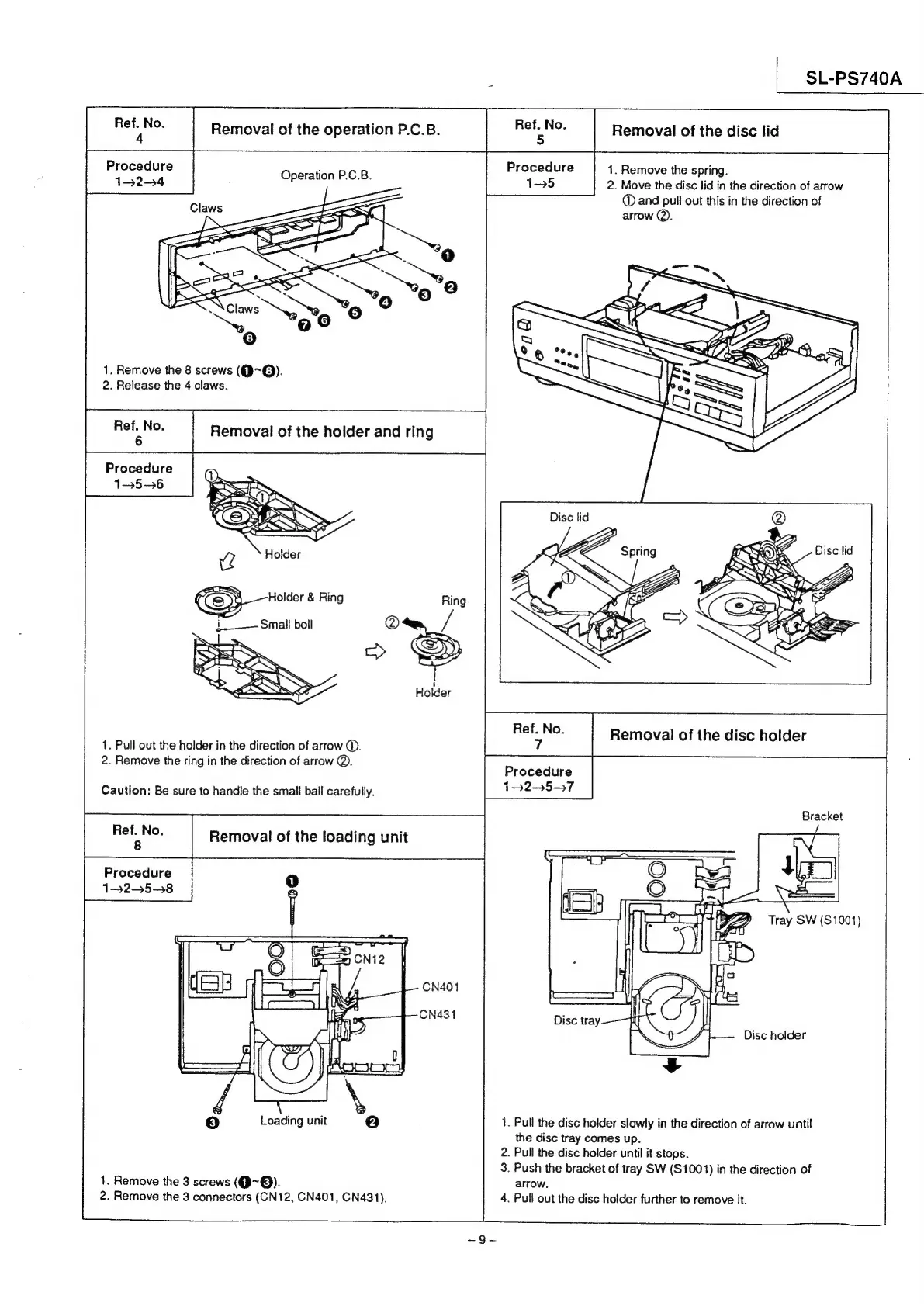
Removal
of
the
operation
P.C.B.
Le
Removal
of
the
disc
lid
Procedure
1.
Remove
the
spring.
15
2.
Move
the
disc
lid
in
the
direction
of
arrow
©
and
pull
out
this
in
the
direction
of
arrow
@).
Operation
P.C.B.
Procedure
132-4
1.
Remove
the
8
screws
(Q~@).
2.
Release
the
4
claws.
Removal
of
the
holder
and
ring
Procedure
15~6
1.
Pull
out
the
holder
in
the
direction
of
arrow
(©.
2.
Remove
the
ring
in
the
direction
of
arrow
@.
boo
Removal
of
the
disc
holder
Procedure
132-57
Caution:
Be
sure
to
handle
the
small
ball
carefully.
Bracket
pa
Removal
of
the
loading
unit
Procedure
1-25-98
Tray
SW
($1001)
Disc
holder
Loading
unit
1.
Pull
the
disc
holder
slowly
in
the
direction
of
arrow
until
the
disc
tray
comes
up.
2.
Pull
the
disc
holder
until
it
stops.
3.
Push
the
bracket
of
tray
SW
(S1001)
in
the
direction
of
1.
Remove
the
3
screws
(Q@~Q).
arrow.
2.
Remove
the
3
connectors
(CN12,
CN401,
CN431).
4.
Pull
out
the
disc
holder
further
to
remove
it.

Related product manuals