EasyManua.ls Logo

Technics SL-PS740A - Disassembly Instructions

Technics SL-PS740A
33 pages
Print Icon
To Next Page IconTo Next Page
To Previous Page IconTo Previous Page
Loading...
SL-PS740A
m
DISASSEMBLY
INSTRUCTIONS
Warning:
This
product
uses
a
laser
diode.
Refer
to
caution
statements
on
page
2.
ACHTUNG:
Die
lasereinheit
nicht
zerlegen.
Die
lasereilnheit
dart
nur
gegen
eine
vom
hersteller
speziferte
einheit
ausgetauscht
werden.
“ATTENTION
SERVICER”
Some
chassis
components
may
have
sharp
edges.
Be
careful
when
disassembling
and
servicing.
*
This
CD
player
is
equipped
with
FPC
boards,
so
handle
them
with
care
during
disassembly
and
reassembly.
hi
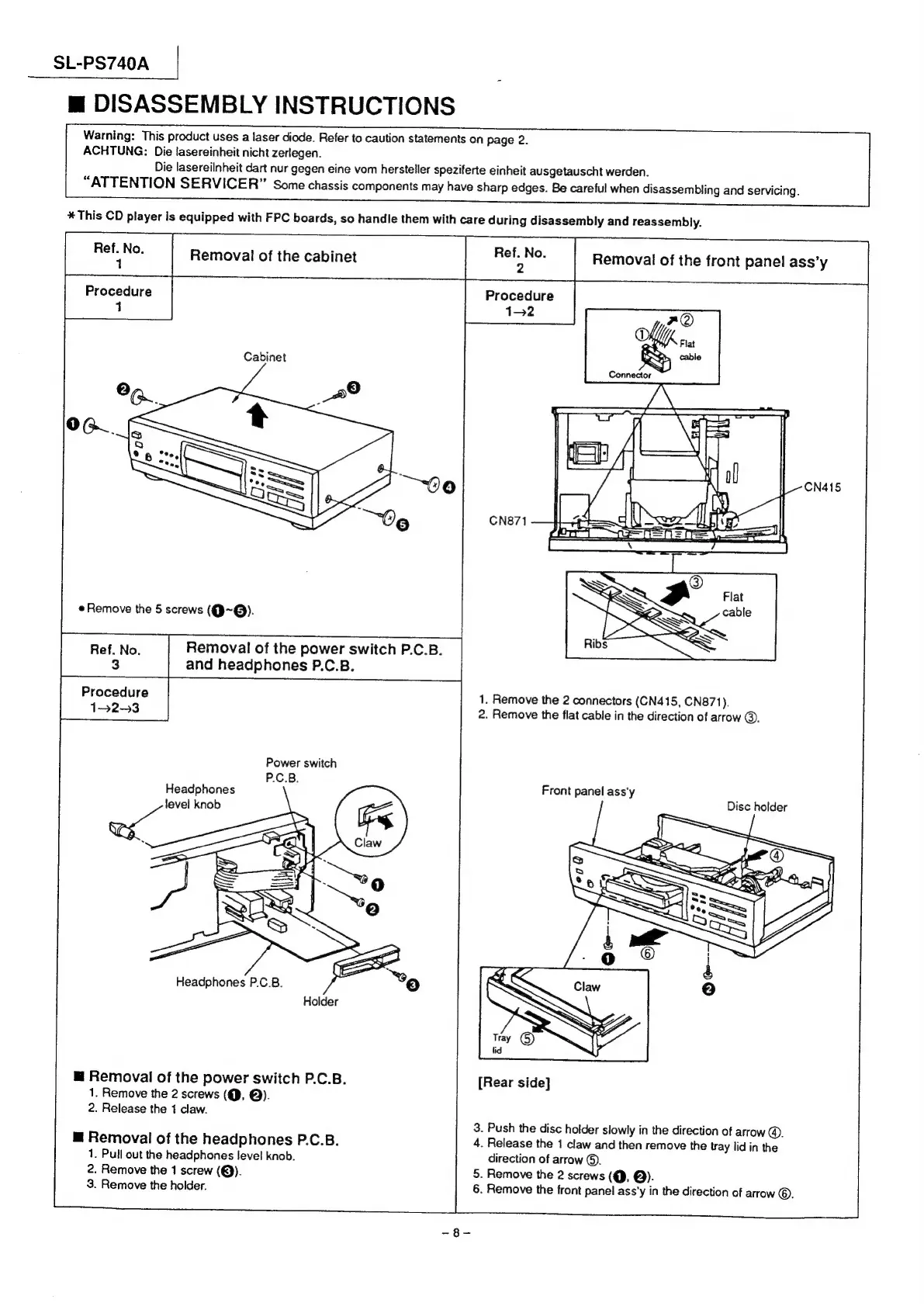
Removal
of
the
cabinet
Procedure
1
Cabinet
Connector
Ialensl
seth
|
Remove
the
5
screws
(Q~@).
Removal
of
the
power
switch
P.C.B.
and
headphones
P.C.B.
Procedure
1-2-3
Power
switch
P.C.B.
Headphones
oe
level
knob
1.
Remove
the
2
connectors
(CN415,
CN871).
2.
Remove
the
flat
cable
in
the
direction
of
arrow
©.
Front
panel
ass'y
Disc
holder
Headphones
P.C.B.
Holder
@
Removal
of
the
power
switch
P.C.B.
1.
Remove
the
2
screws
(@,
@).
2.
Release
the
1
claw.
[Rear
side]
3.
Push
the
disc
holder
slowly
in
the
direction
of
arrow
@.
4.
Release
the
1
claw
and
then
remove
the
tray
lid
in
the
direction
of
arrow
©.
5.
Remove
the
2
screws
(@,
@).
6.
Remove
the
front
panel
ass’y
in
the
direction
of
arrow
©.
m@
Removal
of
the
headphones
P.C.B.
1.
Pull
out
the
headphones
level
knob.
2.
Remove
the
1
screw
(@).
3.
Remove
the
holder.

Related product manuals