EasyManua.ls Logo

Technics SL-PS740A - Page 14

Technics SL-PS740A
33 pages
Print Icon
To Next Page IconTo Next Page
To Previous Page IconTo Previous Page
Loading...
SL-PS740A
:—
BO
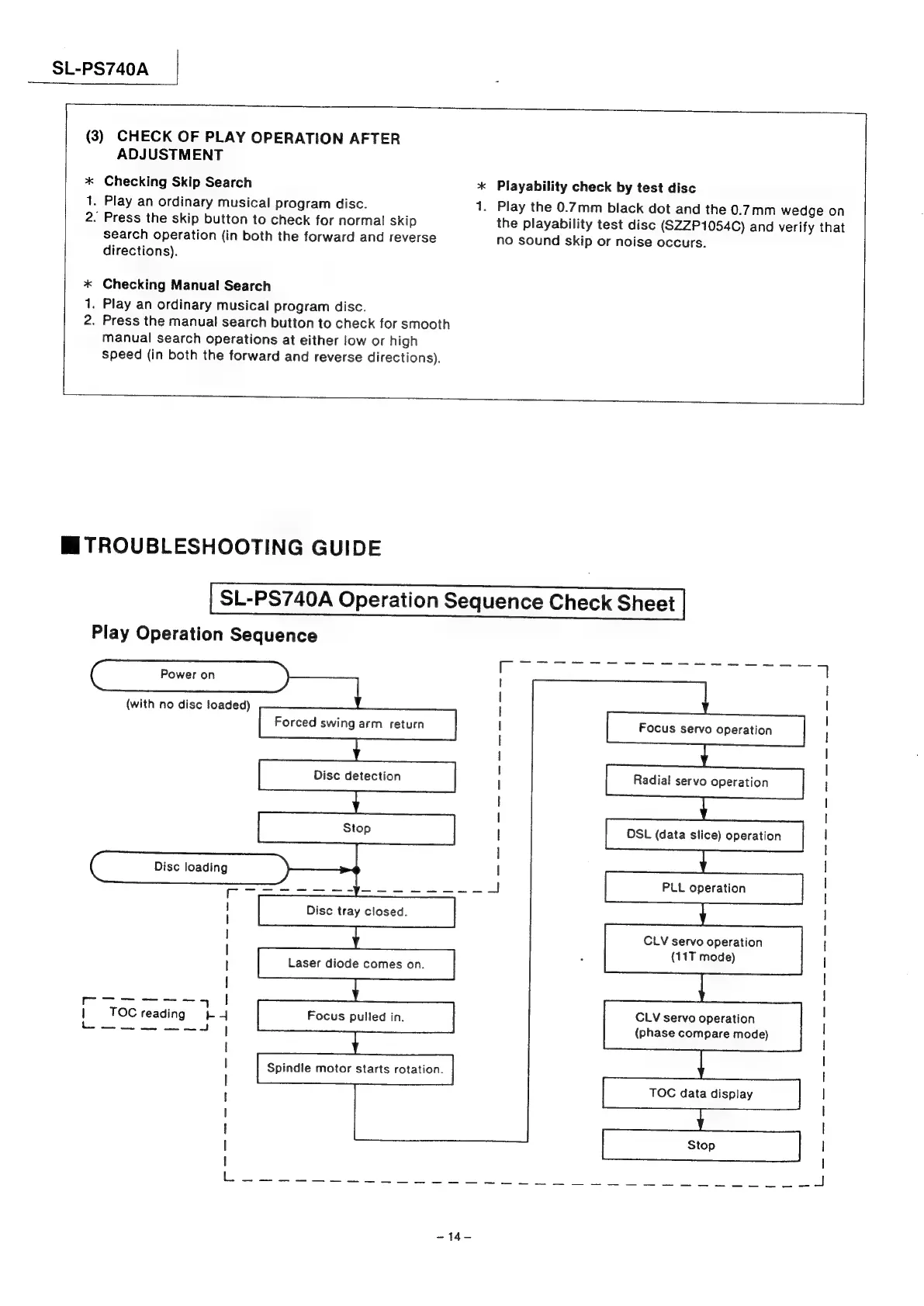
(3)
CHECK
OF
PLAY
OPERATION
AFTER
ADJUSTMENT
*
Checking
Skip
Search
*
Playability
check
by
test
disc
1.
Play
an
ordinary
musical
program
disc.
1.
Play
the
0.7mm
black
dot
and
the
0.7mm
wedge
on
2.
Press
the
skip
button
to
check
for
normal
skip
the
playability
test
disc
(S2ZP1054C)
and
verify
that
search
operation
(in
both
the
forward
and
reverse
no
sound
skip
or
noise
occurs.
directions).
*
Checking
Manual
Search
.
Play
an
ordinary
musical
program
disc.
.
Press
the
manual
search
button
to
check
for
smooth
manual
search
operations
at
either
low
or
high
speed
(in
both
the
forward
and
reverse
directions).
RD
at
Mi
TROUBLESHOOTING
GUIDE
SL-PS740A
Operation
Sequence
Check
Sheet
Play
Operation
Sequence
Pe
ey
8
Og
re
al
:
!
|
(with
no
disc
foaded)
|
!
|
I
!
|
|
I
|
I
|
|
Disc
loading
|
|
PLL
operation
cee
4
!
Disc
tray
closed.
|
|
|
CLV
servo
operation
|
|
(11T
mode)
|
!
!
|
l
Se
5
|
:
|
|
TOCreading
LY
Focus
pulled
in.
CLV
servo
operation
|
A
Se
+
|
(phase
compare
mode)
|
l
|
Spindle
motor
starts
rotation.
I
TOC
data
display
|
|
l
| !
1
|
Nn
as
ia
ce
a
ae
net
ese
toh
ae
a
eel
ties,
ws
les
asl
es
pa
~14—

Related product manuals