EasyManua.ls Logo

Technics SL-PS740A - Page 6

Technics SL-PS740A
33 pages
Print Icon
To Next Page IconTo Next Page
To Previous Page IconTo Previous Page
Loading...
SL-PS740A
|
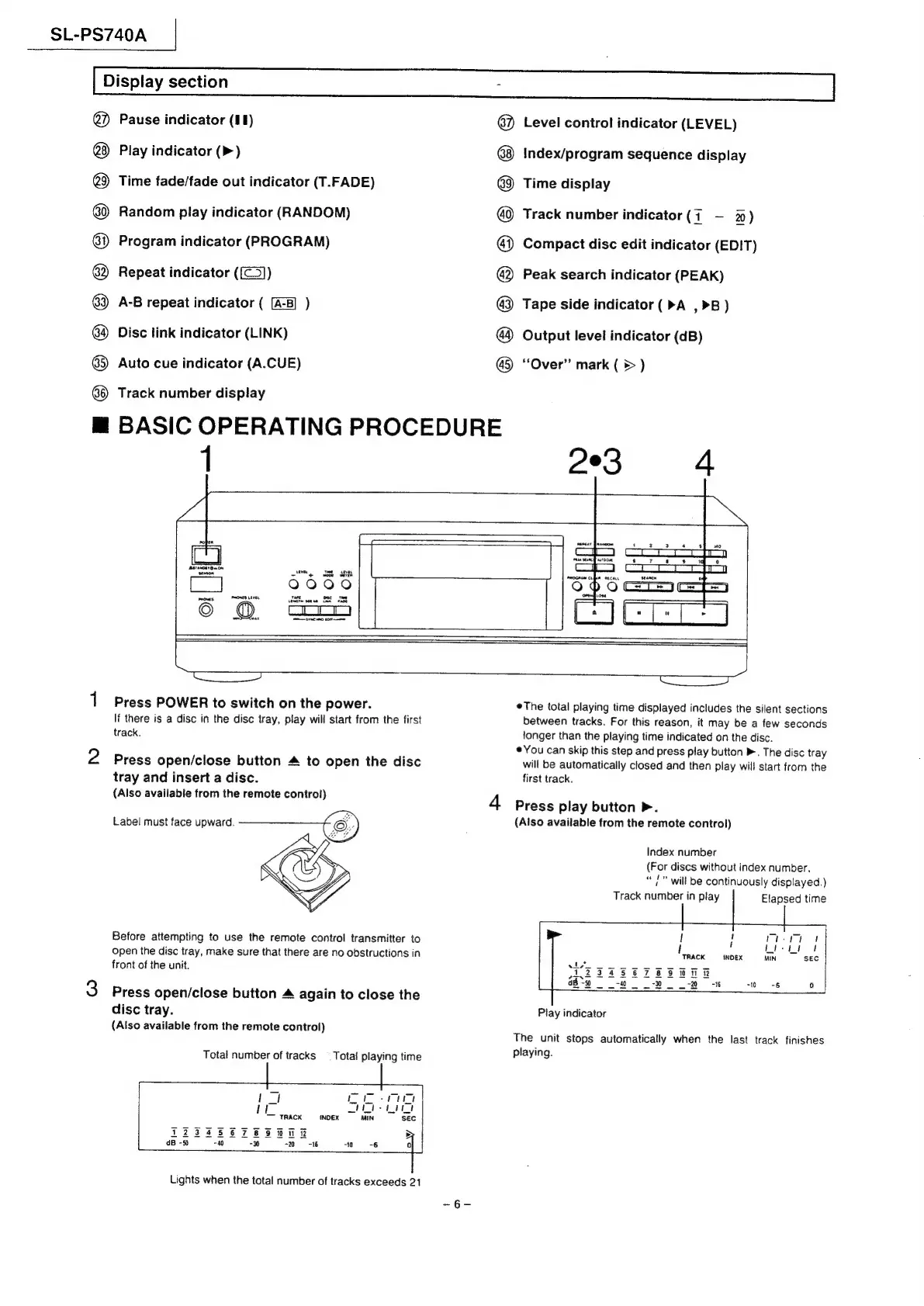
Display
section
@
@®@OO8OS6®
m@
BASIC
OPERATING
PROCEDURE
Pause
indicator
(11)
Play
indicator
(>)
Time
fade/fade
out
indicator
(T.FADE)
Random
play
indicator
(RANDOM)
Program
indicator
(PROGRAM)
Repeat
indicator
((@))
A-B
repeat
indicator
(
)
Disc
link
indicator
(LINK)
Auto
cue
indicator
(A.CUE)
Track
number
display
1
@OSO8SOO88
8
Level
control
indicator
(LEVEL)
Index/program
sequence
display
Time
display
Track
number
indicator
(7
-—
%)
Compact
disc
edit
indicator
(EDIT)
Peak
search
indicator
(PEAK)
Tape
side
indicator
(>A
,>B)
Output
level
indicator
(dB)
“Over”
mark
(
©
)
prrentr
y
anton
ee
oe)
rare
Lec
Te
$0048
cere
roe
HOW
Eras
monet
Lave
5]
©
Laas
trace
tomo
Press
POWER
to
switch
on
the
power.
If
there
is
a
disc
in
the
disc
tray,
play
will
start
from
the
first
track.
Press
open/close
button
4
to
open
the
disc
tray
and
insert
a
disc.
(Also
available
from
the
remote
control)
Label
must
face
upward.
Before
attempting
to
use
the
remote
control
transmitter
to
open
the
disc
tray,
make
sure
that
there
are
no
obstructions
in
front
of
the
unit.
Press
open/close
button
4
again
to
close
the
disc
tray.
(Also
available
from
the
remote
control)
Total
number
of
tracks
_
Total
playing
time
17]
reer
|
i
Deo
a
TRACK
INDEX
iN
sec
T2ZFECTESHTR
D
dB
-50
740
“x
-2
-16
10 -6
Qa
Lights
when
the
total
number
of
tracks
exceeds
21
The
total
playing
time
displayed
includes
the
silent
sections
between
tracks.
For
this
reason,
it
may
be
a
few
seconds
tonger
than
the
playing
time
indicated
on
the
disc.
¢You
can
skip
this
step
and
press
play
button
.
The
disc
tray
will
be
automatically
closed
and
then
play
will
start
from
the
first
track.
4
Press
play
button
P.
(Also
available
from
the
remote
control)
Index
number
(For
discs
without
index
number.
aod
,
will
be
continuously
displayed.)
Track
number
in
play
Elapsed
time
|
*
I
!
rte
!
7
Li-ti
ft
TRACK
INDEX
MIN
SEC
SFE
foe
123456789
i
eve
FF
PPL
ESR
a8
-50
-40
0-16
“0-6
0)
Play
indicator
The
unit
stops
automatically
when
the
last
track
finishes
playing.

Related product manuals