EasyManua.ls Logo

Technics ST-HD50 - Power Supply for Servicing; Signal Output Check

Technics ST-HD50
28 pages
Print Icon
To Next Page IconTo Next Page
To Previous Page IconTo Previous Page
Loading...
ST-HD50
|
mi
To
Supply
Power
Source
This
unit
ST-HD50
is
designed
to
operate
on
power
supplied
from
the
Amplifier
SE-HD50.
When
operating
the
unit
ST-HD50
alone
for
testing
and
servicing,
without
having
power
supplied
from
the
Amplifier
SE-HD50,
use
the
following
method.
Power
Supply
to
Main
Circuit
1.
Short
the
section
between
the
test
points
Bits
((CT])
andiim:aie}
(|D.GND}),
and
as
well
as
the
section
between
the
test
points
(J601)
and
([D.GND)).
2.
Connect
the
10
V
AC
power
through
the
capacitor
(35V
100uF)
to
pin
1
of
the
indicator
module
FL901
and
the
GND
terminal
through
the
capacitor
(35V
100uF)
to
pin
57
of
the
same
FL901
module.
3.
Apply
10
V
AC
power
to
the
section
between
the
point
[ifn
((AC])
and
the
point
[iad
((CT))
as
well
as
the
section
between
the
point
[uGgsee]
([AC])
and
the
point
[fae
((CT]).
This
unit
comes
to
stand-by
mode.
4.
Short
the
section
between
the
jumper
(JK603-pin
9)
and
the
point
fiz)
([D.GND))
fora
moment.
The
main
circuit
comes
to
power
ON
mode.
(Whenever
this
operation
is
performed,
power,
ON/OFF
mode
is
repeated.)
To
Check
Signals
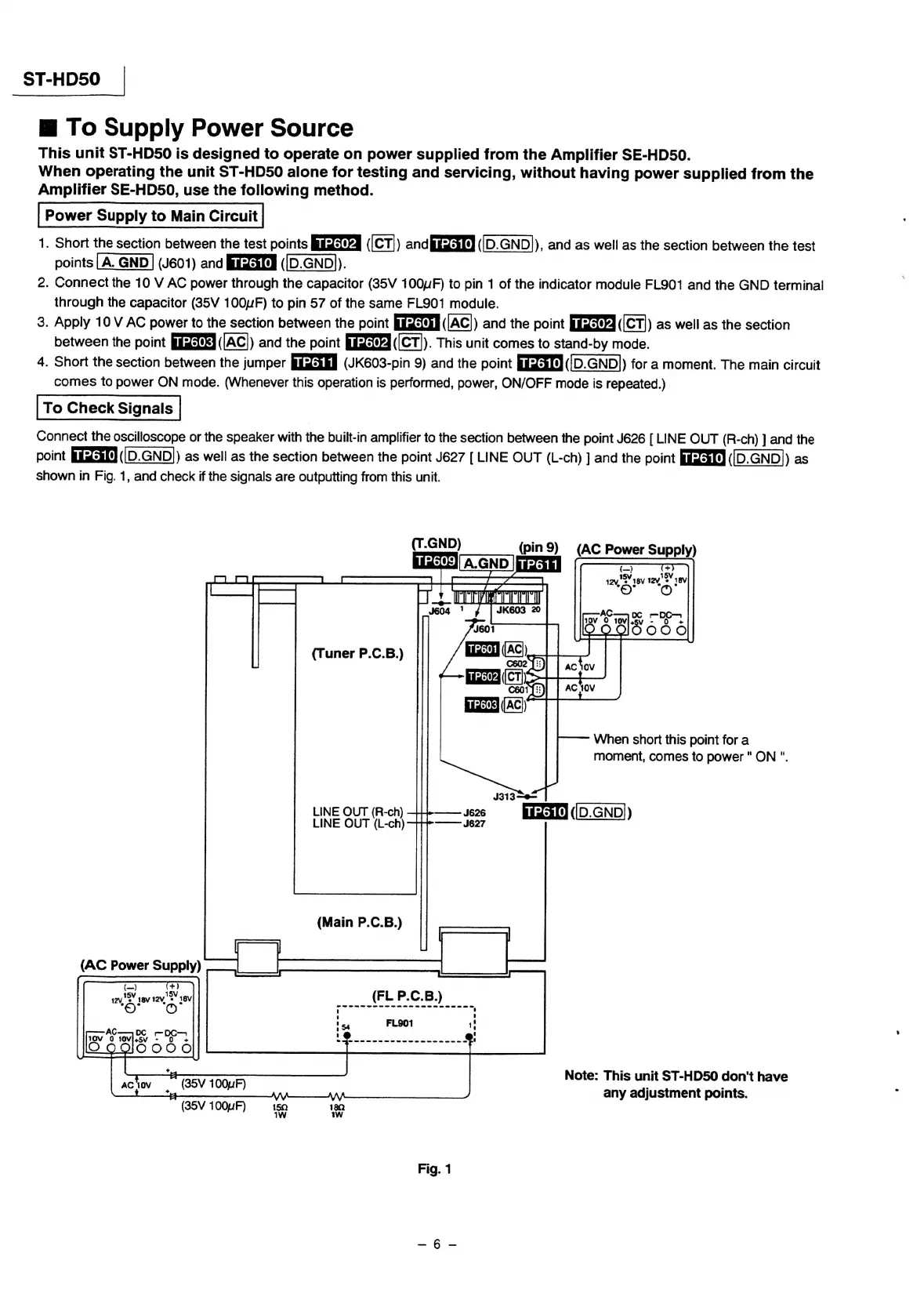
Connect
the
oscilloscope
or
the
speaker
with
the
built-in
amplifier
to
the
section
between
the
point
J626
[
LINE
OUT
(R-ch)
]
and
the
point
fisdsaK4
(|D.GND))
as
well
as
the
section
between
the
point
J627
[
LINE
OUT
(L-ch)
]
and
the
point
uis#f¢]
((D.GND
)
as
shown
in
Fig.
1,
and
check
if
the
signals
are
outputting
from
this
unit.
(T.GND)
(pin9)
(AC
Power
Supply)
i:]'
A.GND
|i
+
ee
oe
J604
J601
i
(Ac})
i
602
{{
#:)
biz)
(C7);
osorfs)
bizare
(AC)
(Tuner
P.C.B.)
When
short
this
point
for
a
moment,
comes
to
power"
ON
".
J313—0—
LINE
OUT
(R-ch)
J626
fastens)
([D.GND))
7
LINE
OUT
(L-ch)
+++——
Je2
Note:
This
unit
ST-HD50
don't
have
any
adjustment
points.
Fig.
1

Related product manuals