35
5. Card Settings
5.1 Wiegand Settings
5.1.1 Wiegand Output
VP-II X outputs a Wiegand code for interface with an external access control system when a User is
successfully verified;
(1) For card Users (proximity or smart card), the VP-II X outputs the Wiegand code as it is read from the
card; and
(2) For PIN Users, VP-II X outputs a Wiegand code created in accordance with the preset format. A
Wiegand format is required to be set for PIN Users accordingly. Also a site code value has to be set with
the option “PIN success” as described in the following section “Chapter 3 5.1.3 Wiegand Output Options”.
VP-II X is also capable of outputting a Wiegand code for verification failure and/or an emergency case
with a duress code.
5.1.2 Set Wiegand Format
Bits Length
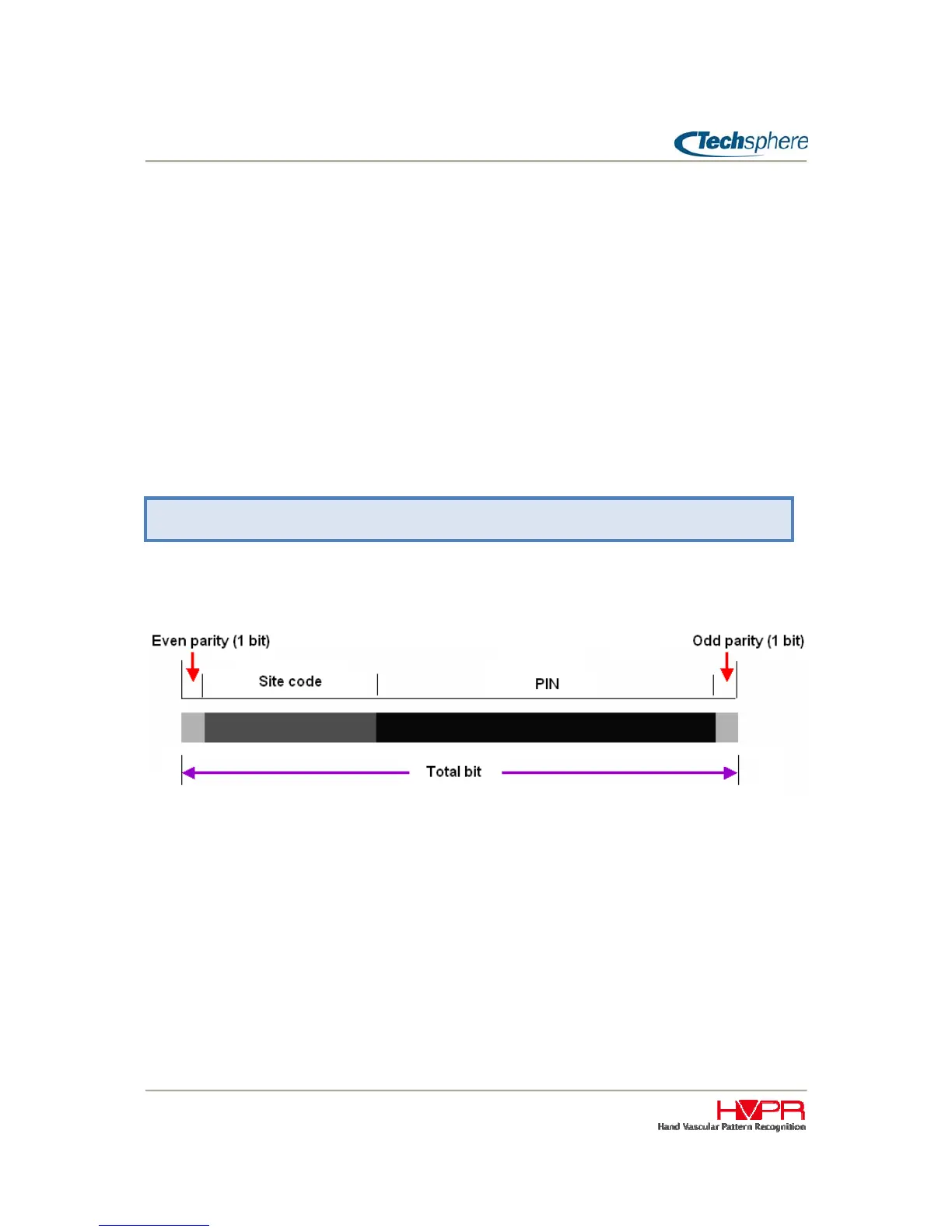
Set both the total bit length (26~128) and site code bit length (0~32), then the bit length for PIN shall be
automatically generated. The Wiegand format being generated by the VP-II X for PIN Users is as follow:
Bit length for PIN (or Card number) = Total bit length – Site code bit length – 2 (Even/Odd parity bits)
As an example for 26 bit Wiegand with 8 bit site code, the bit length for PIN shall be 16 (26 – 8 – 2 = 16).
HID 1000 Card
For the VP-II X to support HID Corporate 1000 cards, the “HID 1000 Card” option must be selected as
shown below.
Manager Menu > 5. Card Settings > 1. Wiegand Settings


 To Next Page