45
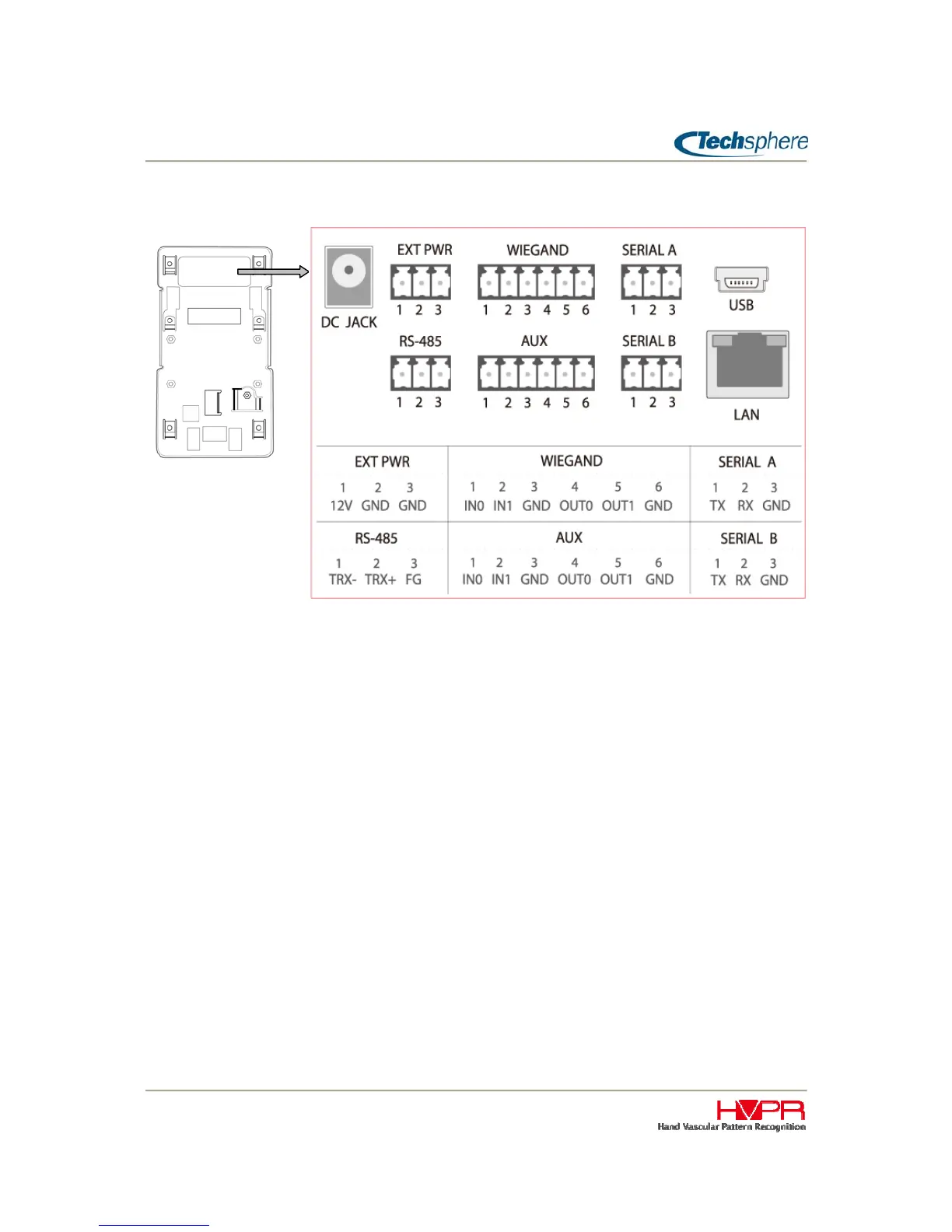
2.2 Ports and Connection
``
DC JACK / EXT PWR
DC JACK is used to plug in a power supply provided along the VP-II X. The input range of the power
supply included in the package is AC100~250 / 50~60Hz, and output is DC 12V / 1.5A. If you need to
supply the power to an external device connected to the VP-II X, such as an external card reader, you
can use EXT PWR port. In this case, the power consumption of an external device must not exceed
200mA. If exceeded, it may cause performance degradation of the VP-II X.
If using an external power source supply the power to the EXT PWR port. The input power must be DC
12V (+/- 5%) with 1.5A or more current source.
Improper use of power supply may cause irreparable damage to the system or may degrade
performance.
USB
This USB port is used for only production purpose for test and/or initial factory set. It cannot be used by a
customer.
LAN
An Ethernet cable with an RJ45 connector is plugged in here for network connection.
WIEGAND
These are Wiegand interface ports for an input from a card reader and/or output to an access control
system (PACS). IN0 means Wiegand D0 signal for input, and OUT0 means Wiegand D0 signal for output.
Rear view


 To Next Page