39
5.3 PACS System Settings
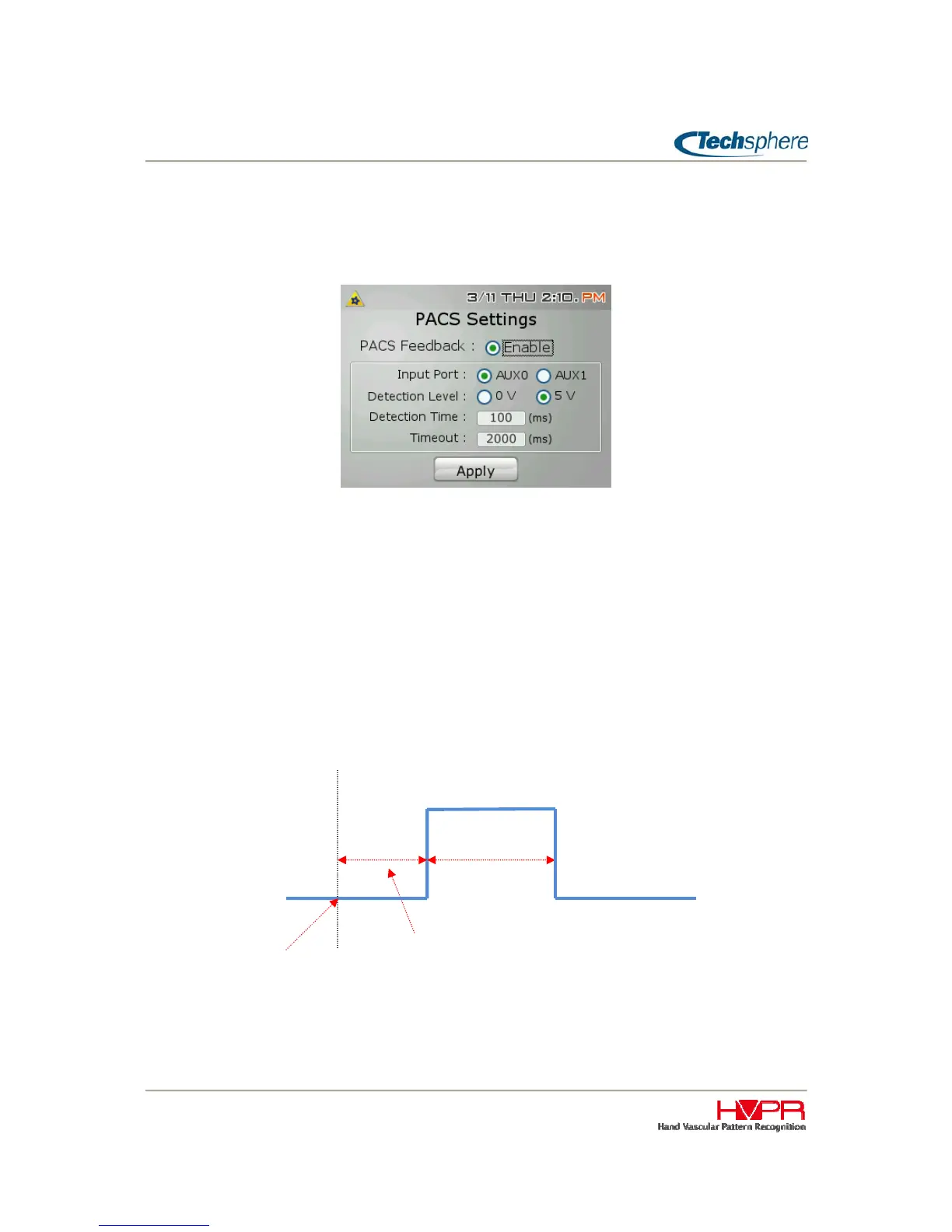
Enable the PACS Feedback to verify the signal communication between PACS (Physical Access Control
System) system and VP-II X.
When VP-II X gets feedback from PACS system, VP-II X will display the message that follows:
Input Port
The input port being utilized for the signal is selected here. Two auxiliary ports are provided, for more
details on auxiliary port, please refer to “Chapter 4 2.2 Ports and Connections”.
Detection Level / Detection Time
A detection level signal will be sent from PACS system to VP-II X. The detection ime is the expected time
when the PACS system will respond to the VP-II X. VP-II X can be configured to detect a signal of 0V
or 5V.
Timeout
The timeout setting sets the time the VP-II X will wait for the signal from the PACS, A minimum required
time of 50ms is required, if VP-II X does not get a signal within this timeout period, a message(“Access is
granted” or “Access is denied”) will be displayed on the VP-II X.
5V
0V
Timeout
PACS System
Detection Time
VP-II X sends signal to
PACS as a User verified


 To Next Page