37
Duress 0 ~ 65535
When a User performs a duress verification to notify an
emergency situation (See “Chapter 2 4.6 Verification
With Duress Code” for details on duress verification),
VP-II X will use this site code value in the same manner
as the failure case described above.
5.2 Mifare / iClass Card
To use smart cards (Mifare or HID iClass), a proper reader module according to the card type must be
installed inside the VP-II X.
For smart card Users, User’s data including the vascular template and personal information is stored in
the card, but can be also stored in the system memory if desired.
Supported Card Types
Mifare 1K, 4K, DESFire
HID iClass 16K/16, 16K/2, 32K(16K/2+16K/1), 32K(16K/16+16K/1)
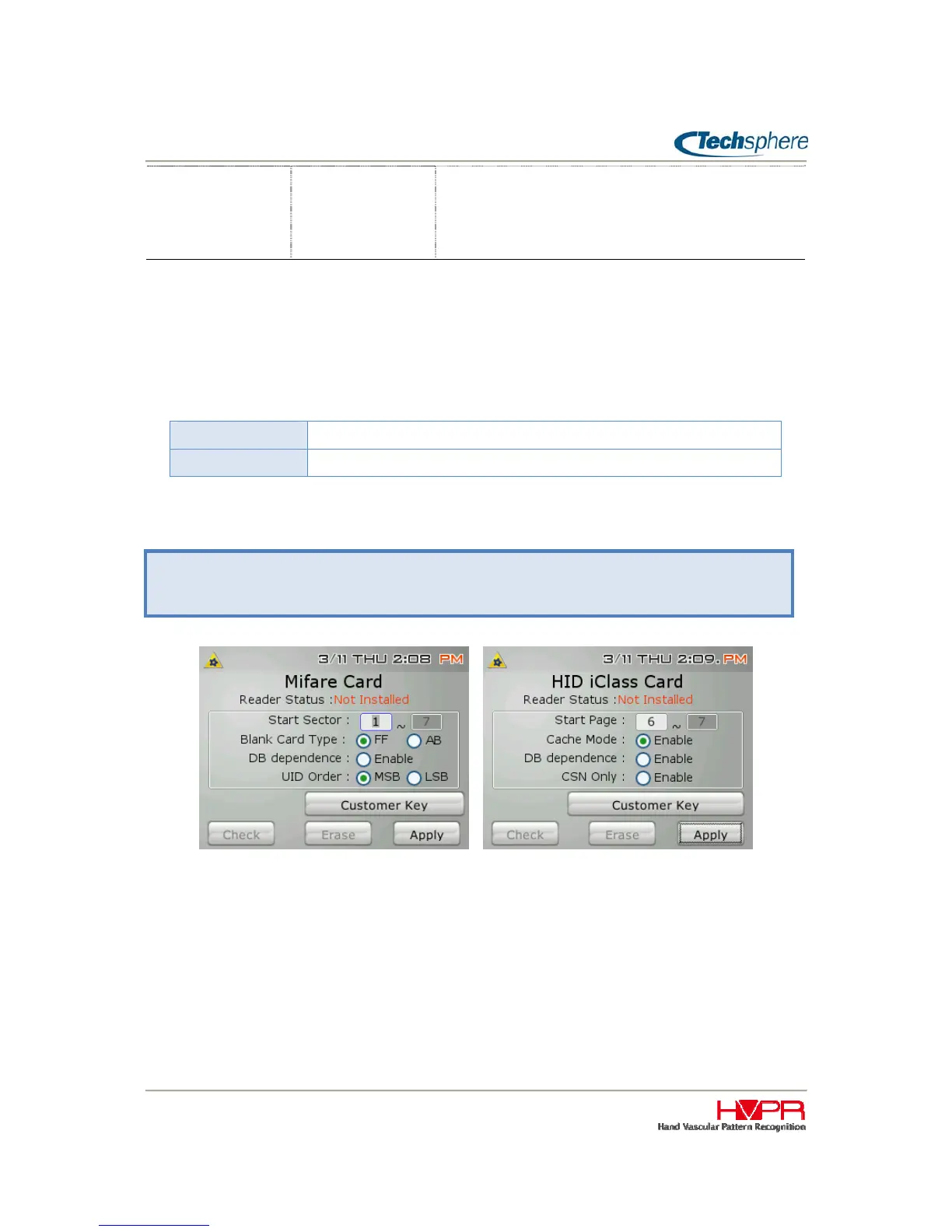
Set the parameters required to access the card accordingly using the following menu:
Reader Status
This shows the status of a reader module. In the above example, there is not reader module installed as
it says “Not installed”.
Start Sector/Page
Set the sectors (Mifare) or pages (HID) to be used for VP-II X template. Required space to store one
User data is 7 sectors for Mifare and 2 pages for HID.
Blank Card Type (Mifare)
Manager Menu > 5. Card Settings > 2. Mifare Card
Manager Menu > 5. Card Settings > 3. HID iClass Card


 To Next Page