EasyManua.ls Logo

TecMate Optimate 5 TM220 - User Manual

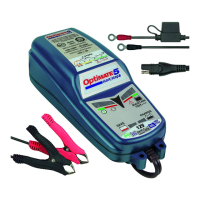
TecMate Optimate 5 TM220
9 pages
Print Icon
To Next Page IconTo Next Page
Loading...
InstructionDisclaimer
Dennis Kirk provides instructions to help our customers better understand how to install the
products we sell. The instructions are exact copies of what the manufacturer includes with the
product being sold.
That means the quality and accuracy of the instructions is solely dependent on what the
manufacturer produces. We do our best to make the text legible and the pictures viewable.
However, the end result depends largely on the quality of instructions the manufacturer
provides.
Therefore, you will find that some instructions are not of the highest quality. Sometimes text is
hard to read and pictures are not easy to see. At times you will find the overall look of the
instructions to be less than professional. However, we feel it is better to provide what we have
rather than provide nothing at all.
To the best of our knowledge the instructions and application information contained in the
instructions is accurate. However, Dennis Kirk assumes no liability related to any errors that
may be contained in the copy of the manufacturer’s instructions we provide. Buyers are solely
responsible to insure that product use is consistent with their application.
If you have any questions please contact us at customerservice@denniskirk.com
or
800-969-7501 so we can further assist you regarding additional product information or any other
business related questions.
Thank you for doing business with Dennis Kirk.
Question and Answer IconNeed help?

Do you have a question about the TecMate Optimate 5 TM220 and is the answer not in the manual?

Summary

OptiMATE 5 Product Identification

Model and Technical Specifications

Details the OptiMATE 5 model, AC/DC input, and output specifications.

OptiMATE 5 Control Interface

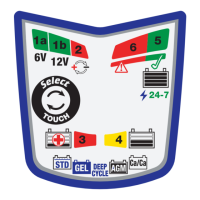
Understanding LED Indicators

Explains the meaning and sequence of the charger's LED indicators.

Critical Safety Information (USA & Canada)

General Safety Precautions

Covers essential safety measures, battery types, and extension cord usage.

Personal Safety Measures

Details personal protective equipment and precautions when working near batteries.

Pre-Charge Preparation Steps

Battery Preparation and Ventilation

Ensures proper battery ventilation and terminal cleaning before charging.

Charger Placement and Connections

Guidelines for safe charger placement and connecting to a vehicle battery.

Automatic Charger Operation Overview

Key Safety Warnings and Notes

Highlights key warnings, acid exposure, and connection set details.

Connecting Battery (Outside Vehicle)

Step-by-step instructions for connecting the charger to a battery not in a vehicle.

Charging Process and Battery States

Handling Deeply Discharged Batteries

Specific advice for charging deep-discharged or neglected batteries.

LED Indicator Interpretation

Detailed explanation of each LED indicator's meaning during charging.

Charge Completion and Maintenance

Voltage Retention Test and Maintenance

Explains the voltage retention test and automatic battery maintenance.

Extended Maintenance and Charging Duration

Guidance on long-term maintenance and estimated charging durations.

Charger Mounting and Cable Extension

Mounting Options

Visual guide for mounting the charger securely.

Cable Extension Guidelines

Information on extending the charger's cables for greater reach.

Summary

OptiMATE 5 Product Identification

Model and Technical Specifications

Details the OptiMATE 5 model, AC/DC input, and output specifications.

OptiMATE 5 Control Interface

Understanding LED Indicators

Explains the meaning and sequence of the charger's LED indicators.

Critical Safety Information (USA & Canada)

General Safety Precautions

Covers essential safety measures, battery types, and extension cord usage.

Personal Safety Measures

Details personal protective equipment and precautions when working near batteries.

Pre-Charge Preparation Steps

Battery Preparation and Ventilation

Ensures proper battery ventilation and terminal cleaning before charging.

Charger Placement and Connections

Guidelines for safe charger placement and connecting to a vehicle battery.

Automatic Charger Operation Overview

Key Safety Warnings and Notes

Highlights key warnings, acid exposure, and connection set details.

Connecting Battery (Outside Vehicle)

Step-by-step instructions for connecting the charger to a battery not in a vehicle.

Charging Process and Battery States

Handling Deeply Discharged Batteries

Specific advice for charging deep-discharged or neglected batteries.

LED Indicator Interpretation

Detailed explanation of each LED indicator's meaning during charging.

Charge Completion and Maintenance

Voltage Retention Test and Maintenance

Explains the voltage retention test and automatic battery maintenance.

Extended Maintenance and Charging Duration

Guidance on long-term maintenance and estimated charging durations.

Charger Mounting and Cable Extension

Mounting Options

Visual guide for mounting the charger securely.

Cable Extension Guidelines

Information on extending the charger's cables for greater reach.

TecMate Optimate 5 TM220 Specifications

General IconGeneral
Output Voltage12V
Output Current0.8A
CasePlastic
Input Voltage100-240V AC
Battery TypeLead-acid, AGM, GEL
Battery Capacity2Ah - 30Ah
Protection FeaturesReverse polarity, short circuit, overcharge
Compatibility12V batteries

Related product manuals