
 Need help?
Do you have a question about the TecMate Optimate 5 Silver Series and is the answer not in the manual?
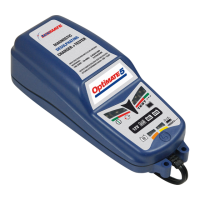
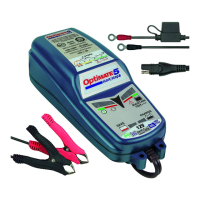
Details the charger model and AC/DC power input specifications.
Lists supported battery types, voltage, and capacity ranges.
Emphasizes reading all instructions before charging the battery.
Explains the process of selecting and confirming the battery voltage (6V/12V).
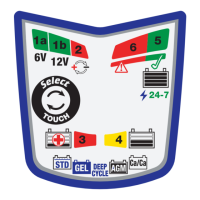
Describes the meaning of various LED indicators (1a, 1b, 2, 3, 4, 5, 6) during operation.
Details checks for over/under voltage conditions and required user actions.
Shows how test results are indicated via LEDs, correlating voltage to state of charge.
Covers essential safety points like avoiding ground connection, rain, and proper cord handling.
Warns about explosive gases from batteries and necessary precautions.
Advises on personal protection, handling battery acid, and avoiding sparks or metal objects.
Outlines steps for preparing the battery, checking terminals, and choosing a safe charger location.
Details how to safely connect and disconnect the charger's DC clips to the battery.
Step-by-step guide for connecting the charger to a battery installed in a vehicle.
Step-by-step guide for connecting the charger to a battery removed from a vehicle.
Advises on charger safety, handling acid, and resistance to accidental liquid spills.
Provides detailed steps for connecting the charger clips to the battery, including polarity and order.
Explains expected charging times for normal and deeply discharged batteries.
Illustrates how to mount the charger securely using screws.
Covers initial voltage selection (STEP 1) and reverse polarity/voltage safety checks (STEP 2).
Explains the SAVE (STEP 4) and CHARGE (STEP 5) modes based on battery state of charge.
Details the OPTIMIZE (STEP 6) and TEST (STEP 7) stages for battery recovery and health assessment.
Describes the OptiMATE smart maintain mode (STEP 8) for long-term battery care.
Provides specific instructions for recovering very flat or neglected batteries.
Explains how to interpret the results of the battery test (LED #5 and #6).
Offers advice on maintaining batteries for extended periods, including checks.
Describes the charger's ECO mode and its power consumption during standby.
 General
| Output Voltage | 12V |
|---|---|
| Charge Amps | 0.8A |
| Input Voltage | 100-240V AC |
| Output Current | 0.8A |
| Battery Types Supported | Lead-acid, AGM, GEL |
| Protection Features | Short circuit protection, reverse polarity protection |
| Charging Modes | Automatic multi-stage charging (recovery, absorption, analysis, recondition, float) |
| Maintenance | Automatic maintenance mode (float/pulse) |





 To Next Page