41
Instruction and maintenance manual
ENGLISH
3.4.3 ST200 (model with 7 levels)
To be able to use several levels of magnetization, it is
possible to replace the basic push-button panel with
a 7-level model that enables to control milling and
grinding chucks.
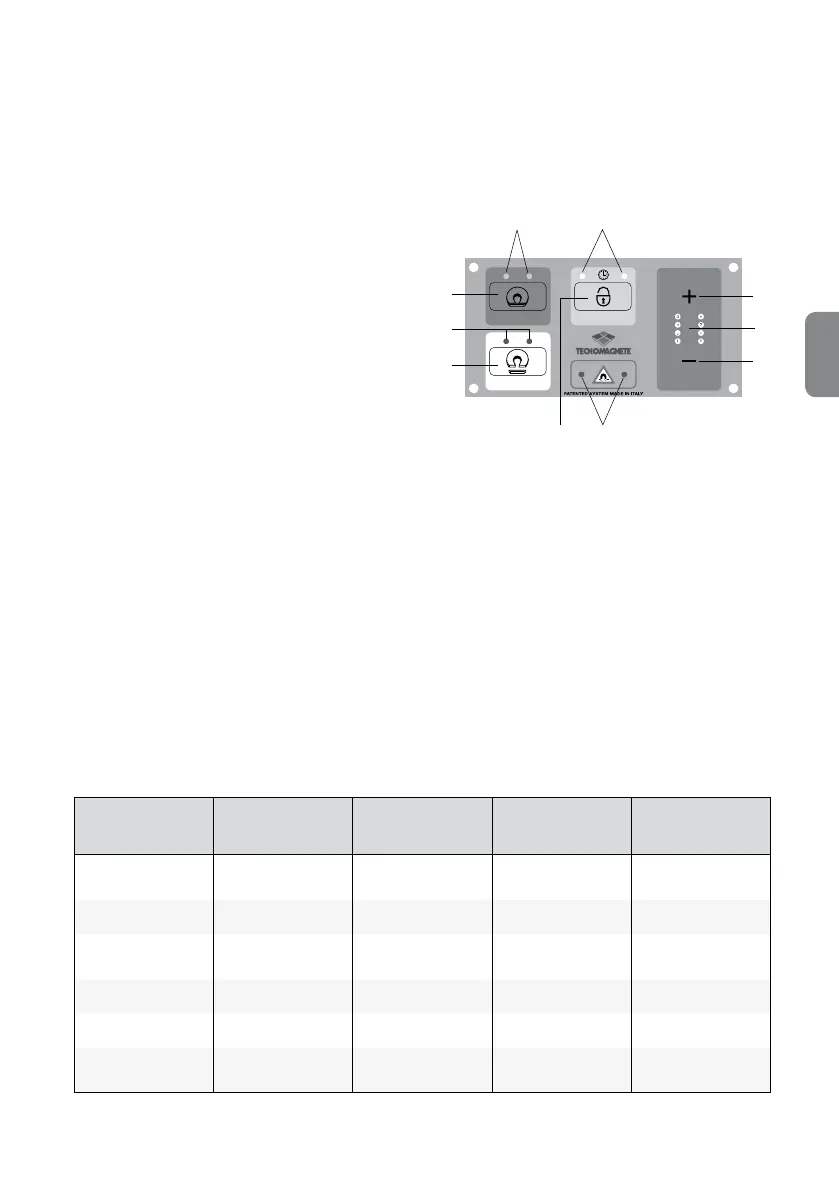
This push-button panel has the following ve but-
tons:
•
Magnetization MAG,
•
Increase of magnetization
level +
•
Reduction of magnetization
level –
•
Demagnetization DEMAG,
•
Enabling ENABLE.
The ENABLE button is used together with the mag-
netization and demagnetization buttons, depending
on the cycle that needs to be performed.
There are also ve indicator lights placed next to the
full FULL-MAG, DEMAG, + and – buttons and the
CYCLE and ALARM buttons.
These indicator lights are used to provide informa-
tion on the status of the system, which is automati-
cally reset to the last operating cycle.
Once the start sequence has been successfully
completed, the indicator light corresponding to the
total/partial magnetization or demagnetization
switches on, depending on the option selected. A
failure in the start sequence switches on the central
alarm indicator light.
If a cycle is active, the only LED that is on is the one
related to the cycle, while all the others are off.
The FULL-MAG and DEMAG indicator lights are al-
ways on and ash during partial magnetization cy-
cles only.
J
G
I
H
D
E
F
A
C
B
PUSH-BUTTON PANEL
A
➜ MAG button
B
➜ ENABLE button
C
➜ DEMAG button
D
➜ Button +
E
➜ Button -
6
➜ FULL-MAG Led (xed) of MAG Led for
partial magnetization (ashing)
G
➜ Cycle Led
H
➜ DEMAG Led
I
➜ Alarm status Led
J
➜ Level selection LED (levels from 1 to 7) and
FULL-MAG 8
System status MAG Led DEMAG Led Cycle Led Alarm Led
Full magnetization
Level 8
Permanently on Off Off Off
Demag Off Permanently on Off Off
Partial magnetization
Levels 1-7
On ashing Off Off Off
Cycle Off Off Permanently on Off
Current alarm Off Off Off Permanently on
Communication
alarm
*
Off Off Off On ashing
*
For version ST200 only



 To Next Page