10 TS1061 Dual Wiegand Interface Installation Manual
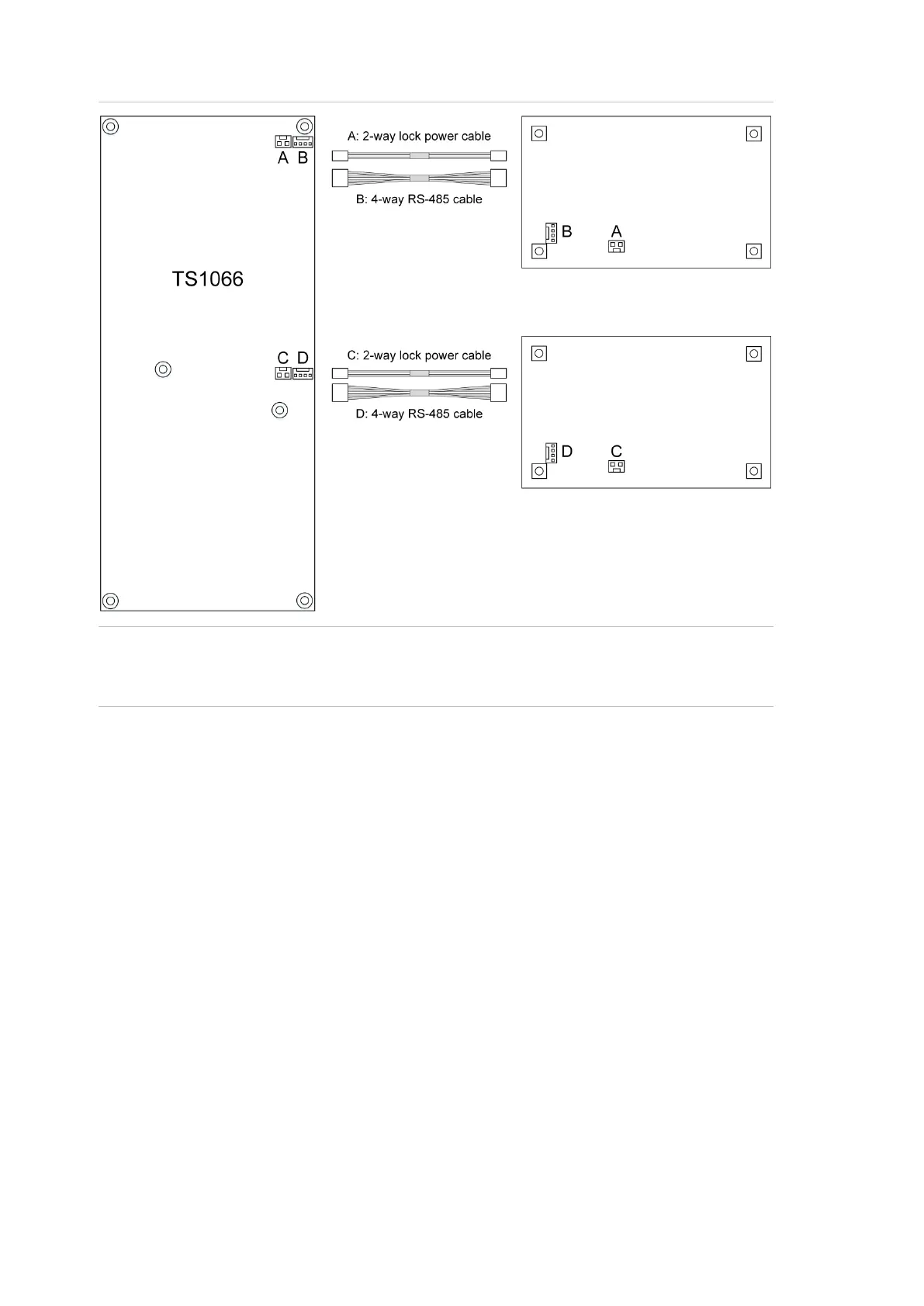
Figure 3: Example TS1066 to TS1061 cable connections for RS-485 and lock power
Note: Refer to the TS1066 Network Access Controller Installation Manual for
information on the maximum total current draw allowed from a Network Access
Controller.
Using the RS-485 terminals:
Use 2-pair twisted shielded data cable such as Belden 8723 to connect the
Interface to a ChallengerPlus panel or Network Access Controller.
• Connect the +12 terminal to the red wire. The +12 terminal provides +12 V
to the Interface (Refer to section Power supply to RS-485 devices for
more details).
• Connect the − terminal to the black wire.
• Connect the D+ terminal to the white wire. The D+ terminal is data
positive.
• Connect the D− terminal to the green wire. The D− terminal is data
negative.
• Connect the data cable shield to the LAN earth connection (Figure 2 on
page 8, item 11) if the other end of the data cable shield is not earthed.


 To Next Page