TS1061 Dual Wiegand Interface Installation Manual 13
Install EOL resistors in input circuits at the end of the circuit. If an alarm device is
connected, place the EOL resistors at the device’s connections. If an input is not
used, you do not need to connect an EOL resistor.
Tip: Use sleeves on the resistor leads to prevent accidental shorting.
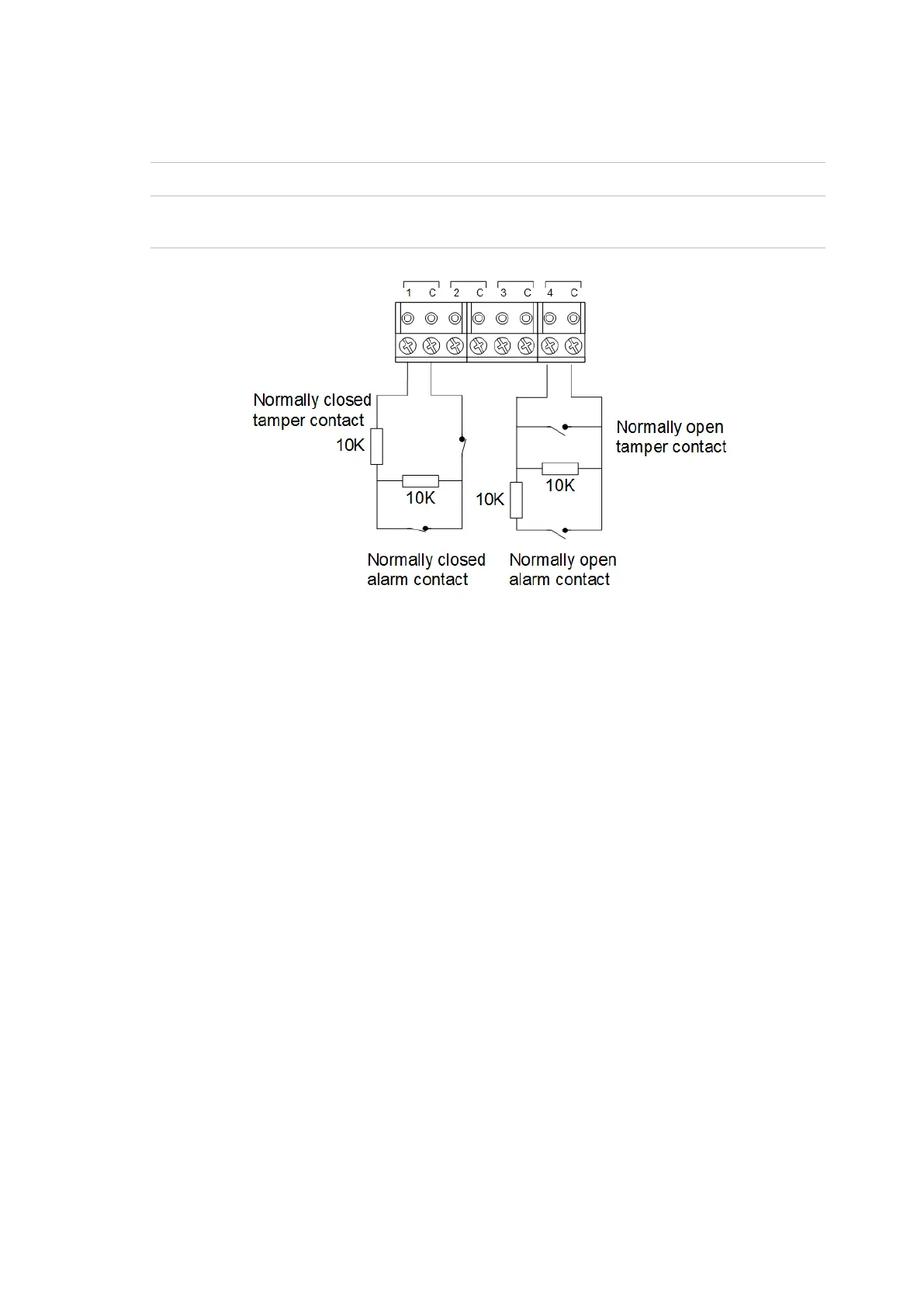
Figure 5: Four-state monitored input circuits
When four-state monitoring is used, the panel uses the circuit’s resistance to
determine the state of the input. In this example, 10 kΩ EOL resistors have been
used:
• 10 kΩ indicates sealed
• 5 kΩ or 20 kΩ indicates unsealed
• Open circuit indicates input tamper
• Short circuit indicates input tamper
To use four-state monitoring, input tamper monitoring must be set to Yes for the
ChallengerPlus panel or Network Access Controller. See the ChallengerPlus
Programming Manual or the TS1066 Network Access Controller Programming
Manual, respectively, for information on enabling tamper monitoring.
Alternatively, the ChallengerPlus panel or Network Access Controller can be
configured to monitor inputs for two states (sealed and unsealed). This is
accomplished by using one resistor in each circuit, as shown in Figure 6 on page
14.


 To Next Page