TECSUN RADIOS AUSTRALIA
24/9 Powells Road, Brookvale, NSW 2100 Australia
Ph: +61 2 9939 4377
Email: info@tecsunradios.com.au
www.tecsunradios.com.au
16
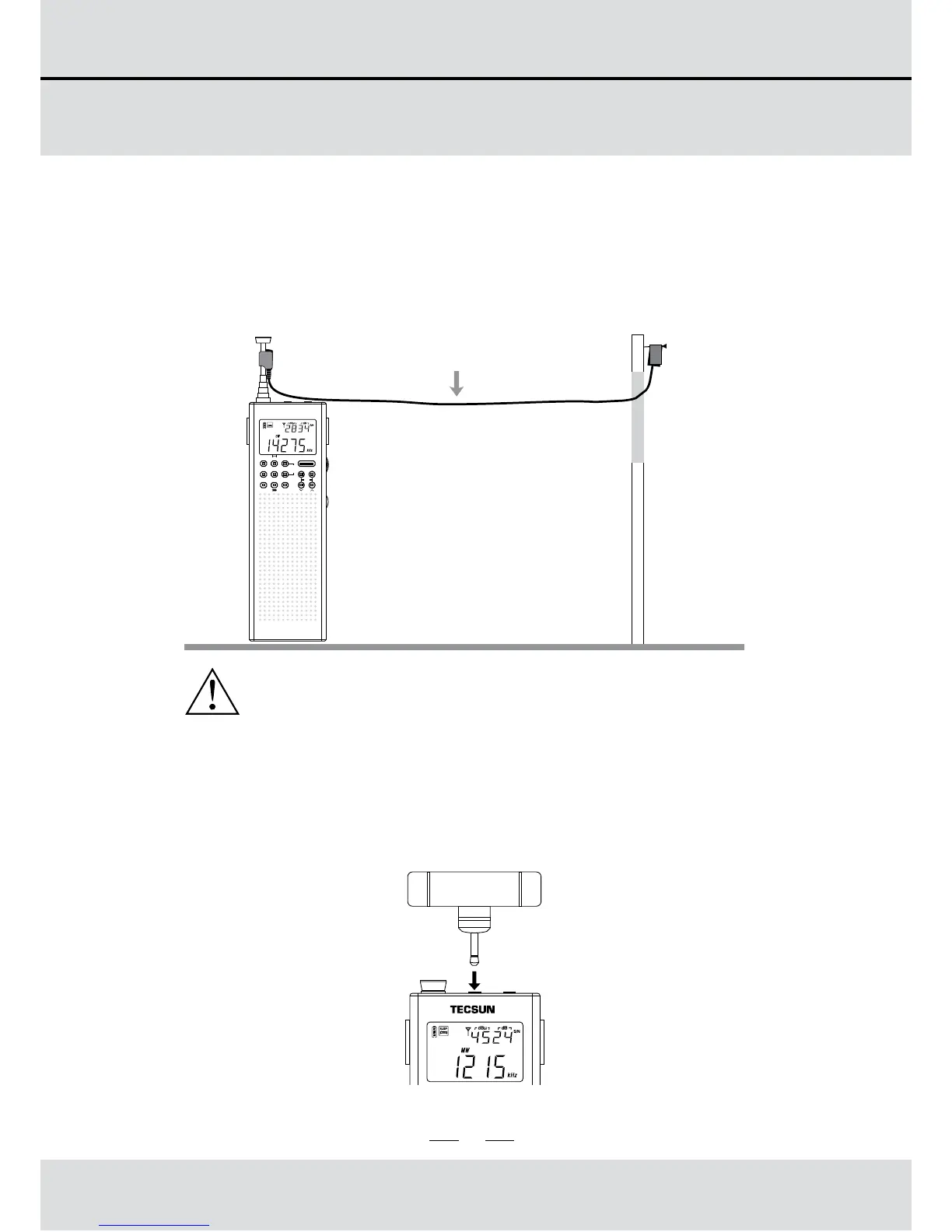
USING THE EXTERNAL ANTENNA
WINDOW WALL
Do not place the external antenna outdoors
during a thunderstorm!
EXTERNAL FM/SW ANTENNA
Enhancing FM/SW reception
Use the external wire antenna to clip onto the telescopic
antenna of the PL-365. Then position the opposite end
outside the window for better FM and SW reception.
PL-365
TECSUN
POWER
FM
MW
SW
ATS
SLEEP
High Sensitivity AM Antenna
Enhancing AM/LW reception
Plug the AM/LW external antenna into the AM Antenna
jack, then rotate the antenna for better AM/LW reception.
5
2. Short press on [POWER] button to turn the radio on or off.
TURN ON / OFF THE RADIO
1. Installing batteries
The battery compartment is located on the back of the
PL-365. To remove the battery compartment cover, apply
thumb pressure and slide it towards the bottom of the
radio. Install 3 AA size batteries into the battery
compartment, observing the battery polarity diagram on
the back of the radio. Display screen would show battery
capacity, time, etc.
Note:
If the radio is not able to be turned on. Please check if the
batteries were installed correctly, battery capacity is
sufficient or the lock function had been applied with symbol
" " displayed on screen.
Temp.
Short press
9/10k
TIME
ALARM
STEP
MEM.
DISPLAY
SCAN
VF/ VM
BFO
ETM
DEL.
USB/ LSB
FM ST.
FM STEREO/ MW/ SW-SSB DSP RECEIVER



 To Next Page