EasyManua.ls Logo

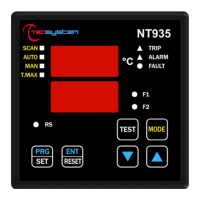
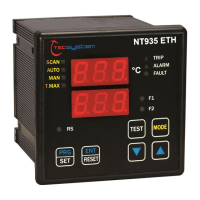
TECSYSTEM NT935 ETH - User Manual

TECSYSTEM NT935 ETH
33 pages
Print Icon
To Next Page IconTo Next Page
Loading...
1MN0121 REV. 0
operates with ISO9001 certified quality system
http://www.tecsystem.it
R. 1.5 06/09/17
“Translations of the original instructions”
TECSYSTEM S.r.l.
20094 Corsico (MI)
Tel.: +39-024581861
Fax: +39-0248600783
NT935 ETH
INSTRUCTION MANUAL
ENGLISH

Questions and Answers

  • M
    michellewallaceJul 29, 2025
    What to do if all PT100 sensors are in FCC in TECSYSTEM NT935 ETH?
    • J
      Jesse BerryJul 29, 2025
      If all PT100 sensors are showing an FCC error, it might be due to an incorrect sensor connection or the terminal block being inserted upside down. Verify the connections and the terminal board to resolve this issue.
    • Г
      ГостьApr 17, 2026
      Jesse Berry, все соединения проверены и соответствуют схеме подключения, ошибка так и осталась
  • D
    Diane KochAug 4, 2025
    How to fix TECSYSTEM NT935 ETH Controller if it does not switch on?
    • J
      jessicajacksonAug 4, 2025
      If the TECSYSTEM Controller unit doesn't switch on even with correct supply to terminals 40-42, ensure the connector is properly inserted and wires are tightened. Look for any burning signs on the connectors. After disconnecting the power, check these elements and then reconnect the power supply.
  • S
    smoralesAug 10, 2025
    What to do if one channel is in FAULT due to FOC/FCC in TECSYSTEM Controller?
    • P
      patricia81Aug 10, 2025
      If one of the three/four channels on your TECSYSTEM Controller is in FAULT due to FOC/FCC, check the connections of the Pt100 sensors. Also, consult the instructions regarding measurement signal transfer and temperature sensor diagnostics.
  • B
    brandon87Aug 16, 2025
    Why does TECSYSTEM NT935 ETH display 'ECH' when turning on?
    • L
      Laura HarrisonAug 16, 2025
      If the display of your TECSYSTEM Controller shows “ECH” when turning on, it means strong interference has damaged the stored data.
  • D
    David TurnerAug 22, 2025
    How to solve CH4 FAULT due to FOC in TECSYSTEM NT935 ETH Controller?
    • D
      Dr. Roberto ThompsonAug 22, 2025
      If CH4 is in FAULT because of FOC (and only the 3 Pt100 sensors are connected) on your TECSYSTEM Controller, this could be due to a programming error of the CH4 / YES control unit. Check and repeat the programming, selecting CH4 / NO.

Summary

Safety Requirements and Precautions

Power Supply and Liquid Handling

Guidelines for safe power supply connection and protection against liquids.

Technical Specifications - Part 1

Power Supply and Input Characteristics

Electrical supply range and input types supported by the unit.

Output Relays and Ethernet Port

Details on alarm, fault, and fan output relays, plus Ethernet capability.

Display and Data Management Features

Control Functions and Thresholds

Overview of temperature control, thresholds, and advanced functions.

Front Panel Controls and Indicators

Display and Indicator LEDs

Description of the unit's display and various status indicator LEDs.

Operating Buttons and Mode Selection

Details on the function of each button for operation and mode selection.

Electrical Connections Guide

Terminal Block Identification and Wiring

Overview of terminal block numbering and connection types.

Power Supply, Alarms, and Faults

Universal Power Supply Details

Detailed information on the unit's universal power supply capabilities.

Alarms, Ventilation, and Fault Contact

Control of alarms, ventilation, and the behavior of the fault contact.

Programming - Part 1

Entering Programming Mode and Defaults

Procedure to enter programming and restore default values.

Alarm and Trip Threshold Configuration

Setting alarm and trip temperature thresholds for channels.

Fan Control and Channel 4 Setup

Configuring fan control and channel 4 settings.

Temperature Sensor and Signal Integrity

Sensor Installation and Configuration

Guidelines for installing and configuring Pt100 sensors.

Measurement Signal Transfer Guidelines

Rules for cabling and signal transfer to ensure accurate measurements.

Diagnostics and Functionality

Sensor Fault Diagnostics (Fcc, Foc, Fcd)

How the unit diagnoses sensor faults like short-circuit or interruption.

Cooling Fan Control and Tests

Fan Control Modes and Wiring

Details on controlling fans based on temperature or ambient conditions.

Ethernet Modbus TCP Output - Part 1

Modbus TCP Communication Notes

Operating notes and data transmission rules for Modbus TCP communication.

Modbus Function Codes (3 and 16)

Explanation of supported Modbus function codes for reading and writing.

Ethernet Modbus TCP Output - Part 2

Remote Programming Guidelines

Rules and considerations for remote programming via Modbus.

Ethernet Modbus TCP Output - Part 3

Modbus Register Mapping Table

Table detailing Modbus register addresses for information and commands.

Ethernet Modbus TCP Output - Part 4

System Settings and Status Registers

Modbus registers for system settings, status, and fan control.

Temperature Fan Control Registers

Modbus registers specifically for managing temperature-based fan control.

Ethernet Modbus TCP Output - Part 5

Temperature Channel 1-4 Registers

Modbus registers for reading temperature data from channels 1 through 4.

Ethernet Modbus TCP Output - Part 6

Ethernet Modbus TCP Output - Part 7

Ethernet Modbus TCP Output - Part 8

Ethernet Module Parameter Programming - Part 1

Ethernet Module Parameter Programming - Part 2

Telnet Screen Connection Steps

Step-by-step guide to connect to the unit using the Telnet screen.

Ethernet Module Parameter Programming - Part 3

IP Parameter Programming Menu (Telnet)

Accessing and navigating the IP parameter programming menu via Telnet.

Ethernet Module Parameter Programming - Part 4

Modifying IP Address and Gateway

Procedure for changing the device's IP address and default gateway.

Modifying Netmask and Telnet Password

Procedure for changing the Netmask and Telnet configuration password.

Ethernet Module Parameter Programming - Part 5

Troubleshooting Guide

UL Specification and Ratings

TECSYSTEM NT935 ETH Specifications

General IconGeneral
BrandTECSYSTEM
ModelNT935 ETH
CategoryController
LanguageEnglish

Related product manuals