Energy, Inc. • 3297 Pacific Street • Charleston, South Carolina 29407 • (843) 766-9800
Page 11
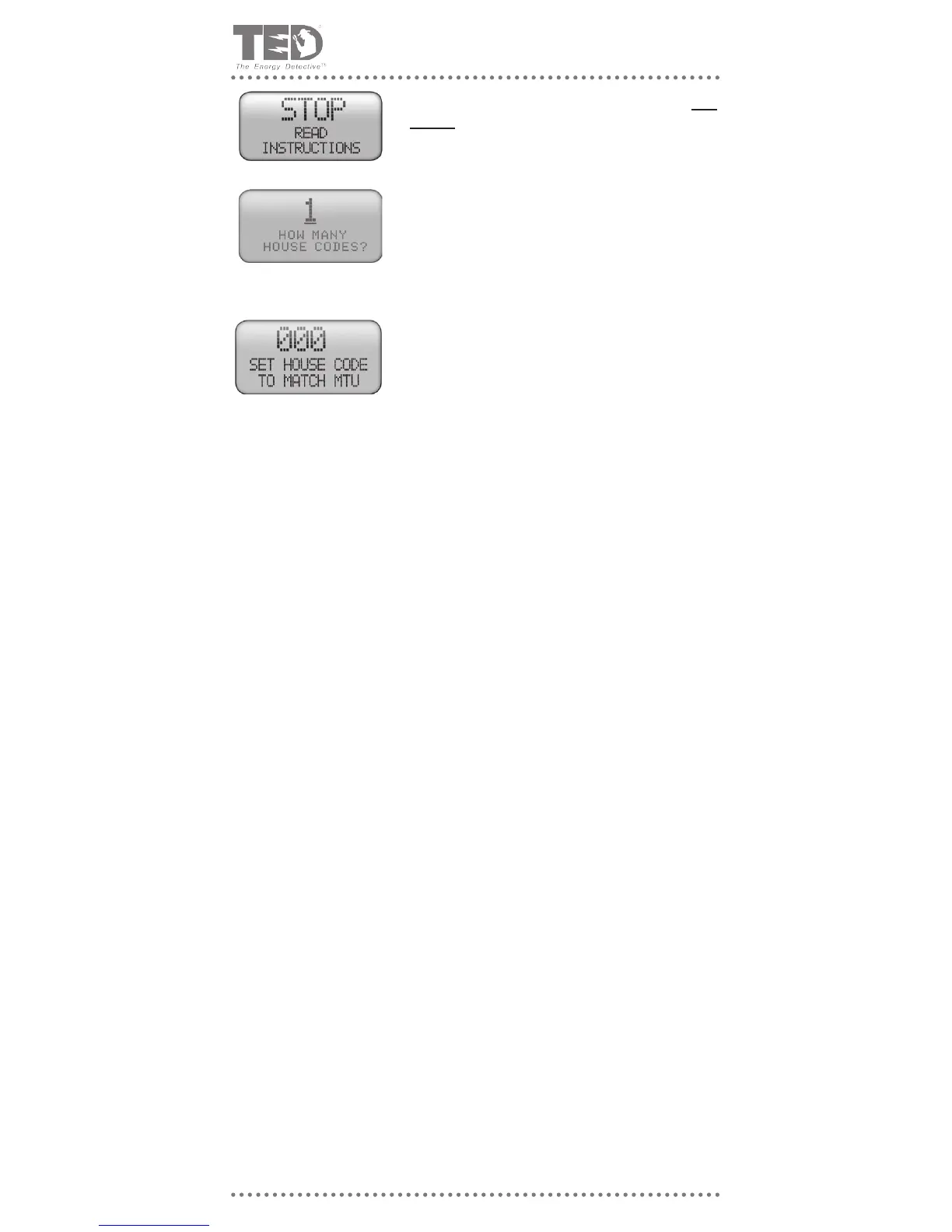
A. Hold the “$” and p keys down at the same time for 3
seconds and this screen should come up. You are reading
the instructions, so go ahead and press the MODE key to
go to the next screen.
B. If you have TED model 1001, you will only have 1 House
Code. Press the MODE key to go to the next screen. If
you have TED model 1002, please see the separate in-
structions included in your additional MTU box.
C. Use the ►and ▲ keys to change the “000” to match the
House Code that you noted above. Press the MODE key
when done. This will take you to the primary kW display
screen.
STEP 5 - CONFIRM PROPER OPERATION
A) Insure that the RDU is set to read kW and not $/Hr (by depressing the ‘$’ key if neces-
sary). NOTE: All $/Hr readings will read zero because the energy rate charge (tariff) has
not been input yet. This will be done later. Observe the RDU; it should now be showing
the current kW usage in the home or business. The LED on the front of the RDU should
be ashing green approximately every one second, indicating that data is being sent
and received properly.
B) If the reading is still 0 kW, check House Code Setting (See prior section on House Code
details - Page 10)
C) If the reading is still 0 kW, insure that the RDU and MTU are on the same phase. If not,
change the wiring in the panel so that they are, or install a phase-coupling capacitor.
If still not operating, see Troubleshooting Section. Check the polarity of the CT’s by
turning on a large 240V load such as an electric clothes dryer or oven. If the CT’s are
installed with the correct polarity, then the RDU will immediately register an increased
reading of 2–6 kW. If there is little or no change, then it is likely that one of the CT’s has
been installed backwards. Reverse one of the CT’s and try again.
D) The kW reading can be checked by comparison with a good clamp-on multi meter. Turn
off any appliances that cycle on and off automatically to obtain a constant reading (the
higher the reading the better – turn on all the lights and other constant loads). Measure
the voltage from phase to neutral (VL) and the current in each Phase (IA and IB). The
kW display should read very close to kW = VL x (IA +IB)/1001. If the reading is much
lower than this, check that the CT’s have been installed with the red dots facing the
same direction.
E) If still not working, refer to Troubleshooting - Appendix B.
F) Re-install the panel cover.
G) To program Utility rates in the RDU, refer to Part IV.



 To Next Page