© 2008 Energy, Inc. www.theenergydetective.com
Page 17
P A R T V - D A Y - T O - D AY O P E R A T I O N
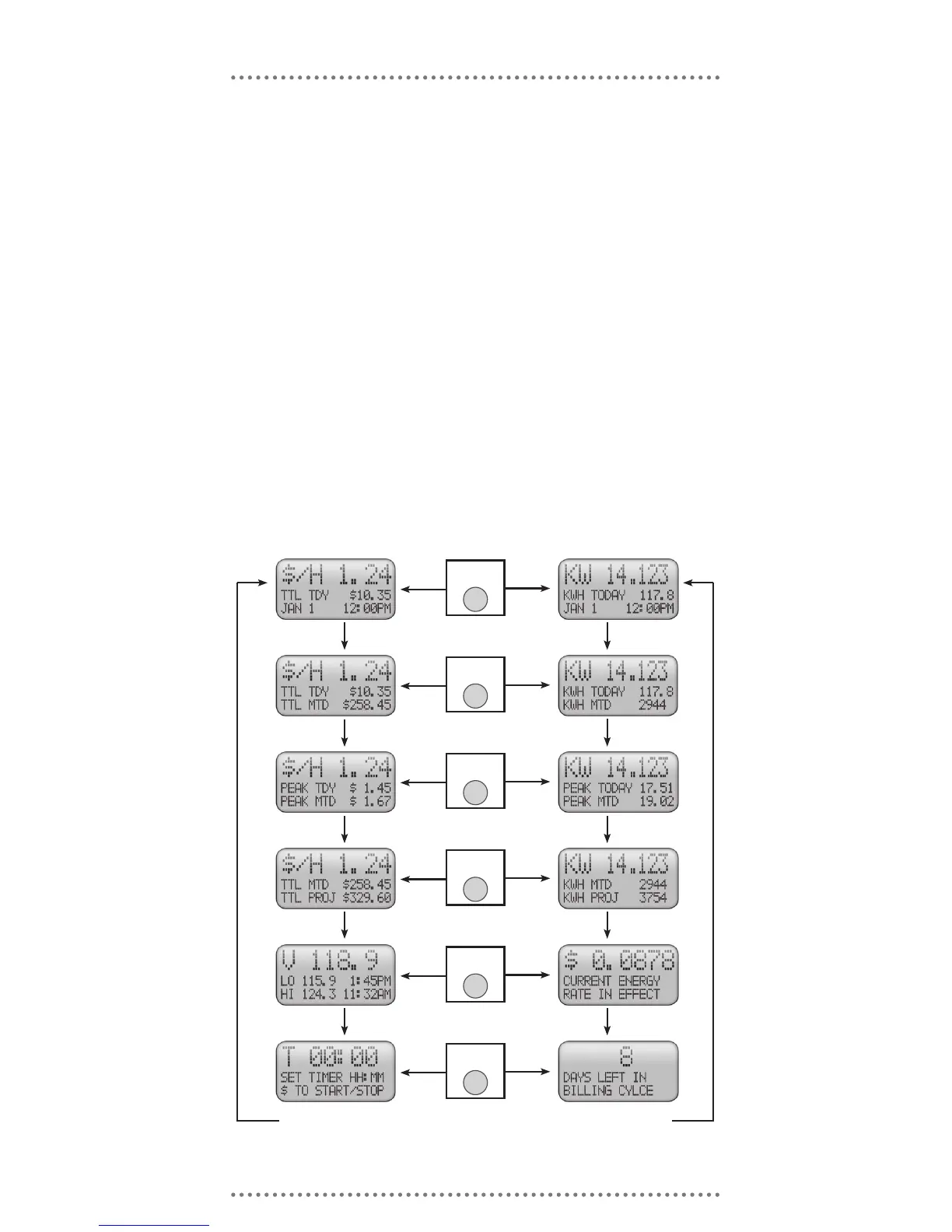
TED should now be displaying values for both KW and $. TED will now provide you
with a wealth of information at your ngertips. The graphics below summarize how
screens are linked and how to navigate between screens. The following pages pro-
vide full descriptions of each screen display. Pressing the MODE Key will advance
the screens vertically. Pressing the “$” Key will alternate the screens between the
‘$’ and ‘KW’ view.
TED’s “Alarm” Light (Light Emitting diode – LED)
1. The LED should now be ashing green once per second indicating receipt of good data
packets from the MTU indicating that the power is on and that it is operating normally.
2. If the LED ashes green intermittently, TED 1001 may have a poor communication link
and is probably missing data packets sent by the MTU – see Appendix B – Troubleshoot-
ing Guide for help.
3. If the LED is either off or on, but not ashing, the communication link may have been
lost – see Appendix B – Troubleshooting Guide for help.
LED Operation



 To Next Page