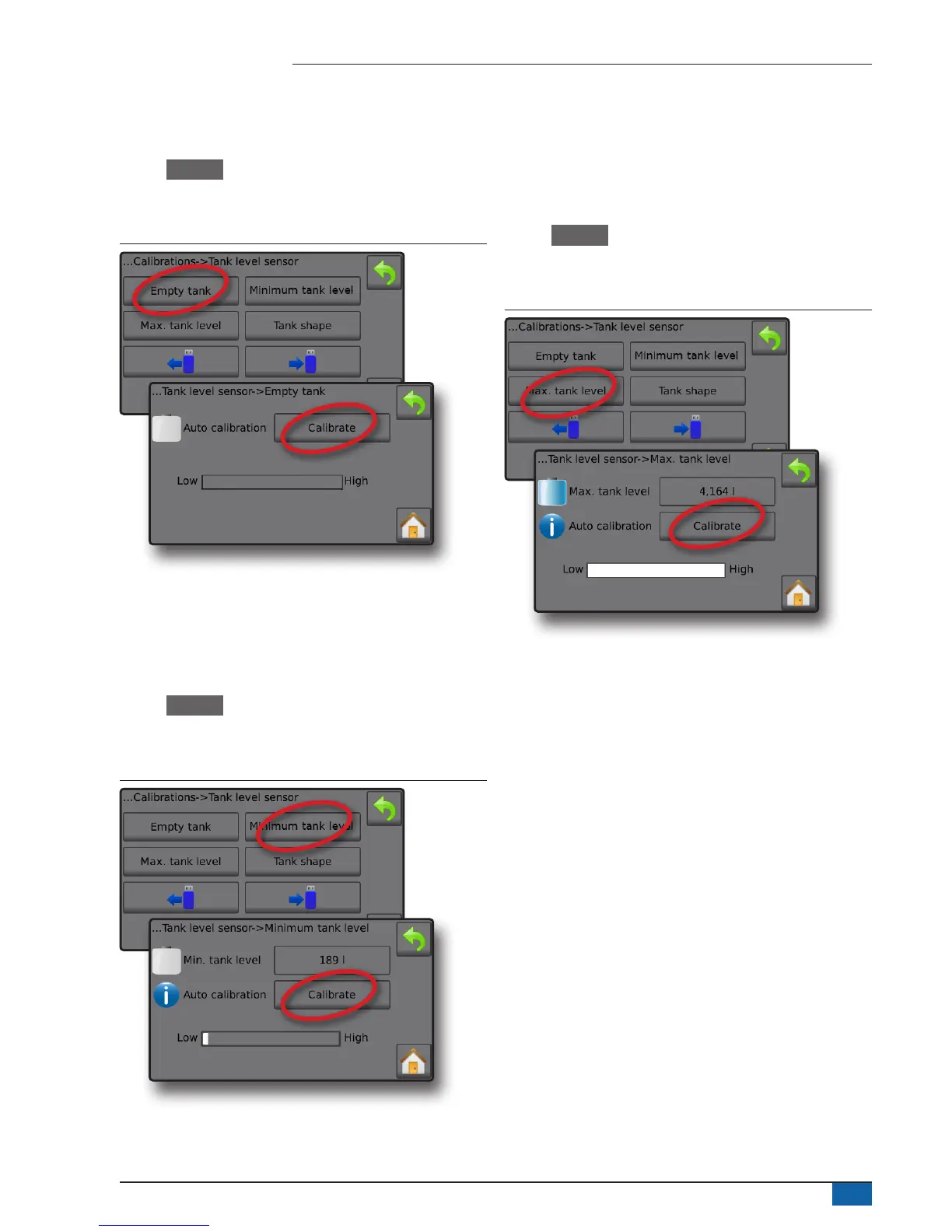
Empty tank – Automatic calibration
Empty tank establishes the empty tank value.
IMPORTANT: The tank should be completely empty.
1. Press Calibrate to record a new calibration value and nalise the
calibration.
◄The low-high graph should be empty
Figure 30: Tank level sensor – Empty tank
Minimum tank level – Automatic calibration
Minimum tank level establishes the minimum level of water on the
tank sensor.
IMPORTANT: Make sure the tank is filled with the contents displayed
on the screen. The amount displayed is established in
Settings
-
>OEM
-
>Tank setup
-
>Minimum tank content.
1. Press Calibrate to record a new calibration value and nalise the
calibration.
◄The low-high graph should display approximately 5% full
Figure 31: Tank level sensor – Minimum tank level
Maximum tank level – Automatic calibration
Maximum tank level establishes the maximum level of water on the
tank sensor.
IMPORTANT: Ensure the tank is filled with the contents displayed on
the screen. The amount displayed is established in Settings
-
>OEM
-
>Tank setup
-
>Maximum tank content.
1. Press Calibrate to record a new calibration value and nalise the
calibration.
◄The low-high graph should display 100% full
Figure 32: Tank level sensor – Maximum tank level



 To Next Page