21
USER GUIDE: CONSOLE DISPLAY
Button Controls
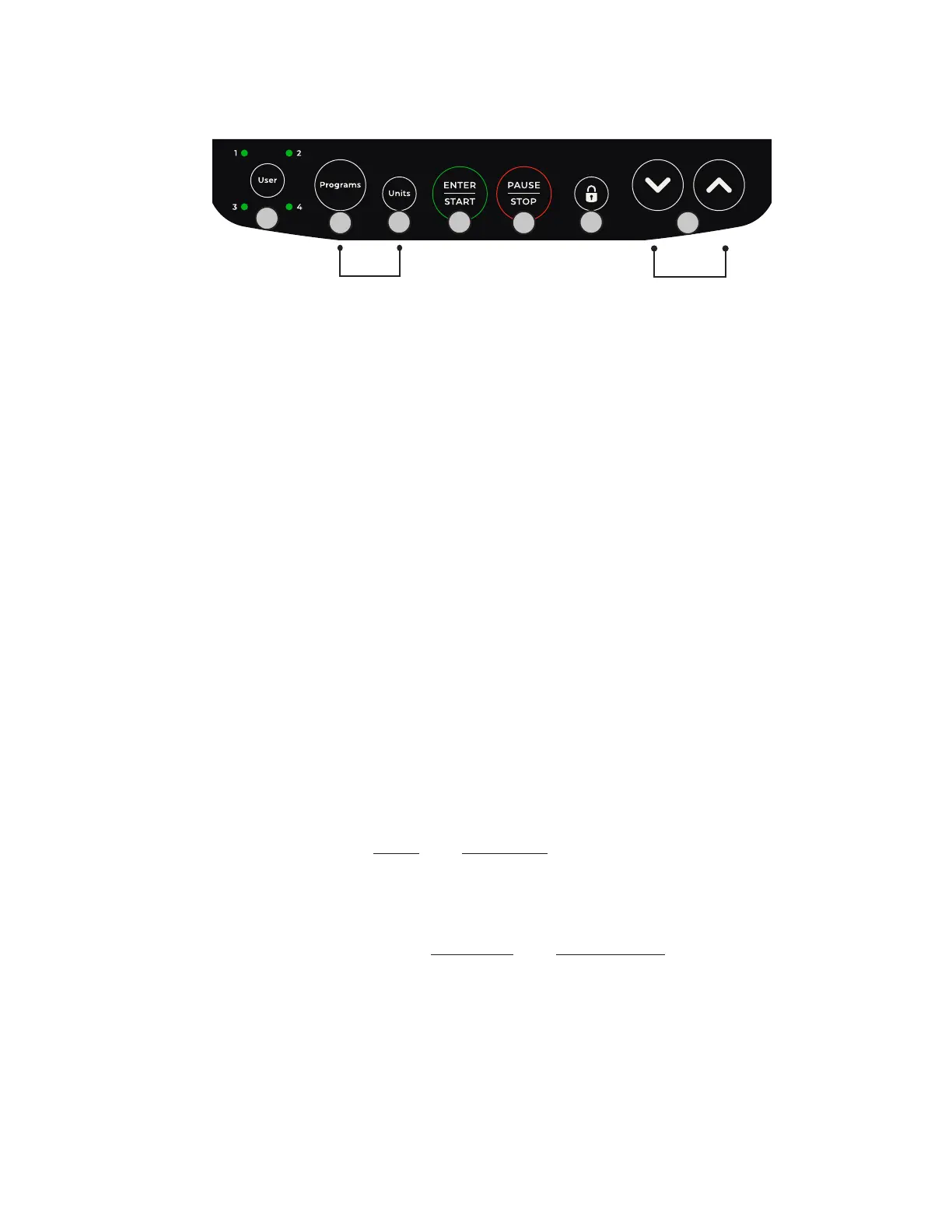
A. USER: Press to select a User Profile (1-4). To set up a new User Profile, press and hold.
B. PROGRAMS: Press to enter the Programs list. To cycle through program options, use the
Programs button or Up and Down Arrows. Press Enter/Start to select your desired program.
C. UNITS: Press to select your desired Speed and Distance units (miles, steps, or kilometers) or
select cycle to alternately display all units while you work out. Units can be changed before or
during your workout.
D. ENTER/START: Press the Enter/Start button to select values or to start your workout.
E. PAUSE/STOP: During your workout, press the Pause/Stop button once to pause your workout
and press it twice to end your workout. Pressing the Pause/Stop button while setting up a
program will cancel the workout settings.
F. STEP LOCK: The Step Lock button allows you to lock the pedals and handles in place, making
it easier to get on and off the machine. To lock or unlock the machine, hold down the Step Lock
button for 5 seconds. You cannot lock the machine while it is in motion or during a workout.
The machine will stay locked even when powered off and must be powered on to unlock. If the
machine is locked, you will need to unlock it before starting a workout.
G. UP/DOWN ARROWS Press to change the resistance during your workout (1-20 levels). The
Arrow buttons can also be used to change values and navigate through settings while setting
up your workout.
MUTE/UNMUTE: Press and hold the Units and Programs buttons at the same time for 2 seconds.
This will mute the audible key tone haptic feedback and all other screen indication tones. The
screen will read “Mute” in the Program Text Line. Press and hold both buttons at the same time
for 2 seconds again to unmute. The screen will read “Unmute” in the Program Text Line.
SCREEN BRIGHTNESS: Press and hold the Up Arrow and Down Arrow buttons at the same time
for 3 seconds, then press the Up or Down Arrow to increase or decrease the brightness. Once
you reach your desired brightness, press the Start button to save your setting.
A
B
C D
E
F
G
MUTE
HOLD 2 SEC
BRIGHTNESS
HOLD 3 SEC



 To Next Page