STEP 3
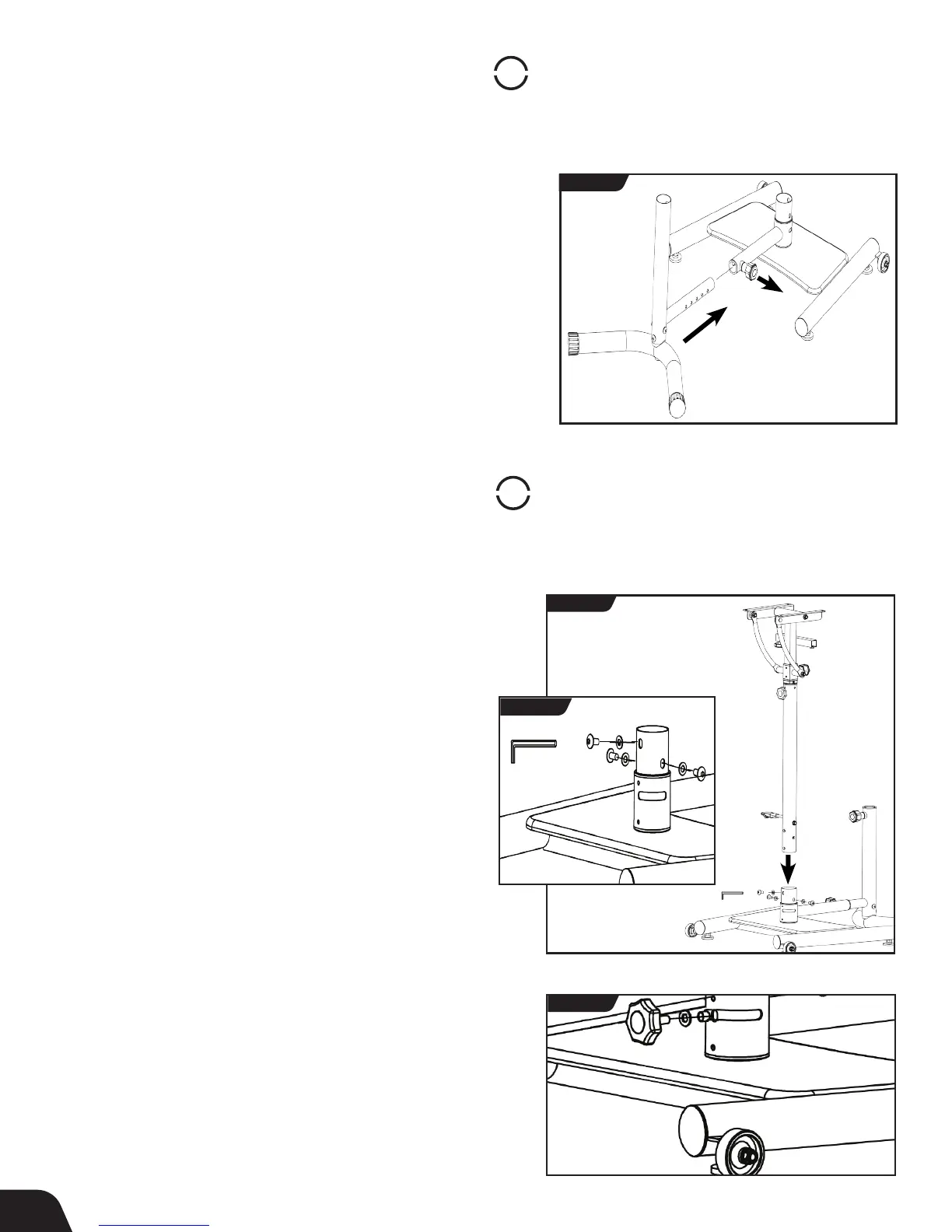
Assemble Seat Frame Base to Desktop Base
• With one hand, untighten and pull out the Seat Telescoping
Auto-Locking Knob. With the other hand, insert the Seat Frame into
the receiving end of the Seat Bushing (Figure 3).
• Release the Auto-Locking Knob and continue to insert the Seat Frame
until the red button on the Auto-Locking Knob depresses or “locks”
into a hole setting.
• Tighten the Auto-Locking Knob. Do not overtighten.
• See pg. 10 for instructions on how to adjust the telescoping feature
on the stool to your preferred setting and how to properly secure
the knob.
STEP 4
Assemble Desktop Post to Desktop Base
• Locate the Desktop Post Assembly Hardware Kit (HK1031).
• Insert the Desktop Post upright into the Desktop Base (Figure 4a).
• Secure the screws and washers into the designated holes with the
Allen Wrench provided (Figure 4b).
• Locate the Seat Stabilizer Knob Assembly Hardware Kit (HK1034).
• Insert the washer and then the bushing onto the screw-end of
the Seat Stabilizer Knob. Proceed to screw the Seat Stabilizer
Knob assembly into the designated hole located in the Desktop
Base Post and through the opening in the Seat Bushing (Figure 5).
6
FIGURE 3
PULL
FIGURE 4a
FIGURE 4b
FIGURE 5



 To Next Page