7.11. Cleaning/replacing the particle sensor
This section is only relevant, if the controller reports a "particle sensor" error message which
persists after being acknowledged even though clearly no smoke is present. In such cases, it is
probable that the particle sensor is too highly contaminated or faulty.
● The particle sensor is located inside the particle filter housing (see section 2.1).
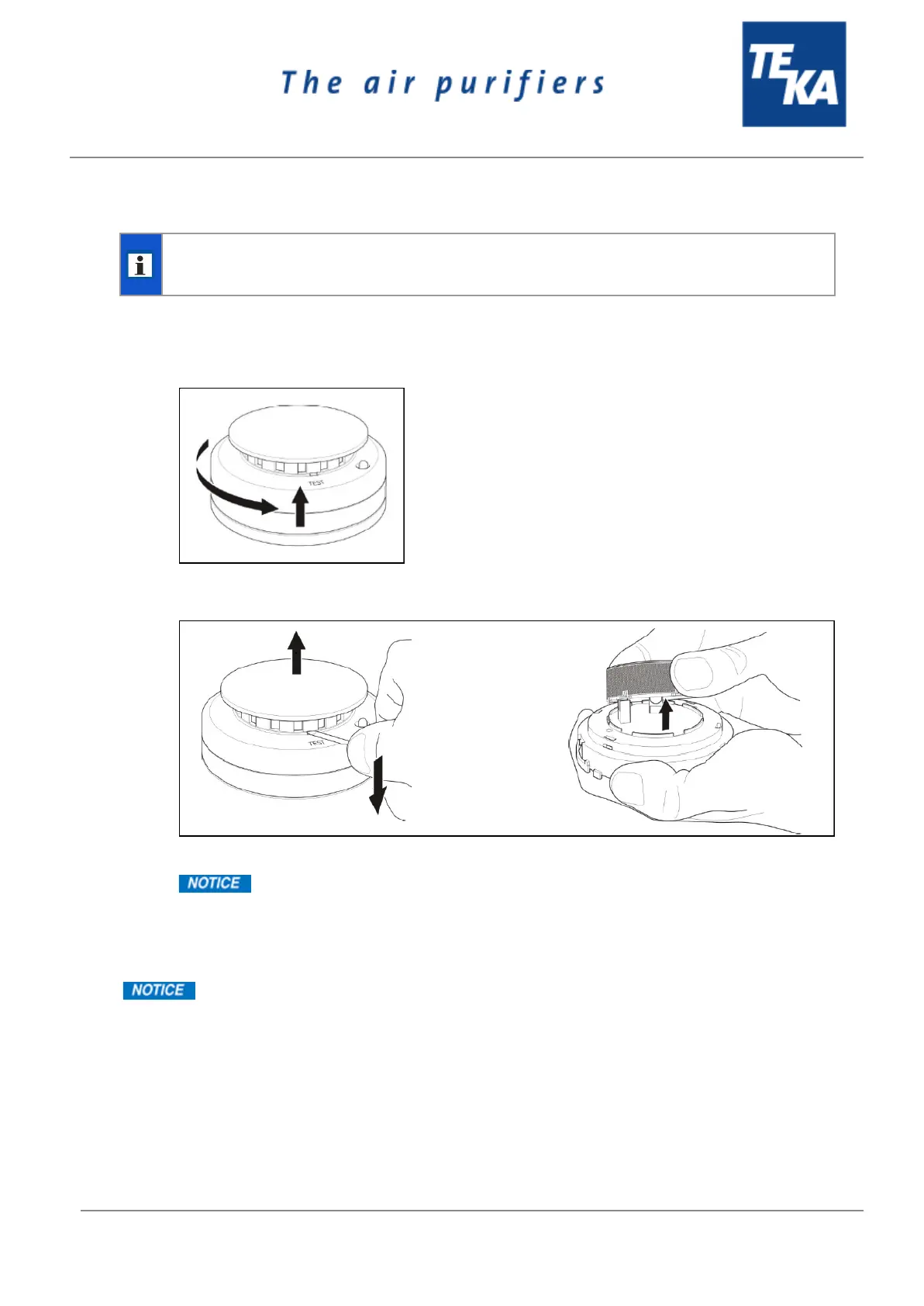
● Remove the detector head from the assembly base. To do this, turn the detector head
anticlockwise slightly.
● Remove the cover. To do this insert a screwdriver and lift the cover. It is then necessary to pull
the black cover off the smokebox.
● Use compressed air to expel dust from the smokebox.
Do not use a dust cloth.
● Mount the covers. Replace the detector head on the assembly base.
If the controller now still reports a “particle sensor” error message then the detector head must be
replaced.
Replacement parts are available from TEKA, see the spare parts list. In this case, it is
not necessary to replace the assembly base which is screwed to the unit.
BA_LFE-101-201-301_220114_EN


 To Next Page