© 2007 D 541 - 08/07 6 of 24
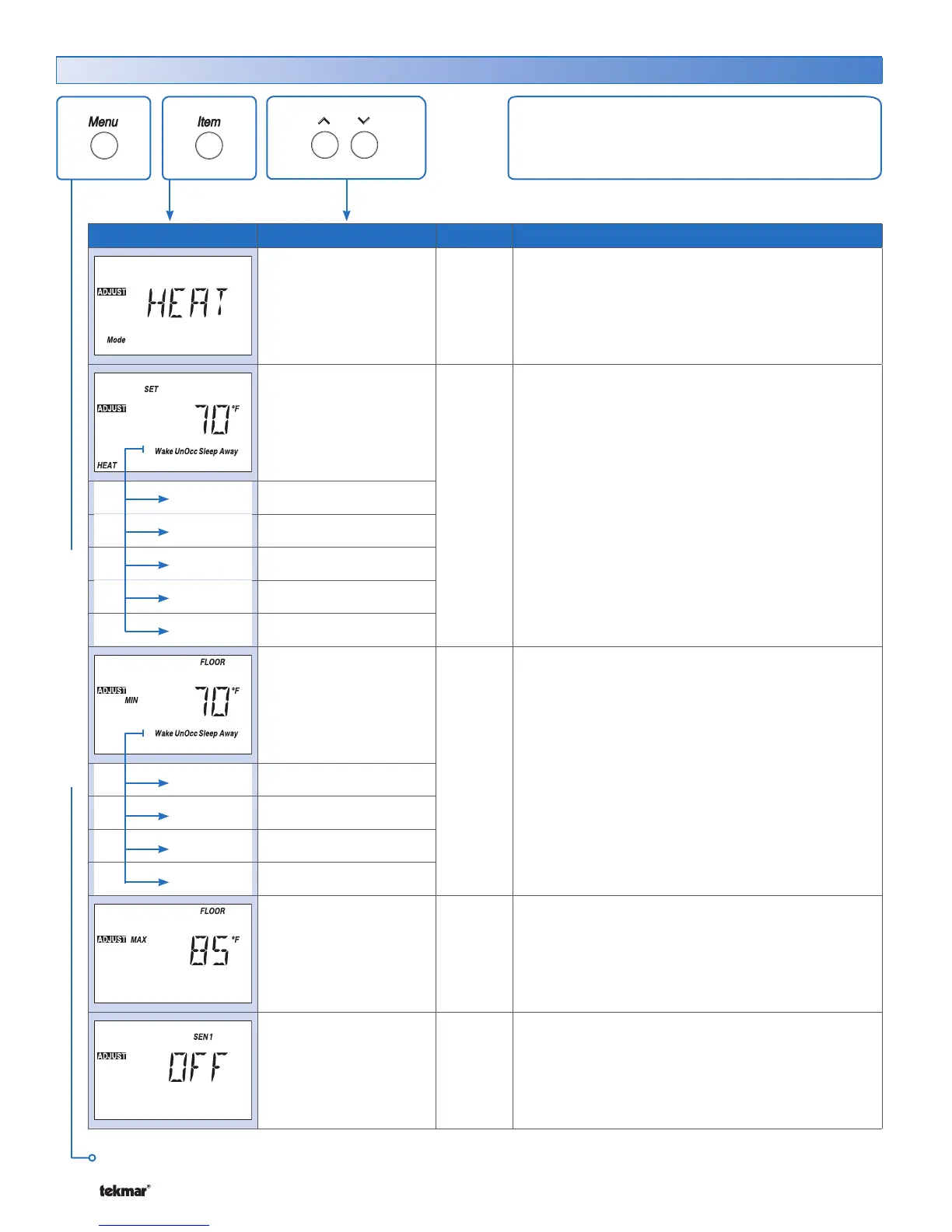
Item Field Range Access Description
OFF, HEAT,
Default = HEAT
USER
INST
ADV
MODE OF OPERATION SECTION B
Mode of operation of the thermostat.
40 to 95°F
(4.5 to 35.0°C)
LTD
USER
INST
ADV
SET HEAT SECTION C
Selected air heating temperature for each event.
Note: At the Limited Access Level, you can only
adjust the temperature +/-3°F (1.5°C) from the last
setting.
Wake
Default = 70°F (21.0°C)
UnOccupied
Default = 62°F (16.5°C)
Occupied
Default = 70°F (21.0°C)
Sleep
Default = 62°F (16.5°C)
Away
Default = 62°F (16.5°C)
OFF, 40 to 122°F
(OFF, 4.5 to 50.0°C)
LTD
USER
INST
ADV
FLOOR MINIMUM SECTION A
Select the minimum floor temperature for each
event.
Note: This item is only available when the Auxiliary
Sensor is set to Floor. At the Limited Access Level,
you can only adjust the temperature +/-3°F (1.5°C)
from the last setting.
Wake
Default = 70°F (21.0°C)
UnOccupied
Default = OFF
Occupied
Default = 70°F (21.0°C)
Sleep
Default = OFF
40 to 122°F
(4.5 to 50.0°C)
Default = 85°F
(29.5°C)
ADV
FLOOR MAXIMUM
SECTION A
Maximum floor temperature.
Note: This item is only available when Sensor 1 is
set to Floor.
OFF, ROOM,
FLOR (Floor),
OUT (Outdoor)
Default = OFF
INST
ADV
SENSOR SECTION A
Select the type of sensor connected to the auxiliary
sensor input.
Adjust Menu (1 of 2)
The Adjust Menu items are the programmable settings
used to operate the mechanical equipment.
Continued on next page.
ADJUST MENU



 To Next Page