EasyManua.ls Logo

Tekmar 680 - User Manual

Tekmar 680
48 pages
Print Icon
To Next Page IconTo Next Page
Loading...
Snow Melting Control 680
680_D
05/16
Snow Melting
Replaces: 10/15
Installation & Operation Manual
1 of 48 © 2016 680_D - 05/16
Features
BACnet or Modbus communication
Automatic snow/ice detection
Supports both in-slab and retrofit aerial sensors
Tandem snow/ice detection
Energy monitoring
Idling
Storm
EconoMelt
Warm weather shut down
Cold weather cut off
Slab protection
Exercising
Introduction
The Snow Melting Control 680 is designed to operate electric or hydronic equipment to melt snow or ice from any surface
including driveways, walkways, business entrances, parking ramps, loading docks, hospital entrances, helipads and car
wash bays. It communicates with Building Automation Systems using BACnet
®
or Modbus
®
for alert notification, remote
monitoring and adjustment capability. The 680 uses a tekmar Snow/Ice Sensor 090 or a Snow Sensor 095 to automatically
detect snow or ice on the snow melting slab. Up to two snow/ice sensors can be installed, thereby increasing detection area
and providing backup redundancy in the case of sensor failure. Upon detection of snow or ice, the 680 operates electric
heating cable, a single hydronic condensing or non-condensing boiler, or a steam valve to provide heat to the snow melt
load. The 680 provides boiler return protection by operating a mixing valve or variable speed injection mixing. Monitoring
of energy consumption is possible when it is connected to an optional flow sensor.
BACnet is a registered trademark of ASHRAE. ASHRAE
does not endorse, approve or test products for
compliance with ASHRAE standards. Compliance of
listed products to the requirements of ASHRAE Standard
135 is the responsibility of BACnet International (BI).
BTL is a registered trademark of BI.

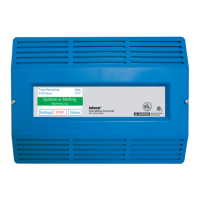
Table of Contents

Questions and Answers

  • S
    Sarah LeblancSep 16, 2025
    How do I fix a 'SNOW SENSOR 2 BROWN WIRE SHORT CIRCUIT ERROR' on my Tekmar 680?
    • A
      Aaron BerrySep 16, 2025
      The control is unable to read the brown wire connected to the Snow/Ice Sensor 090 or 094 on terminals 24 and 25 due to a short circuit. Check the snow/ice sensor 2 brown and black wires for short circuits according to the sensor installation manual. Replacing the sensor might be necessary.
  • C
    conniemeltonSep 17, 2025
    What should I do if my Tekmar Melting Machines displays 'SNOW/ICE SENSOR 2 ERROR'?
    • M
      Ms. Dawn Reilly PhDSep 17, 2025
      Check the snow/ice sensor 2 brown, yellow, red and black wires according to the sensor installation manual. It is important to check any cable splices for loose wiring connections. Replacing the sensor may be necessary.
  • J
    Jessica TaylorSep 18, 2025
    How to solve SETPOINTS MENU SAVE ERROR on Tekmar 680 Melting Machines?
    • B
      belljaniceSep 18, 2025
      Set the access level to Installer and check all settings in the Setpoints menu.
  • J
    jamescolemanSep 18, 2025
    How to solve SYSTEM SETUP MENU SAVE ERROR on Tekmar 680 Melting Machines?
    • A
      alexandra87Sep 19, 2025
      Set the access level to Installer and check all settings in the System Setup menu.
  • A
    alicia77Sep 23, 2025
    How to solve BOILER SETUP MENU SAVE ERROR on Tekmar 680?
    • D
      daniel37Sep 23, 2025
      Set the access level to Installer and check all settings in the Boiler Setup menu.
  • Y
    yvonne09Sep 23, 2025
    How to solve MIXING SETUP MENU SAVE ERROR on Tekmar Melting Machines?
    • W
      wyattlisaSep 23, 2025
      Set the access level to Installer and check all settings in the Mixing Setup menu.
  • A
    Amanda KleinSep 23, 2025
    How to solve BAS MENU SAVE ERROR on Tekmar 680 Melting Machines?
    • M
      Michele WilsonSep 23, 2025
      Set the access level to Installer and check all settings in the BAS menu.
  • S
    Sandra KingAug 23, 2025
    Why does my Tekmar 680 say 'LOW PRESSURE ALERT'?
    • C
      Carmen JonesAug 23, 2025
      The 'LOW PRESSURE ALERT' indicates that the snow melting system may have a leak. You should fix any leaks and make sure that the glycol solution hasn't been diluted with water.
  • C
    Christopher SchwartzSep 6, 2025
    How to fix a 'SLAB 1 SENSOR SHORT CIRCUIT ERROR' on Tekmar 680 Melting Machines?
    • R
      Robert AndersonSep 6, 2025
      The control is unable to read the Slab Sensor 072 or 073 on terminals 19 and 20 because of a short circuit. To fix this, check the slab sensor 1 wire for short circuits according to the sensor installation manual. Replacing the slab sensor might be necessary.
  • E
    Elizabeth ThomasSep 5, 2025
    What causes the 'SLAB 1 SENSOR OPEN CIRCUIT ERROR' on my Tekmar 680?
    • J
      Joshua GibbsSep 5, 2025
      The control is unable to read the Slab Sensor 072 or 073 on terminals 19 and 20 because of an open circuit. Check the slab sensor 1 wire for open circuits according to the sensor installation manual. If necessary, replace the slab sensor.

Summary

Introduction and Features

System Overview

Details the purpose and capabilities of the Snow Melting Control 680.

Key Features

Lists the main functionalities and communication protocols supported by the control.

Getting Started

Initial Setup Guidance

Provides an introduction to the manual's content for installation, programming, and testing.

Safety and Installation Procedures

Safety Warnings and Compliance

Covers essential safety alerts, electrical hazards, and RF interference guidelines.

Installation Preparation and Location

Details tools, materials, packaging, and optimal placement for the control unit.

Wiring the System

Explains sensor, communication, control, boiler, pump, and power wiring connections.

Testing, Overrides, and Settings

Guides on testing sensor/control wiring, manual overrides, and switch settings.

User Interface and System Operation

Interface Navigation and Screens

Describes the home screen, menus, status screens, and symbols used on the control.

System Status and Monitoring

Details available status information for slab, system, boiler, and sensors.

Sequence of Operation

Explains how the control operates in different modes like Melt, Idle, Storm, and Off.

Application Modes Explained

Covers electric, PWM zone, boiler, mixing, and combined operating modes.

Troubleshooting and Technical Data

Troubleshooting Error Messages

Lists common error codes and their corrective actions for system issues.

Frequently Asked Questions

Provides solutions to common symptoms and operational queries.

Technical Specifications

Lists detailed electrical, physical, and environmental data for the control.

Warranty and Returns

Outlines the terms of the limited warranty and product return procedure.

Tekmar 680 Specifications

General IconGeneral
BrandTekmar
Model680
CategoryMelting Machines
LanguageEnglish