햻
____________________________________
Programming: Alarm and Sensitivity
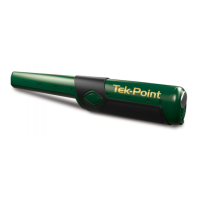
The Tek-Point target alert can be audible, vibratory or both.
There are three different sensitivity levels: low, medium and high.
Default settings:
The default settings for this pinpointer are:
• LED: 70% brightness
• Alarm: Beep and vibrate
• Sensitivity: Medium
To program the alarm-type and sensitivity-level:
1. Start with power on.
2. Press-and-Hold the button.
Do not release the button at the first alarm (beep or vibrate).
If you release the button at the first alarm, the device
will turn off.
3. Following the power-down-alarm, hear the
programming-alarm: JINGLE-JINGLE-JINGLE.
4. Release the button when you hear JINGLE-JINGLE-
JINGLE. The device is now in programming mode.
5. Press-and-release the button to change settings.
Each press of the button will advance to a different setting.
Each setting is indicated with beep(s), vibration(s) or both.
6. To choose a program, stop pressing the button at the
desired setting. Setting is stored after 3 seconds
without button press.
7.
The device will confirm your setting with beep, vibrate or both.
8. Device is now ready to hunt.
OPERATION


 To Next Page