Application Examples
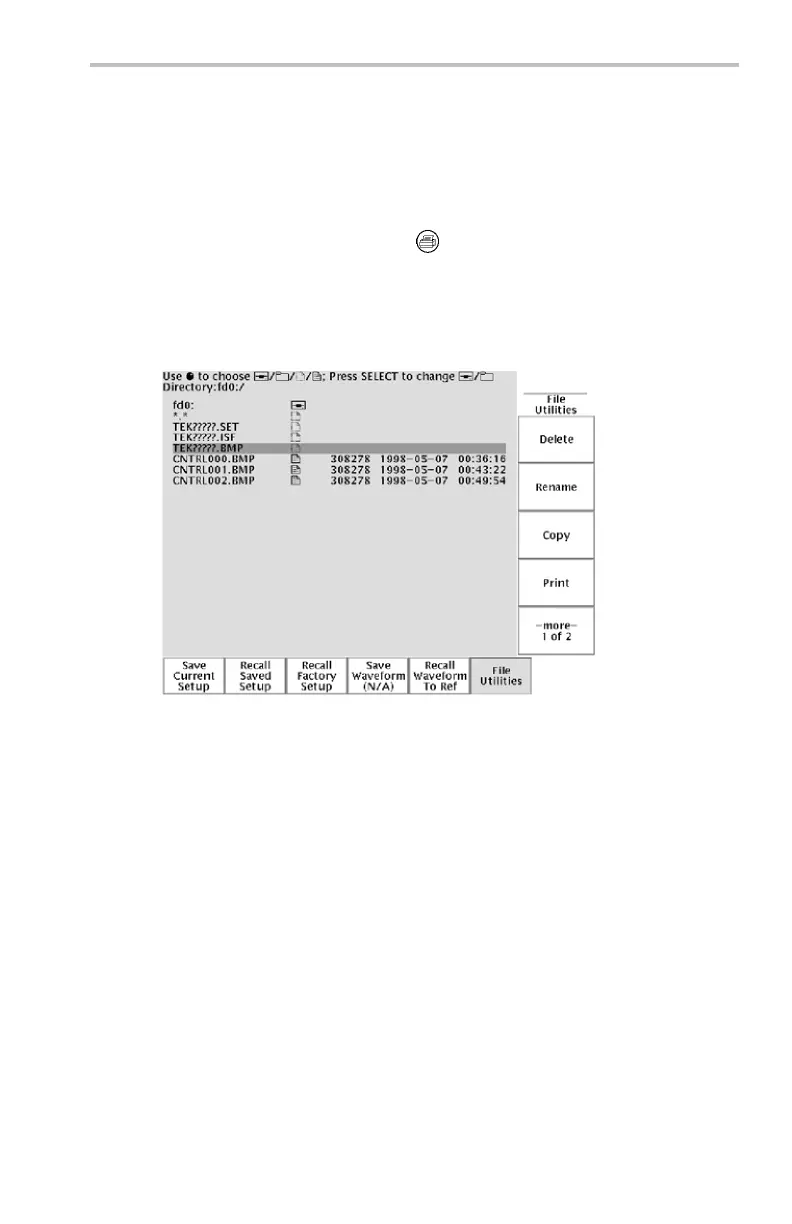
Running the Test. To capture the contro l signal every few minutes,
follow these steps:
1. Display the signal, measurements, and menus as you want them
to appear in the screen images.
2. Push the hard copy button
.
3. Repeat step 2 every few minutes until you are finished with the test.
4. When you are finished, push Utility to see the list of s equen tial
files that have been saved.
The files are labeled wit h thei r sequen tial names, as well as the time
and date each
was created.
Saving Waveform Data
You find ano
ther signal that you want to analyze with a spreadsheet
program back at the office. To save the waveform data on a USB flash
drive, follow these steps:
1. Display the signal on the oscilloscope screen.
2. Push th
e Save/Recall button.
3. Push the Save Waveform screen bu tton.
4. Select To Fil e.
TDS3000C Series O scilloscope User Manual 57



 To Next Page