Installation
21
Move: Select : Exit:Setup/Return
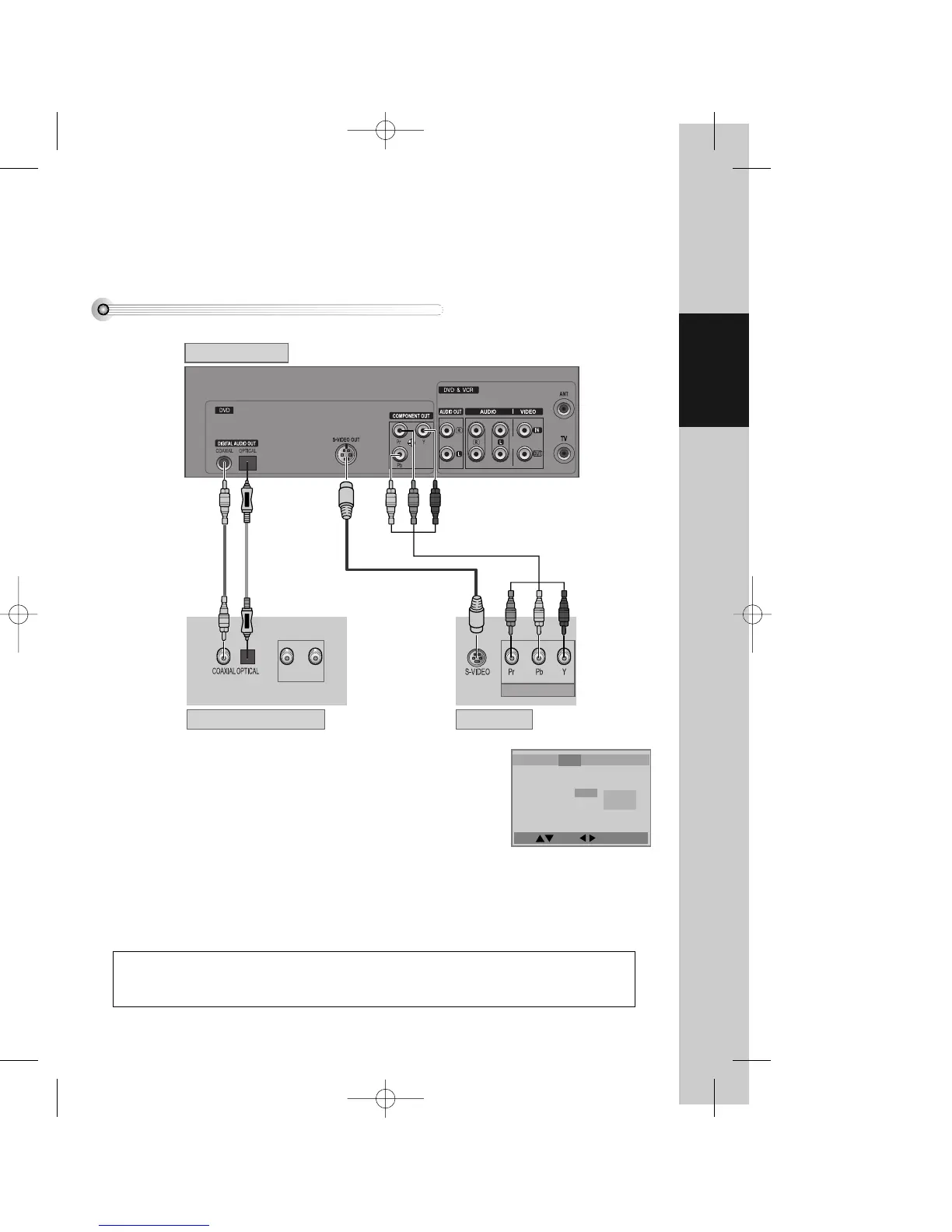
Connecting to a television with S-Video, Component jack and a Dolby Digital Amp.
How to Connect
■ Use in S-VIDEO or COMPONENT In jack attached in TV or amp supporting Dolby Digital.
Language
Video Audio Others
TV Aspect 4:3 PS
TV Type PAL
Video Out S-Video
Brightness Normal
Sharpness Normal
Component
S-Video
Manufactured under license from Dolby Laboratories.
"Dolby", "Pro Logic" and the double-D symbol are trademarks of Dolby Laboratories.
¡ Select either S-VIDEO IN or COMPONENT IN to connect to TV. You should
select “Video Out” type in DVD SET(see 60P) in advance.
™ Select either COAXIAL or OPTICAL to connect to amp of Dolby Digital.
£ If screen is broken in connecting COMPONENT OUT to Pr, Pb, Y of TV
COMPONENT IN jack , connect to Cr, Cb, Y.
DV6T714D-RG1H(TDV6000)1 02.8.12 10:18 AM ˘ ` 21 mac001 300DPI 120LPI


 To Next Page