21
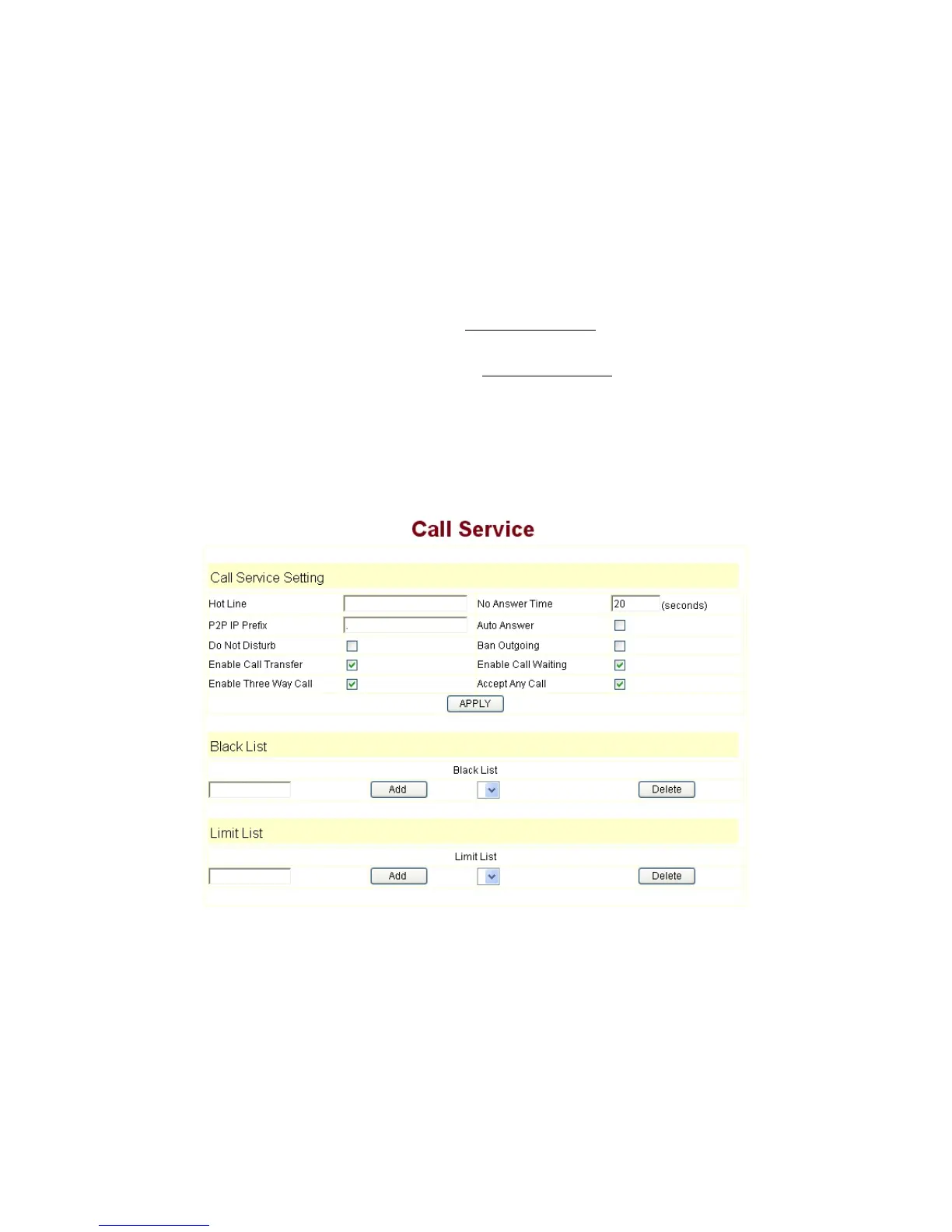
3.5.8 Call Service Settings
User configure the value add service such as hotline, call forward, call transfer, call
waiting, 3-way conference call, auto-answer, etc in this page
Hotline: configure hotline number. 9600IP immediately dials this number after
hook-off if it is set.
Auto Answer: Enable/disable auto answer function.
No Disturb:
DND, do not disturb, enable this option to refuse any calls.
Ban Outgoing:
Enable this to ban outgoing calls.
Enable Call Transfer: Please refer to Value_add_service
for detail.
Enable Call Waiting:
Enable/disable Call Waiting
Enable Three Way Call:
Please refer to Value_add_service
for detail.
Accept Any Call: If this option is disable, 9600IP refuse the incoming call when the
called number is different from 9600IP’s phone number.
No Answer Time: no answer call forward time setting.
Black List:
incoming call in these phone numbers will be refused.
Limit List:
outgoing calls with these phone numbers will be refused


 To Next Page