23
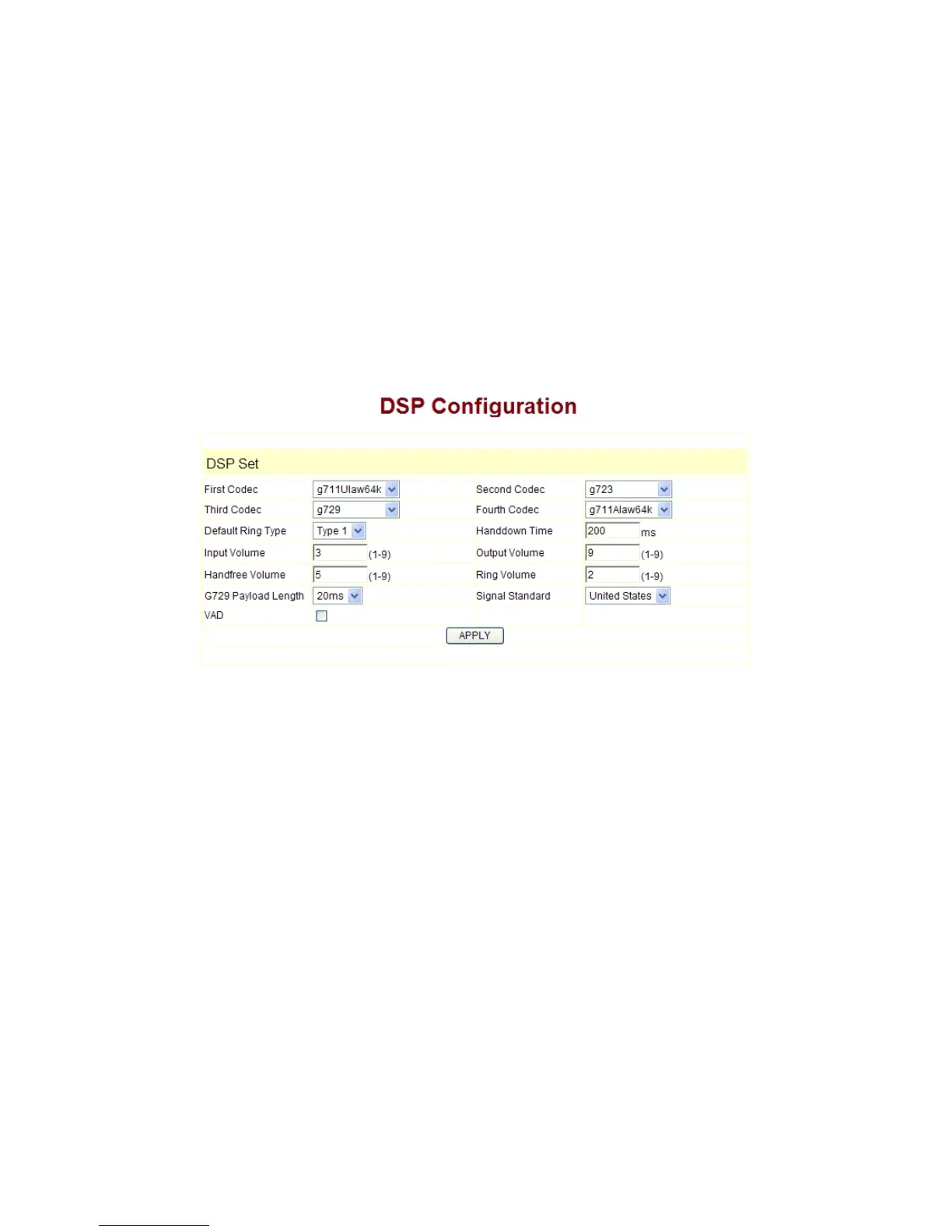
3.5.11 Audio Settings
CODEC:
select the prefer CODEC; support ulaw, alaw, G729 and G7231 5.3/6.3
Signal Standard: Signal standard for different area.
Handdown Time:
hand down detect time.
Input Volume: Handset in volume.
Output Volume:
Handset out volume.
Handfree Volume:
Hand free volume
G729 Payload Length: G729 payload length
VAD:
Enable/disable Voice Activity Detection
3.5.12 VPN
This page is VPN setting page , the IP phone support the VPN with UDP and L2TP
protocol .The parameters is as below
VPN IP
: After VPN registered successfully, VPN server will give an IP aggress to the
terminal. If there is a IP address shown on terminal (except for 0.0.0.0),it means your VPN
has registered
UDP Tunnel
VPN Server Addr
: register to the address of VPN server
VPN Server Port: Register to the port of VPN server
Server Group ID:
the group ID of UDP VPN
Server Area Code
: the area code of VPN server


 To Next Page