34
Register Password:
Password of your SIP account.
Phone Number: Phone number of your SIP account
----choose Enable Register;
You can dial VoIP phone when the WAN interface and IAX protocol are being set correctly.
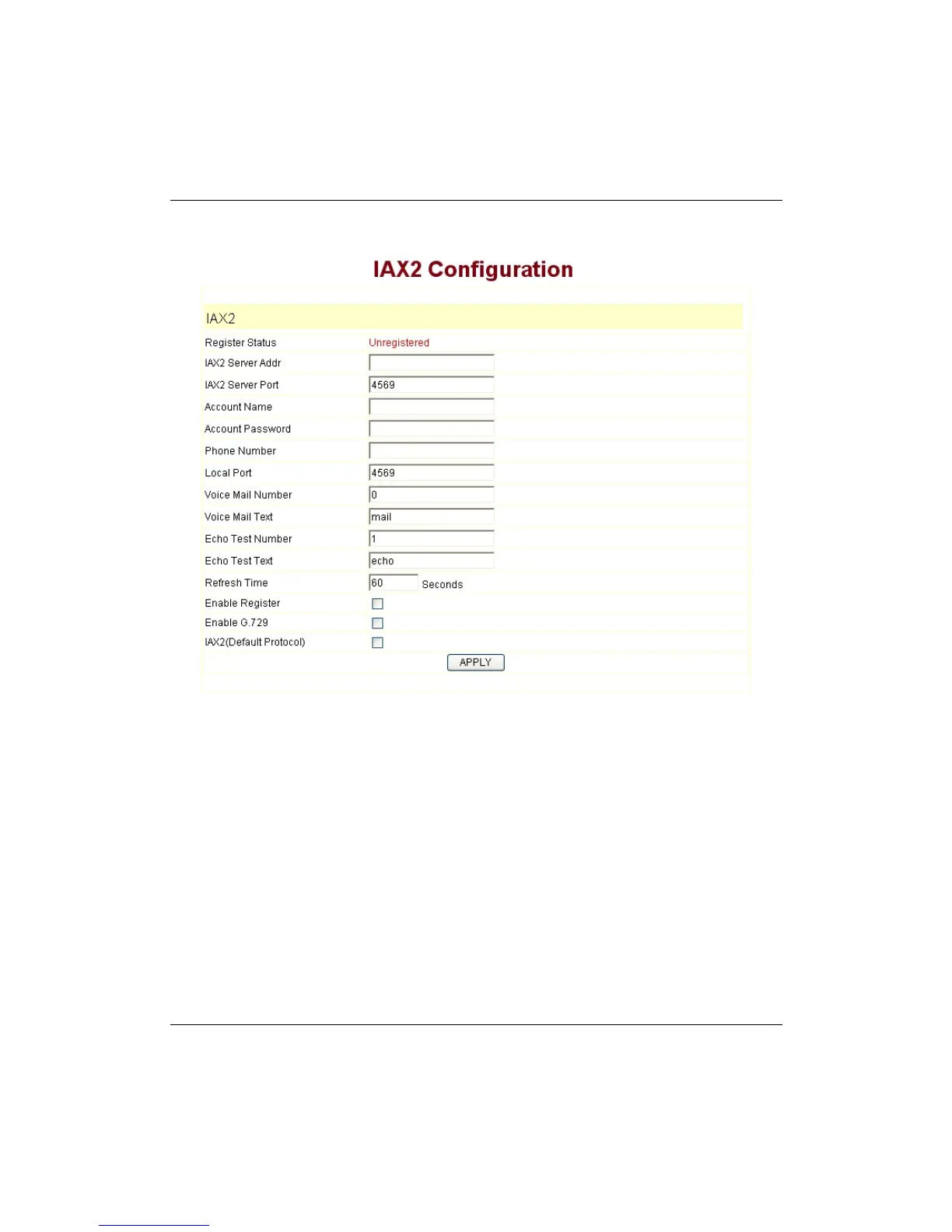
4.2.3 IAX setting
IAX Server Addr:
Register address of public IAX server
IAX Server Port:
Register port of public IAX server,default port is 4569
Account Name:
Username of your SIP account (Always the same as the phone
number)
Account Password:
Password of your IAX account.
Local port:
Signal port of local, default port is 4569
Phone Number:
Phone number of your IAX account
----choose Enable Register;
----if you use IAX account to make a call, please choose IAX
(
Deault Protocol
)
, if you fail
to choose it, then you can use SIP account to make a call again.
----if you use G..729 to arrange it ,please choose Enable G..729
You can dial VoIP phone when the WAN interface and IAX protocol are being set correctly.
Note:
please choose Save Config in the Config Manage after setting the information, or
the existing setting information will be failed after rebooting..
4.3
How to use the dial rule?
9600IP provide flexible dial rule, with different dial-rule configure, user can easily


 To Next Page