T ELEPHONICS C ORPORATION
TM115007 REV A (04/07) 3-6
USE OR DISCLOSURE OF DATA CONTAINED ON THIS PAGE IS SUBJECT TO THE
RESTRICTION ON THE TITLE PAGE OF THIS DOCUMENT.
C
OMMUNICATION S YSTEMS D IVISION
ORDER CHANGE MASTER is used to switch out the MASTER unit of a network. It swaps the
roles of MASTER and SLAVE between the issuing SLAVE and the current MASTER. For further
information, see Paragraph 3.8.1.5.
3.4.5 Logging on to a Network
The TAP will always act as a MASTER. Therefore it will start a network at power-up and will
always succeed in the network logon. The TAP should be powered up before any TPTs are turned
on.
3.4.6 Status Indications
The TAP status and operation are indicated visually with a two-color LED on the side of the TAP
unit. Press and hold the LED button to view the status LED. See Table 3.4.6-1 for an explanation of
the status LED indications. If a TPT is logged on to the TAP, some indications also appear as sounds
and SynVoice messages in the TPT connected headset.
Note
The LED on the TAP is NOT NVG compatible.
3.4.6.1 Power-On BIT Failure
If any errors are encountered during the power-on BIT testing, the LED indicates MALFUNCTION.
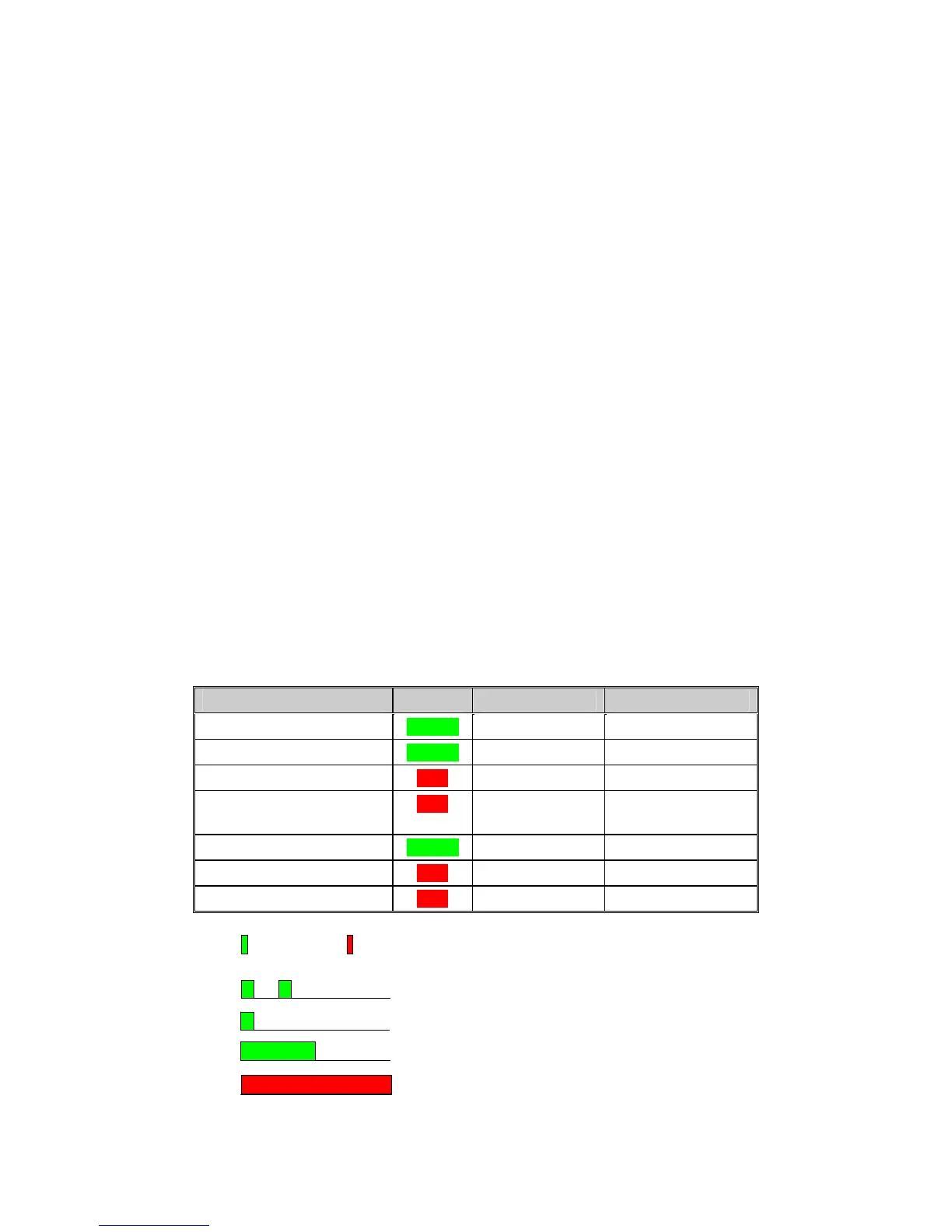
Table 3.4.6-1
Status LED Indications
CURRENT STATUS COLOR ON TIME MS OFF TIME MS
Normal, Master logged on GREEN 100 1900
Normal, Slave logged on GREEN 100/100 150/1650
Power-up RED 1000 0
Malfunction (BIT failure,
fatal error)
RED 1000 0
Out-of-range (Slave only) GREEN 500 500
Ready for SW download RED 1000 0
SW download in progress RED 1000 0
Green Red
NORMAL, Master
OUT_OF_RANGE
NORMAL, Slave logged on
POWER_UP_BOOT, POWER_UP or MALFUNCTION


 To Next Page