ECLIPSE 8/16/32/99 Series – User Operation Manual
12
3. OPERATION INSTRUCTIONS
3.1 Arming with a Keyboard
3.1.1 Full Arming Mode
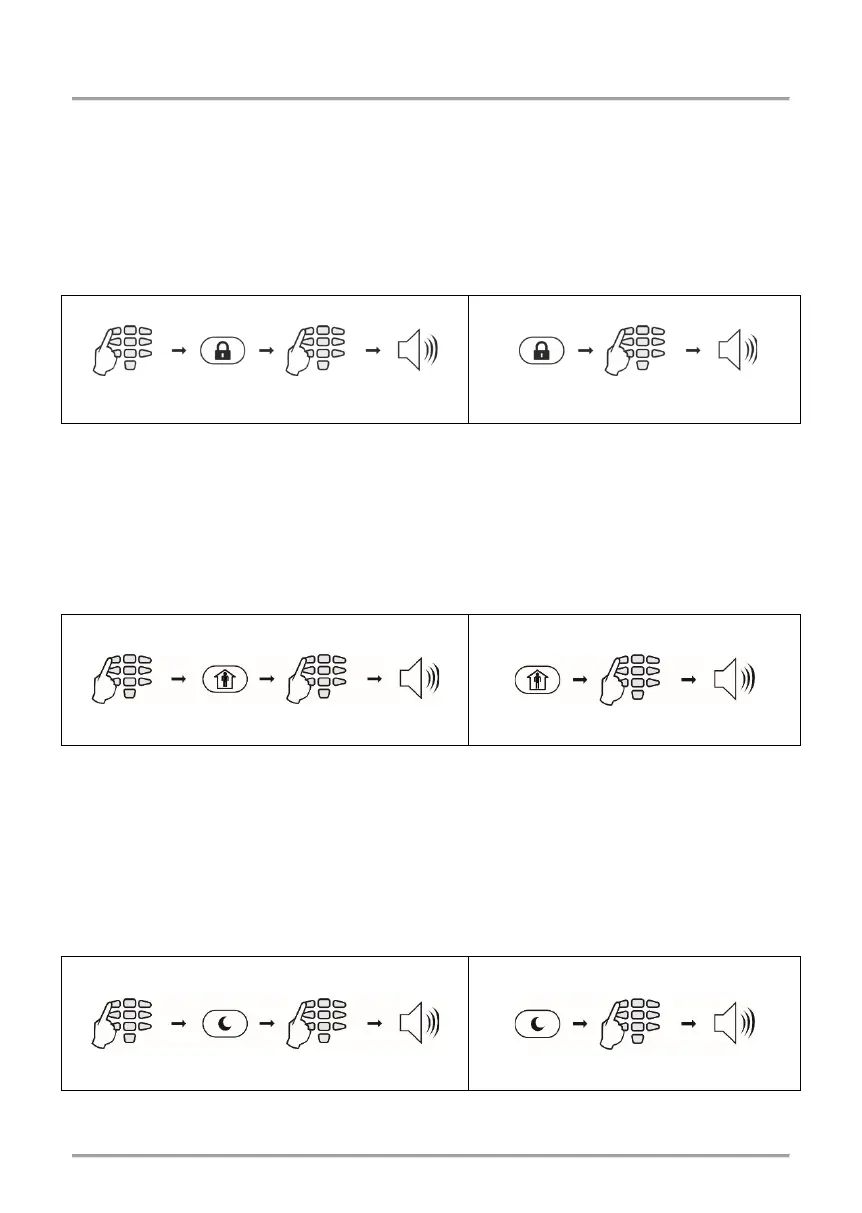
Full Arm mode means that all zones in the armed areas are being protected. Full Arm can
be initialized after entering a valid user code or with quick access without code, when this
option is allowed in the menus for engineer programming.
Sequence of buttons for activation of “FULL ARM” mode:
3.1.2 Stay Arming Mode
Stay Arm mode means that the user can remain in certain, already bypasses zones of the
protected areas. Stay Arm mode can be initialized after entering a valid user code or with
fast access without code, when this option is allowed in the menus for engineer
programming.
Note: Certain users may not be permitted to ARM the system in “Stay ARM” Mode.
Sequence of buttons for activation of “STAY ARM” mode:
3.1.3 Sleep Arming Mode
Sleep Arm mode means that the user can remain in certain, already bypasses zones of
the protected areas. Sleep Arm mode differs from Stay Arm mode in that for some of the
areas it is initialized without exit time. In that case, the arming of the system is instant. Ask
your installer for more details about you own system.
Note: Certain users may not be permitted to ARM the system in “Sleep ARM” Mode.
Sequence of buttons for activation of “SLEEP ARM” mode:
seconds
















 To Next Page