ECLIPSE 8/16/32/99 Series – User Operation Manual
23
4.4 Zone bypassing by User
Every user can bypass only zones that are associated to areas he is allowed to work with
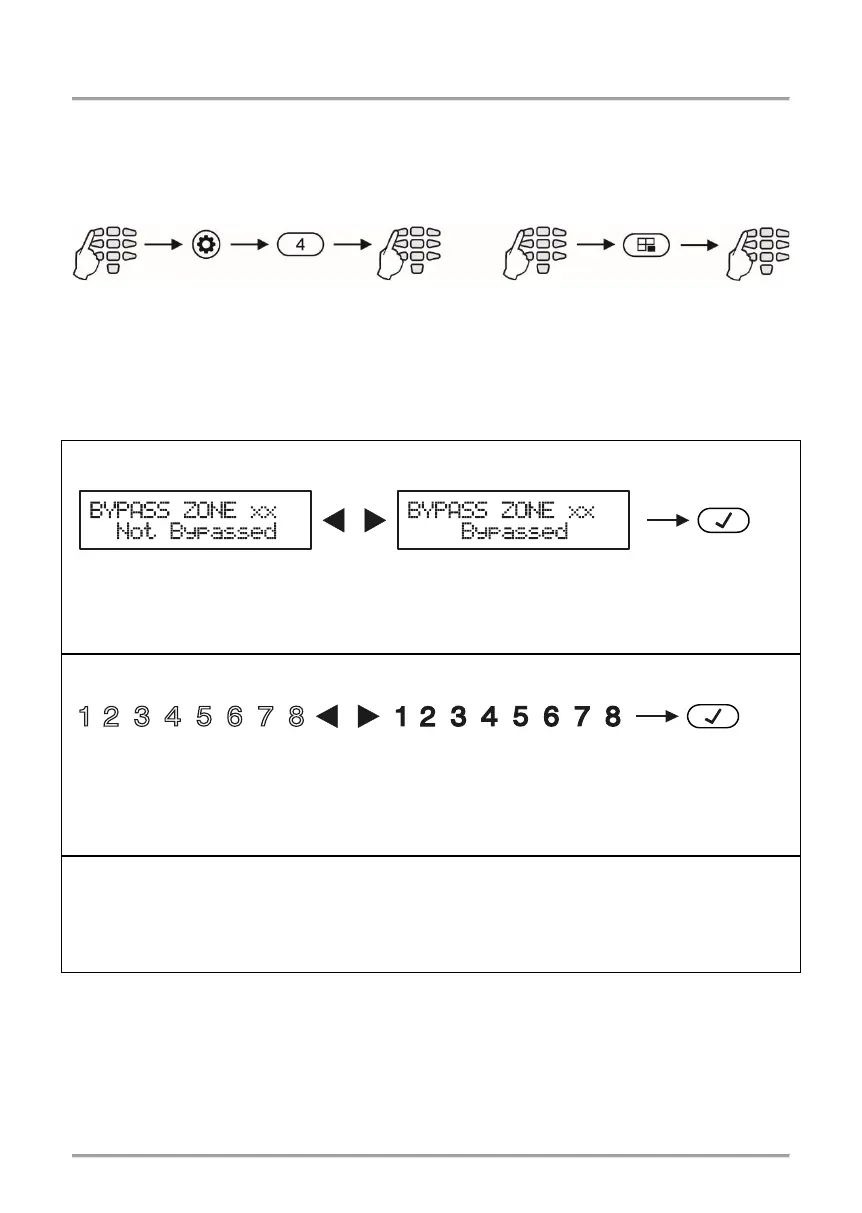
(arm and/or disarm). Bypassing zones is done in menu “4. ZONE BYPASS” (Address 4)
or by pushing the BYPASS button, after a valid user code has been entered:
Note: Bypassing zones with LED 8 and LED16 keyboards is possible only by entering
address 4, because these keyboards do not have a BYPASS fast button.
Depending on the keyboard used, the visualization on screen is as follows:
LCD 32 and LCD 32 Sensitive (address menus)
Pushing the digit buttons or arrow buttons changes alternatively the state of the zone.
When the user chooses to bypass the zone, the BYPASS button is lit.
When return to
normal operation mode, the BYPASS button is lit permanently on all keyboards.
Pushing the digit buttons or arrow buttons changes alternatively the state of the zone.
When the user chooses to bypass a zone the BYPASS button is lit, while digits 1 to 8 of
the display are lit permanently.
After going back to normal working mode, the BYPASS
button is lit permanently on all keyboards.
Enter at the address 4 and choose a zone number for bypass – the LED for zone 1 is
blinking on the display. If the buttons 1 to 9 are off the zone is not bypassed; if the buttons
1 to 9 are lighting on in red – the zone is bypassed. To change the zone status, press a
random button or the arrows. The BYPASS LED is lit permanently.
The choice is confirmed by pressing the ENTER button.
To check the bypassed zones in the system, see item 3.8.
Note: Certain users may not be permitted to bypass zones. In order for users to bypass
zones option “BYPASS ENB” must be enabled in manager’s menu 1. USERS – xx. User
– 02. Options (Address 06 – option 3).
address
















 To Next Page