Eclipse 8/ 16/ 32 Series - Engineer Programming Manual
14
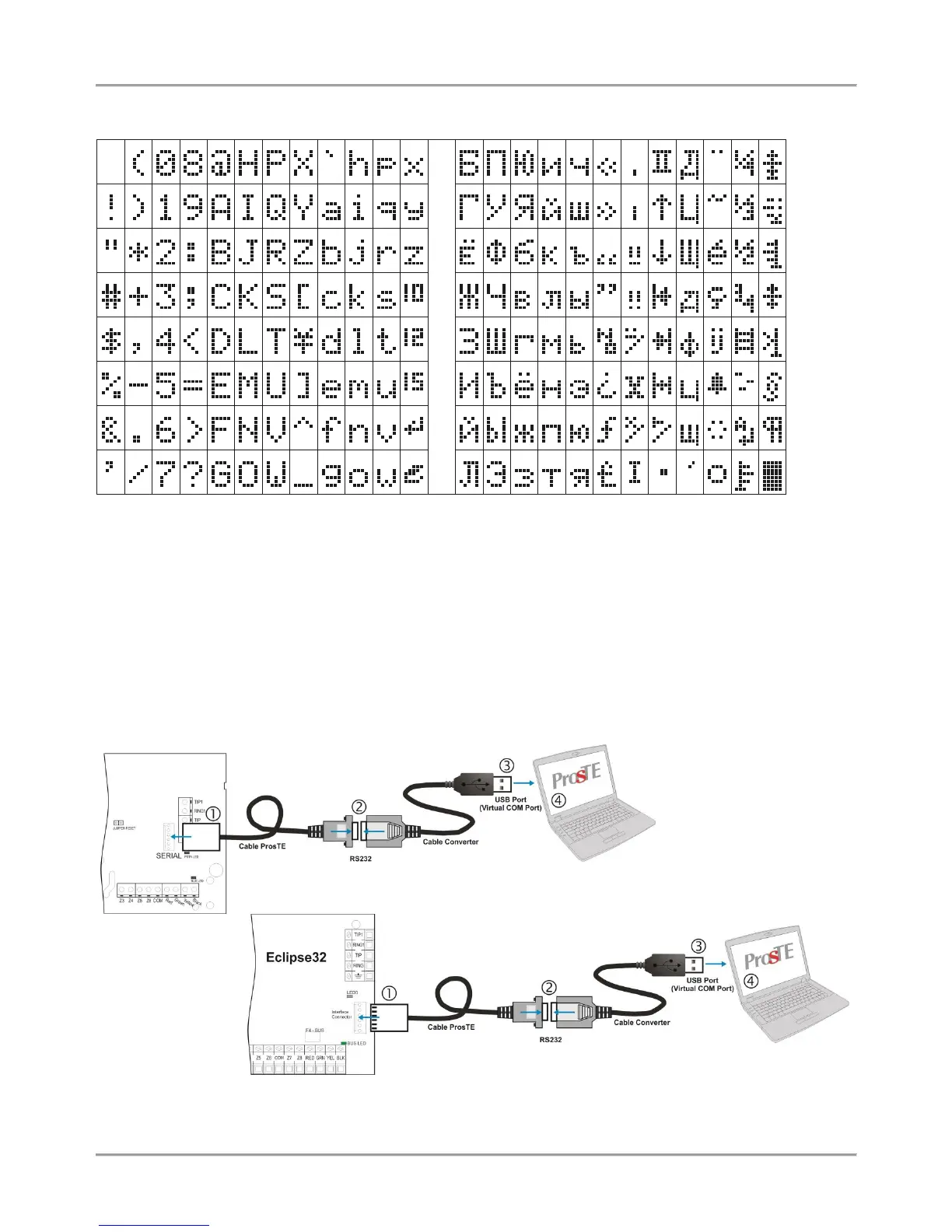
Table of the symbols and codes correspondence:
Example: To enter the „asterisk” symbol, first press the MEMORY button (a solid cursor appears on the place)
and after that enter code 042. The asterisk symbol will appear and the cursor will move one position to the
right.
3. PROGRAMMING WITH SPECIALIZED ProsTE SOFTWARE
ProsTE is specialized software for direct programming of burglary and fire alarm panels manufactured by Teletek
Electronics JSC.
The programming of ECLIPSE Series control panels is via serial connection using specialized “cable ProsTE”. It is
strongly recommended as a first step to read the set to control panel parameters, as second – changing parameters
and at the end – writing the new settings to the control panel.
A detailed description for the operation with ProsTE software is provided in the built-in help files.
Serial connection between the ECLIPSE 8 / 16/ 32 and PC with ProsTE software
















 To Next Page