Home
Teletek electronics
Control Panel
ECLIPSE 32
Engineer Programming Manual
Page 85
Teletek electronics ECLIPSE 32 - Page 85
96 pages
Manual
Save Page as PDF
To Next Page
To Next Page
To Previous Page
To Previous Page
Loading...
Eclipse 8/
16/
32 Serie
s
-
Engineer Programming Manual
85
To the
3.User CODES
M
enus
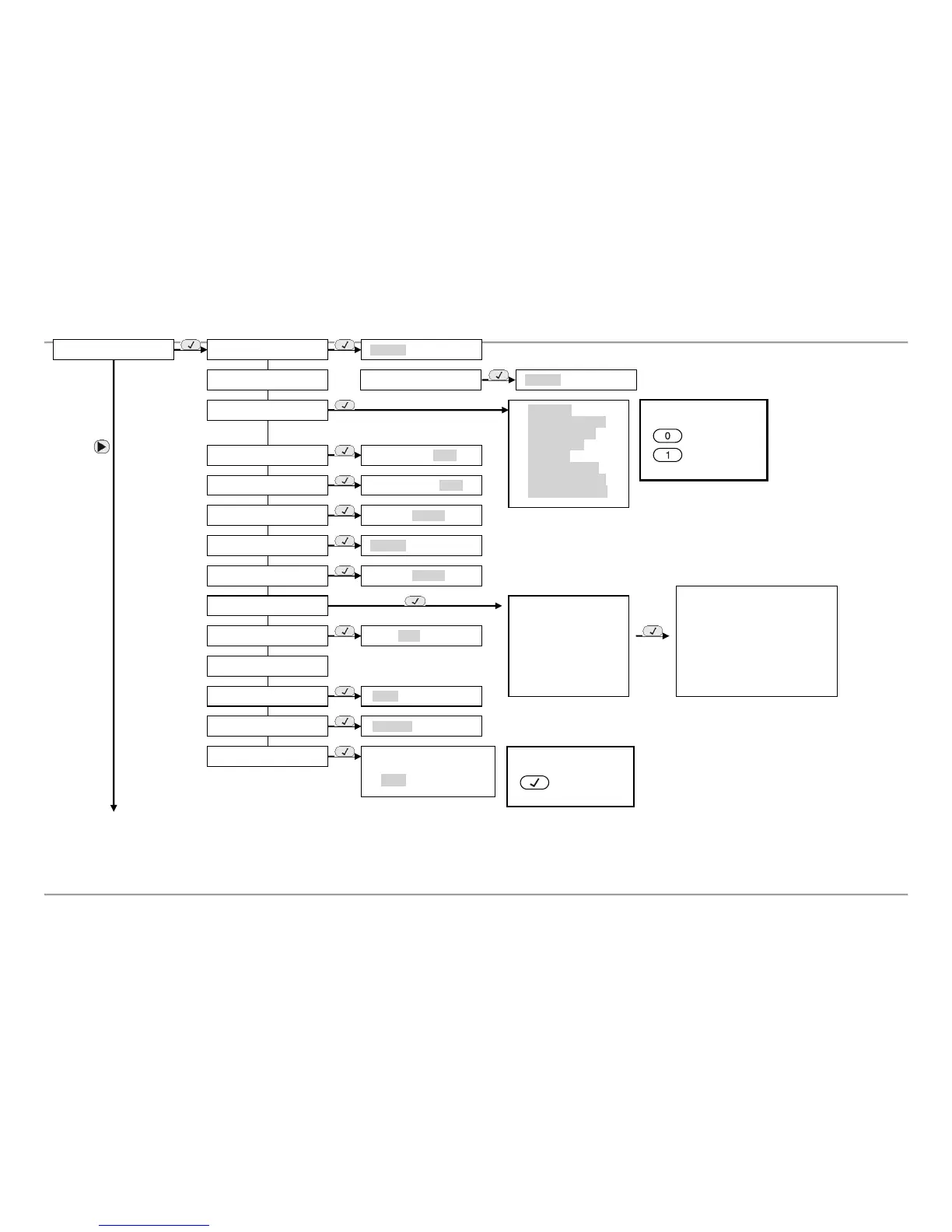
2. SETTINGS
01. AMBUSH CODE
Disable
/
Enable
02. KBD BLOCK
Disable
/
Enable
03. TRBL SOUNDS
AC LOST
BATT TROUBLE
BLOWN FUSE
PSTN TRBL
TAMPER
SYSBUS TRBL
FIRE LINE TRBL
SOUNDER TRBL
04. CONFIG. TIMER
1
0
–
180 sec;
[010]
05. AC DELAY
0
00
–
255
min;
[0
3
0]
06. SOUNDS TMPR
Disable
/
Enable
10. RESET MNG
Pass:
0000
11. SYSTEM NAME
12. TIME
[
00:00
]
13. DATE
[
01/01/12
]
14. MENU STYLE
ADDRESS
OPERATION
TEXT
07. ALARM DELAY
Disable
/
Enable
08. HWR RESET
Disable
/
Enable
09. PART DEFAULT
1.
SETTINGS
2. CODES
3. INPUTS
4. OUTPUTS
5. PARTITIONS
6. SCHEDULES
7. COMMUNICATION
8. DEVICES
Use for menus 09, 10 and 15!
Partial reset:
Choose the menu you want to
reset
.
Select it with the arrow
buttons
.
Enter in sequence
1,2,3,4, 5
and
6, and confirm
with ENTER.
NOTE!
Use button:
to ENABLE
NOTE!
Use button
s:
to DISABLE
to ENABLE
or
02. CHIME
(Eclipse 8)
84
86
Table of Contents
Main Page
Default Chapter
2
Table of Contents
2
General Information
4
Supported Keyboards for Programming and Operation
7
LED/LCD Keyboards
7
Sound Signalization from the Keyboards
8
Supported Trouble Events in ECLIPSE Series
8
Buttons Functions
9
General Information for Operation with LED8/ 16A
10
General Information for Operation with LED16 and LED32
12
General Information for Operation with LCD Keyboard
13
Entering Text for LCD Keyboard
13
PROGRAMMING with SPECIALIZED Proste SOFTWARE
14
Operation with a Service Keyboard
15
Enrolling / Deleting of Devices
15
Enrolling Devices During the Initial Start-Up of the Control Panel
15
Enrolling Devices to a Working System Configuration Via LCD Keyboard
16
Enrolling Devices to a Working System Configuration Via LED Keyboard
17
Deleting of a Device from the System Configuration
17
Engineer Programming
17
Organization of the Engineer Programming Menus
18
Indication
18
Special Symbols
19
ENGINEER MENUS - Programming Tables
20
General Settings
20
Users
28
Zones
33
PGM Outputs
45
Areas
54
Timeslots
61
Communication
64
General Parameters
65
Voice Dialer
69
Remote Programming
71
Peripheral Devices
73
Appendix
79
APPENDIX 1. Structure of Zone Inputs on the ECLIPSE 32 Control Panel
79
APPENDIX 2. Memory LOG Events
79
APPENDIX 3. FIRE DELAY Operation Algorithm (ADDRESS 2015)
82
APPENDIX 4. VD/ DTMF Operation Algorithm
83
APPENDIX 5. Text Tree-Structure Menus
84
APPENDIX 6. Style Diagrams for Zone Connection
93
APPENDIX 7. ECLIPSE Series Control Panels - Main Board Connection Diagrams
94
Other manuals for Teletek electronics ECLIPSE 32
User's Operation Manual
48 pages
Installation Manual
40 pages
User And Manager Operation And Programming Short Manual
4 pages
Related product manuals
Teletek electronics ECLIPSE 8
48 pages
Teletek electronics ECLIPSE 16
48 pages
Teletek electronics ECLIPSE 99
48 pages
ECLIPSE Series
48 pages
Teletek electronics CA60Plus
44 pages
Teletek electronics MAG8
20 pages
Teletek electronics SIMPO
20 pages
Teletek electronics MAG2
16 pages
Teletek electronics MAG4
16 pages
Teletek electronics iRIS4
31 pages
Teletek electronics iRIS8
36 pages
Teletek electronics REPEATER
25 pages
















 To Next Page