INSTRUCTION MANUAL
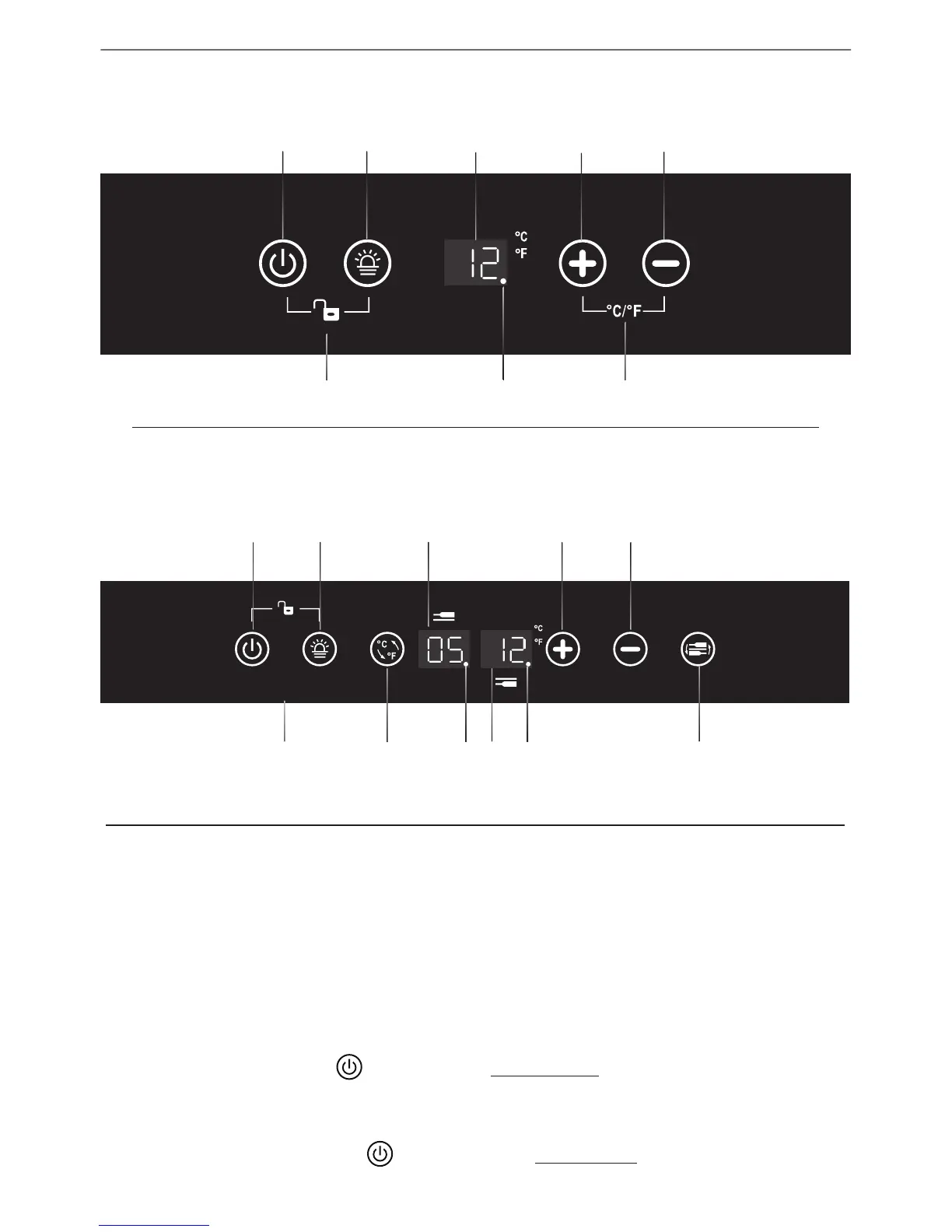
CONTROL PANEL (Control In Cabinet)
•
For Single Zone
A Power B Lighting C Display Window D Temp Plus E TempMinus
F Lock ⁄ Unlock G Function Indicator H
ºC/ºF
Switch
A B DC E
F
G H
** For models of 116L, it is without the Function Indicator
•
For Dual Zone
A Power B Lighting C
Upper Zone
Display Window
D Temp Plus E TempMinus
F
Lock⁄
Unlock
G
ºC/ºF
Switch
H
Function
Indicator
I
Lower Zone
Display Window
J
Function
Indicator
K Zone Select
F
G H I J K
•
For Tripe Zone
The Control Panel of upper zone is same as Single Zone above;
The Control Panel of Mid Zone and Lower Zone is same as Dual Zone above.
POWER ON/OFF CONTROL
•
When the appliance is plugged in to a power outlet, it powers on automatically.
•
Touch the power mark and hold for 10 seconds to turn off (or turn on) the
appliance.
•
No matter it is under a locked or unlocked condition, you can turn o the appliance
by touching the power mark
and holding for 10 seconds.



 To Next Page