TENA Slip /
TENA Stretch Brief
/
TENA Brief
TENA Pants/
TENA Underwear
TENA Slip /
TENA Stretch Brief
/
TENA Brief
TENA Pants/
TENA Underwear
TENA Slip /
TENA Stretch Brief
/
TENA Brief
TENA Pants/
TENA Underwear
TENA Slip /
TENA Stretch Brief
/
TENA Brief
TENA Pants/
TENA Underwear
1 2 3
4 5 6
Apply TENA product
on the resident
19
en
TENA Pants / TENA Underwear
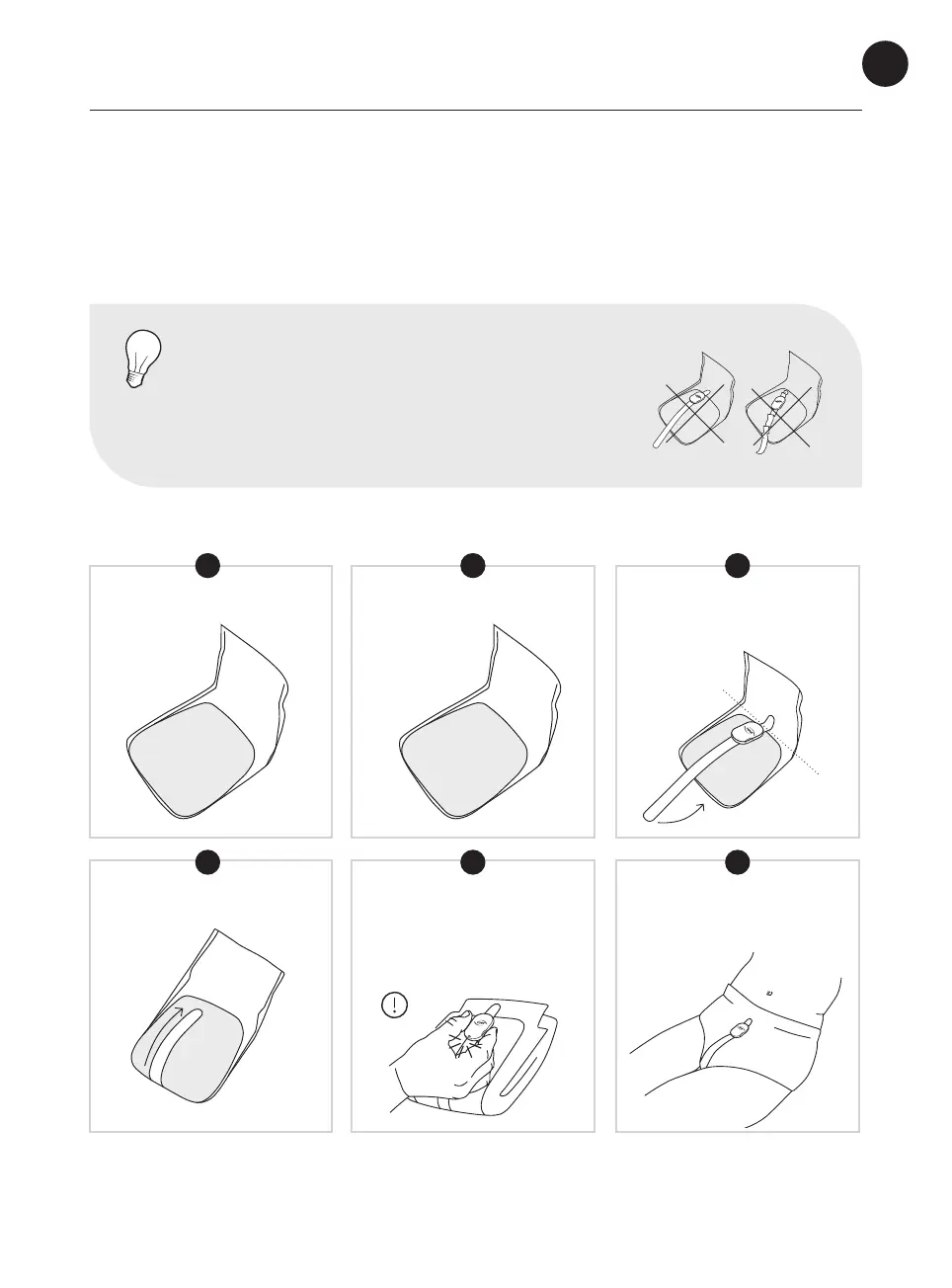
The TENA SmartCare Change Indicator™ should always be attached when the
incontinence product is folded and before it has been applied to the user.
Every time you change an
incontinence product, press both
buttons simultaneously for two
seconds to reset the transmitter
to register the change in the app.
Keep folded
Place tightly
Align with the top
of the thicker
absorbent area
Find the front
Apply the absorbent product
with the Change Indicator to
your loved one.
FRONT
THICKER
ABSORBENT
AREA
NOTE
Ensure the Change Indicator is straight. Smooth any
sensor strip wrinkles, then press rmly to ensure the
Change Indicator has full contact with the TENA
absorbent product.


 To Next Page
 Loading...