35
right of the CH1 label changes to “Mod” in yellow, indicating the CH1 output has
been enabled.
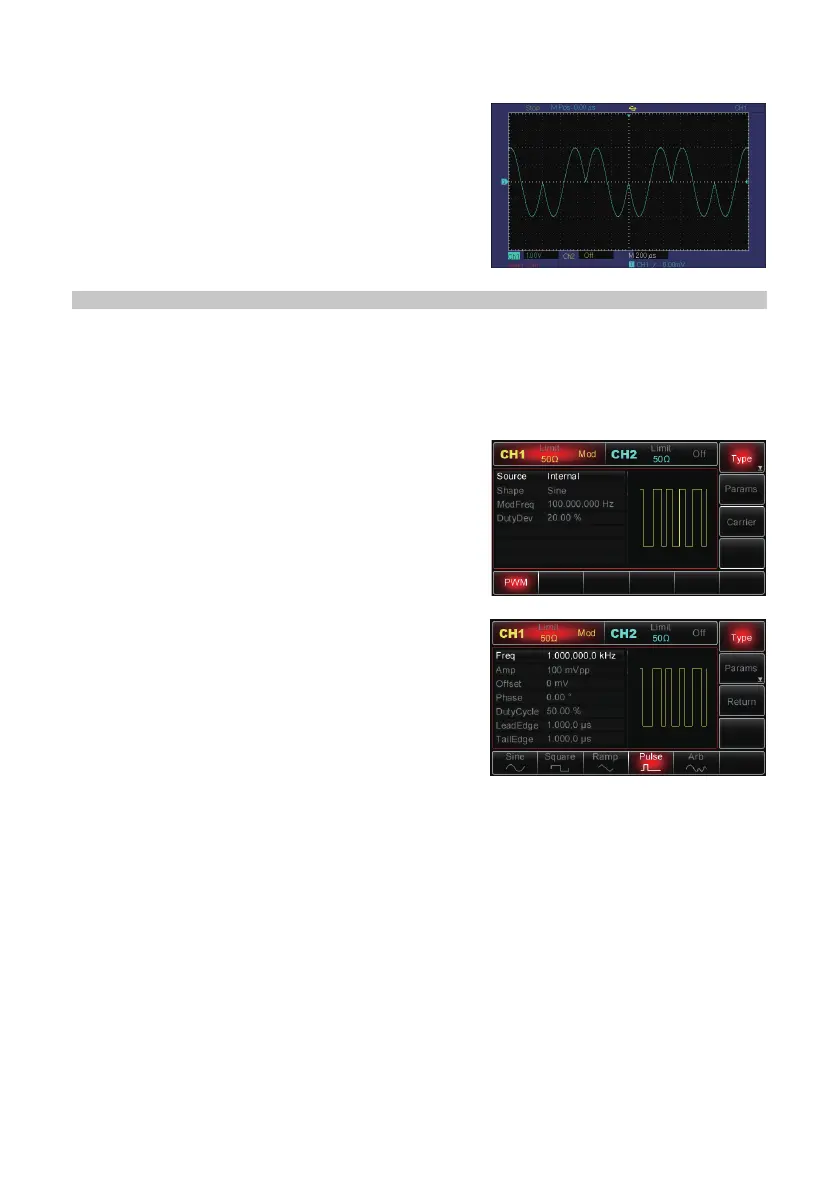
• PSK modulated waveform with an oscilloscope:
PULSE WIDTH MODULATION (PWM)
• In PWM, the modulated waveform consists of the carrier and modulation shape.
• Pulse Width of the carrier varies according to the changing amplitude of
modulation shape.
• CH1 and CH2 of the Generator can be modulated independently with modulation
modes applied with the same one or different ones.
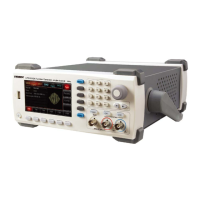
• Press Menu→Mod→Type→PWM to enable
PWM function.
• With PWM enabled already, the Generator will
output the modulated waveform according to
current settings of modulation shape and the
carrier.
Carrier Wave
• PWM carrier can be impulse wave only.
• When PWM is selected, press Carrier to
access the carrier wave selection interface and
the ‘Pulse’ label is automatically chosen.
Setting Carrier Frequency
• The frequency of impulse wave ranges from 500μHz to 25MHz and the default
value is 1kHz.
• To set the parameter, press Carrier MHz to show the corresponding interface,
then use the multipurpose knob & direction buttons to complete the setup, or press
Params→Freq MHz, then enter in the desired value before selecting the desired
unit to nish the setting.
Selecting Carrier Duty Cycle
• Duty cycle of impulse wave can be set from 0.01% to 99.99% and defaults at 50%.
• To set up the duty cycle of the carrier, press Carrier MHz to reveal the
corresponding interface, and then use the multipurpose knob and direction buttons
to complete the setup, or press Params→DutyCycle MHz and then enter in the
desired value, and select the desired unit to nish the setting.


 To Next Page