9
• Alternatively, the number required can be typed using the numerical keypad.
Waveform Display Zone
• No waveform displays when setting the system, so the waveform graphic zone are
expanded for the parameter list.
START
Adjusting the Carrying Handle
• The Generator is designed with a carrying handle.
• To adjust the handle, hold it by either side and pull outwards.
• The handle will then be able to be moved into the desired position.
Outputting Basic Waveforms
• Once powered on, the Generator congures a default sine wave with 100mVp-p
sine wave with a 0V DC offset, with a frequency of 1kHz (into a 50Ω terminal).
Setting Output Frequency
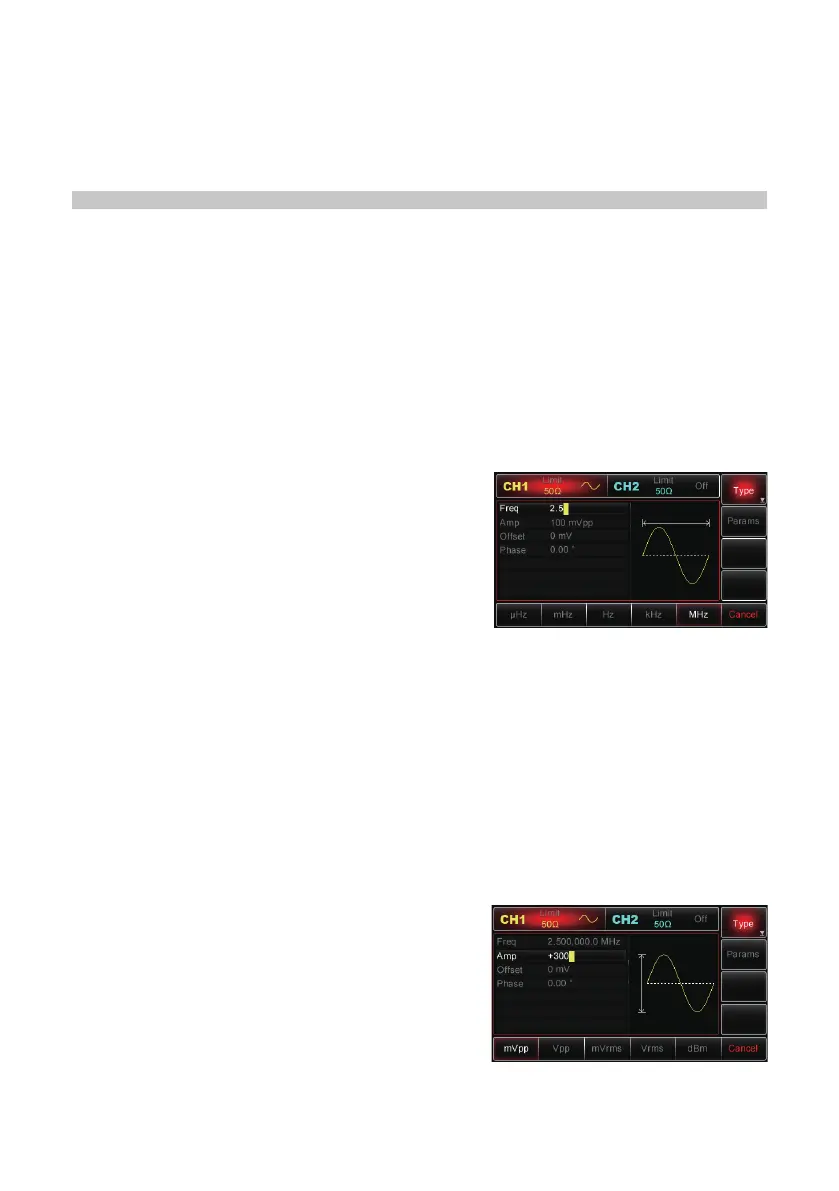
To change the frequency to 2.5MHz, follow the steps below:
• Press Menu→Wave→Params→Freq button or
softkey.
• When you change the frequency, the same
frequency is used if the current frequency value
is valid for the new application.
• To modify the waveform period at this moment,
press the Freq softkey again to toggle between
“Period” and “Freq” labels.
• Enter the desired number “2.5” using the numeric keypad.
Select the desired unit
• Press the softkey that corresponds with the desired unit.
• Once the unit is selected, the Generator outputs the waveform with the displayed
frequency (if the output has been enabled).
• In this example, press the MHz softkey.
Note: You can also use the multipurpose knob and direction buttons together to set
this parameter.
Setting Output Amplitude
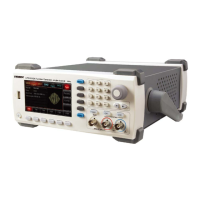
To change the amplitude to 300mVpp, follow the steps below:
• Press
Menu→Wave→Params→Amp button or
softkey.
• When you change the amplitude, the same
amplitude is used if the current amplitude value
is valid for the new application.
• Press the Amp softkey again to quickly switch
between different units (Vpp, Vrms and dBm).
• Enter the desired number “300” via the numeric
keypad.


 To Next Page