48
Applications
• Firstly, enable impulse train mode.
• To set a sine wave with 500mVpp amplitude, 5ms period as impulse train
waveform and set impulse train types to N-cycle with impulse train period 15ms
and cycle count 2, follow the steps below:
Enabling Burst Function
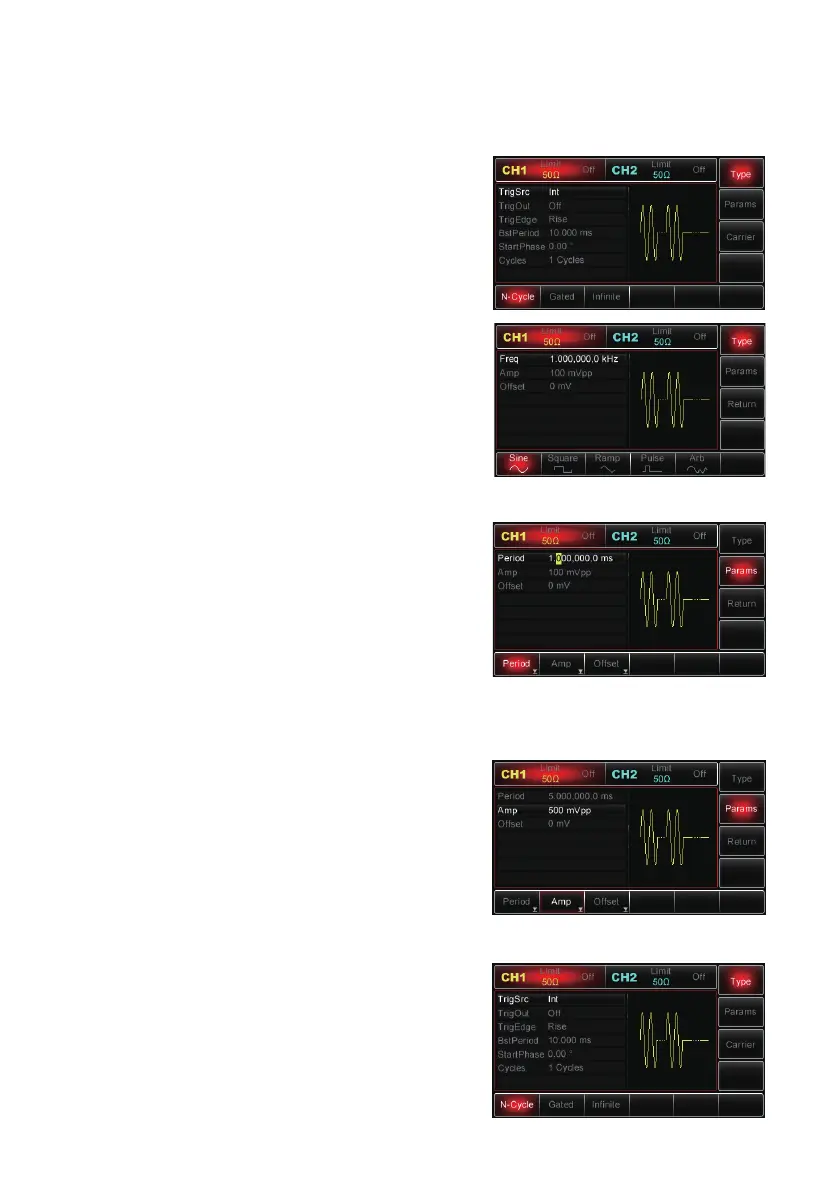
• Press Menu→Pulse→Type→N-Cycle to set to
impulse train type “N-Cycle” mode.
Selecting Impulse Train Waveforms
• With N-Cycle mode enabled, press
Carrier→Type→Sine MHz to set the sine
waveform as the carrier signal.
• Since default burst waveform is sine, there is no
need to modify in this case.
• Then you can use the multipurpose knob and
direction buttons to set the amplitude (note: if
there is only frequency options available on the
display, there is no toggling between frequency
and period, therefore in order to set the period
to 2ms, please set the display frequency to
500Hz, since they are reciprocal, T=1/f).
• Or you can press Params→Freq→Freq MHz
(the second press on Freq is to toggle between frequency and period on the
parameter list), then the interface shown to the right will be on display.
• To set the desired parameter, press the
corresponding MHz, then enter in the desired
value and select the unit as required.
Setting Impulse Train Period and Cycle Count
• After completing the setup of impulse train
wavefom and relative parameters, press Return
MHz to go back to the interface as shown right.


 To Next Page