-10-
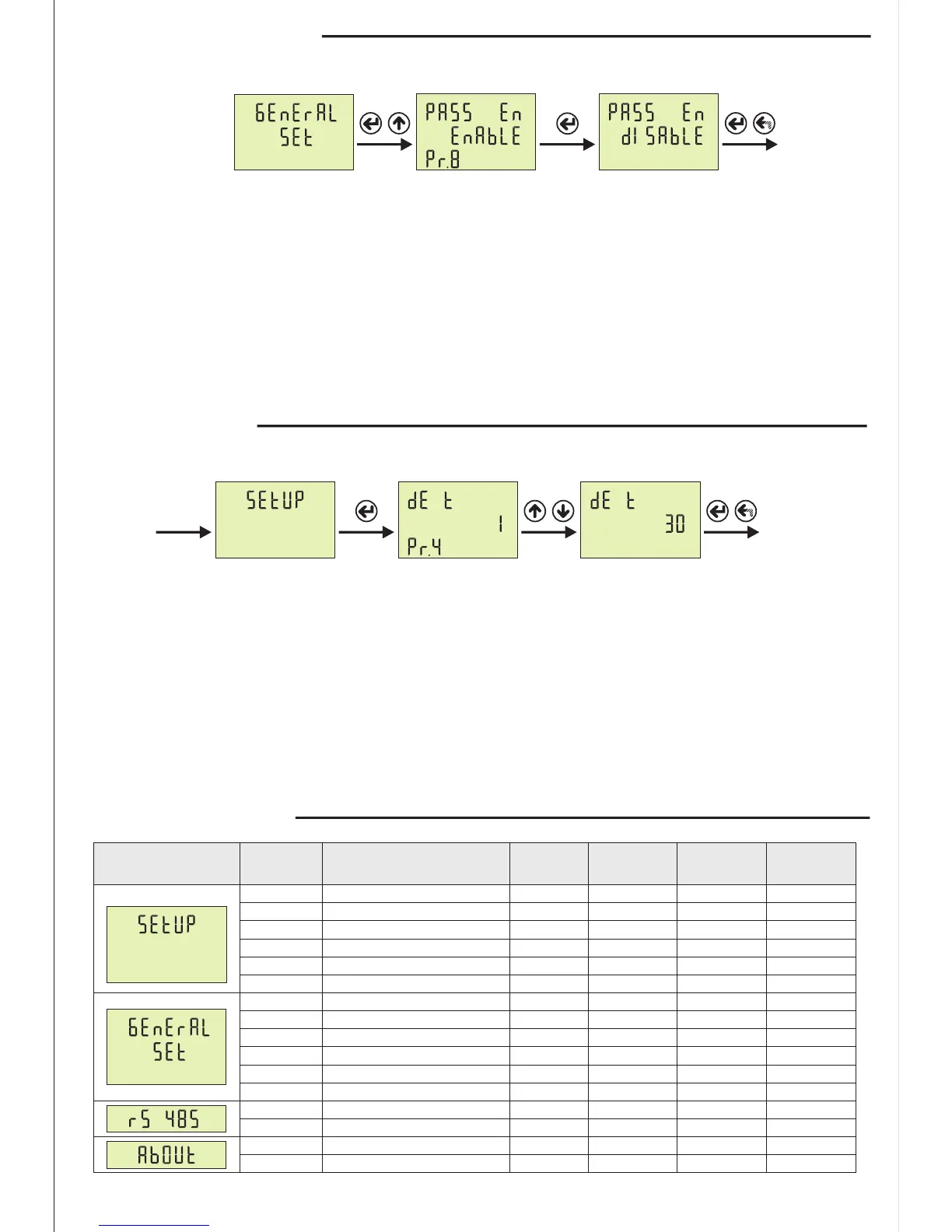
Step 1: Press Menu button and enter password to enter program list. The SETUP is displayed when you
enter password and press the Menu button.Press “Up”button until you see the GENERAL SET
Step 2: Pr.7 is displayed when you press the “SET” button and press “Up” button. You will see Pr.8 It is
using for enable/disable password protection. It is deleted from screen when you press the “SET” button.
Step 3: You can select Disable/Enable to use Up/Down Button. You can use “SET” button to save. if you
press “ESC” button, you cannot record your settings.
14- Password Enable/Disable:
Step 1
Step 3
Step 2
Parameter
Minimum
Value
Default
Value
Unit
Maximum
Value
Parameter
Number
Menu
9999
Enable
120
-
20
-
-
2000
999
0000
Disable
1
-
1
-
-
1
1
0000
Disable
15
-
1
-
-
1
1
-
-
Minute
-
Round
-
-
-
-
Pr.7
Pr.8
Pr.4
Pr.5
Pr.3
Pr.11
Pr.12
Pr.1
Pr.2
Password Change
Password Protection
Demand Time
Demand Delete
C.T. Cable Turn Number
Serial Number
Version
Current Transformer Ratio
Voltage Transformer Ratio
16- Parameters Table:
----
Pr.6
Energy Delete
247
38400
1
1200
1
9600
-
bps
Pr.9
Pr.10
ModBus ID
ModBus BaudRate
15- Demand Time Set:
Step 1: Press Menu button and enter password to enter program list. The SETUP is displayed when you
enter password and press the Menu button.
Step 2: Pr.1 is displayed when you press the “SET” button. Press “Up”button until you see the Pr.4. It is
using for setting demand time. It is deleted from screen when you press the “SET” button.
Step 3: You can increase/decrease value to use Up/Down Button. You can use “SET” button to save. If you
press “ESC” button, you cannot record your settings.
Step 3
Step 2Step 1


 To Next Page