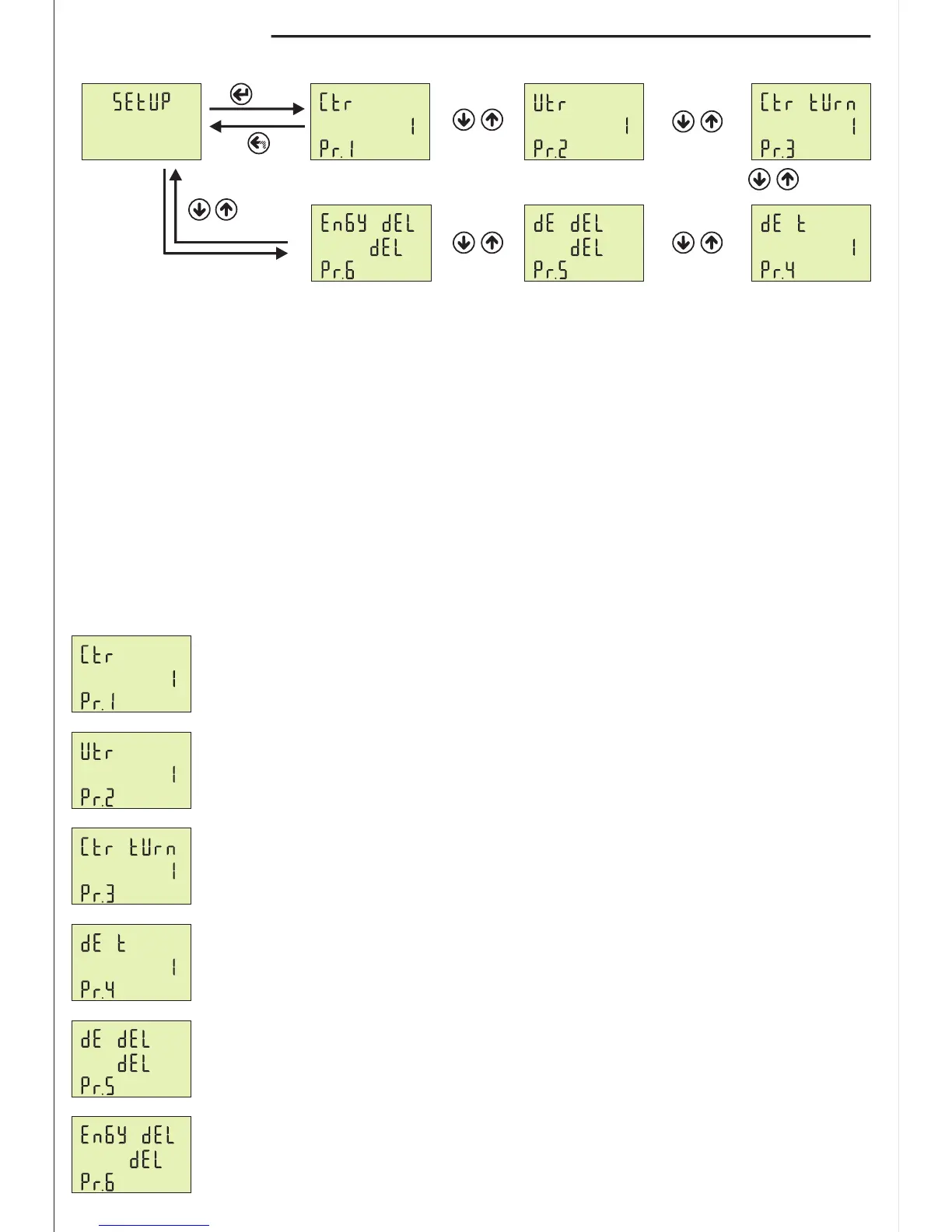
11.1 - Setup Settings:
-7-
Pr.1: Current Transformer Ratio
Pr.2: Voltage Transformer Ratio
Pr.3: Current Transformer Cable Turn Number
Pr.4: Demands Time
Pr.5: Demand Record Delete
Pr.6: Energy Record Delete
Figure-36Figure-35
Set
Esc
Press Menu button and enter password (Default Password =0000) to enter program list. The figure-31 is
displayed when you enter password and press the Menu button. You enter setup menu when you press
Menu button. If you enter setup menu, the figure-35 displayed. This menu have 6 different parameters.
When you press the up button to see the other set values on the display, the next data is displayed.
The figure-35 is displayed when you press the up button after the Pr.6 is displayed. By using up-down
buttons select the program. Press Menu to enter required program. By up-down buttons, you can set the
program. Press Menu to record your settings, if you press ESC button, you cannot record your settings.
Figure-31
Figure-38
Figure-37
Figure-39Figure-40
Figure-35
Figure-36
Figure-37
Figure-38
Figure-39
Figure-40
Pr.1: Current Transformer Ratio: If a current transformer which has a ratio of
100/5A is used between the system and device; Current transformer ratio is entered
as = 100/5 = 20. If the current transformer is not used between the system and device,
current transformer ratio is entered as ”1”
Default: 1, Min: 1, Max: 2000
Pr.2: Voltage Transformer Ratio: If you use medium voltage , you can use VTR
Default: 1, Min: 1, Max: 999
Pr.3: Current Transformer Cable Turn Number: User defines the turn number, which
is the number of how much tour the current cable has rounded into the current
transformer. Numbers can be selected between 1-20. Greater the number of turn means
greater the sensitivity
Default: 1, Min: 1, Max: 20.
Pr.4: Demand Time: Determines demand calculate time. Demand is calculated using
average value. Device take sample for demand time and calculate average value.
Demand is maximum average value.
Default: 15min, Min: 1min, Max: 120min.
Pr.5: Demand Record Delete: You can delete demand and average records.
Pr.6: Energy Record Delete: You can delete energy records.


 To Next Page