28
4.1. Enter settings
1) 20 seconds after the display is powered on, long press Function button for 3
seconds to have the system enter the user settings interface, where you can set and
view relevant parameters.
2) Long press Function button for 3 seconds to exit the user settings interface and
save the settings; you can also select [Exit] in the setting interface and short press
Function button to exit the user settings interface and save the settings.
3) The display will return to the normal riding state without saving the parameter
settings if no operations are made on the user settings interface in 10 seconds.
4) Short press Up button / Down button on the user settings interface to select a
setting.
5) Short press Function button to change a setting and Up button / Down button to
switch to other settings.
Setting options: Unit, password, auto off time, and restore factory settings
4. User settings
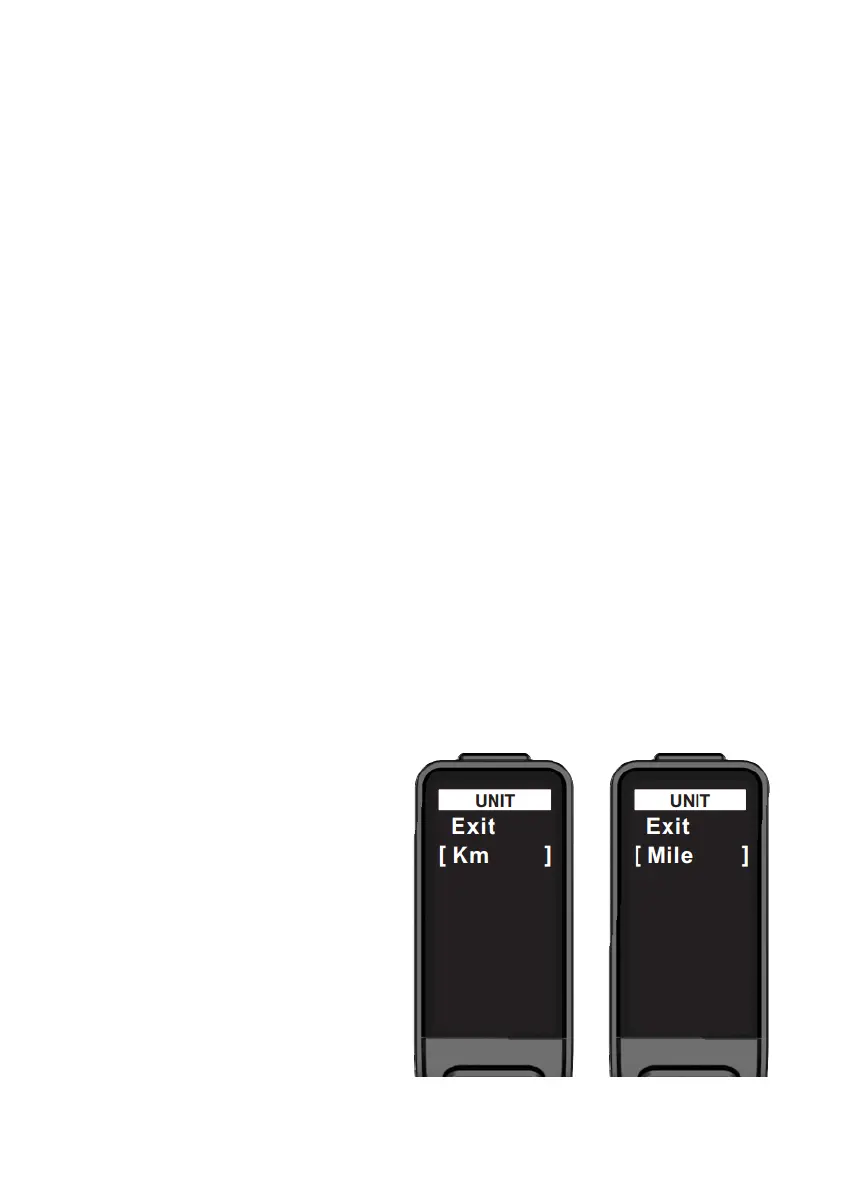
4.2. Enter settings
Press Up button / Down button to
select a setting, short press Function
button with Exit selected to return to
the settings interface, and short press
Function button on KM/Mile to switch
between kilometers and miles for
units.
KM : The unit for TRIP and TOTAL is
KM, while the unit for current speed,
AVG, and MAX is KM/H.
Mile : The unit for TRIP and TOTAL is
Mile, while the unit for current
speed, AVG, and MAX is MPH.



 To Next Page