3
2
Attach the H and V barrel antennas to the type-N connectors on the
transmitter (A, B). The V antenna attaches to the V-connector, and the
H antenna attaches to the H-connector.
Connect the output from your video source to either the SDI or HDMI input (D or F) on the transmitter.
Connect either the SDI or HDMI output (E or M) from the Ranger receiver to the video input on your
monitor.
1
POWER AND CONNECT
3
Attach a compatible battery (Gold or V mount) to the back (female side) of both the transmitter and
receiver.
NOTE: If the receiver is mounted upright on a stand above the monitor, use a right-angle SDI
adapter to relieve any strain caused by the weight of the cable, and to avoid damaging the SDI
output’s internal connectors.
Move the power switches on both the transmitter and receiver (L) to
the ON position. Video appears within a few seconds.
4
Attach the Ranger transmitter (male side) to the back of your camera.
6
5
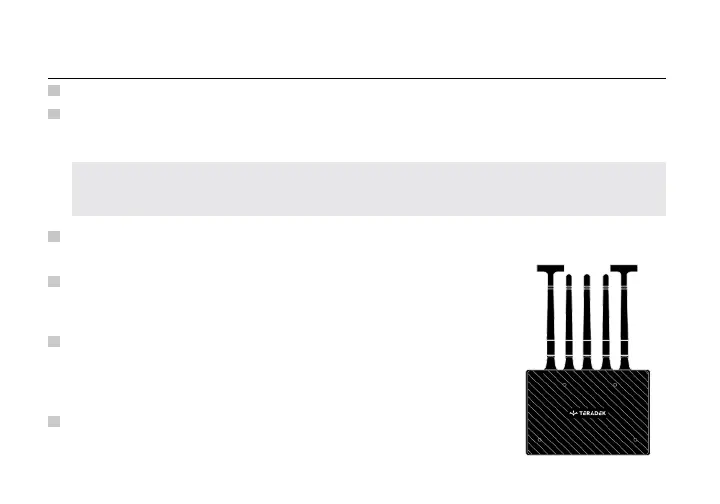
Attach the three 2dBi antennas to the receiver’s center connectors
and the two horizontal (mushroom) antennas to the left and right
connectors (see image). If using an Array Antenna with the receiver,
refer to the Array Antenna Quick Start Guide for installation.
RX antenna configuration



 To Next Page