17
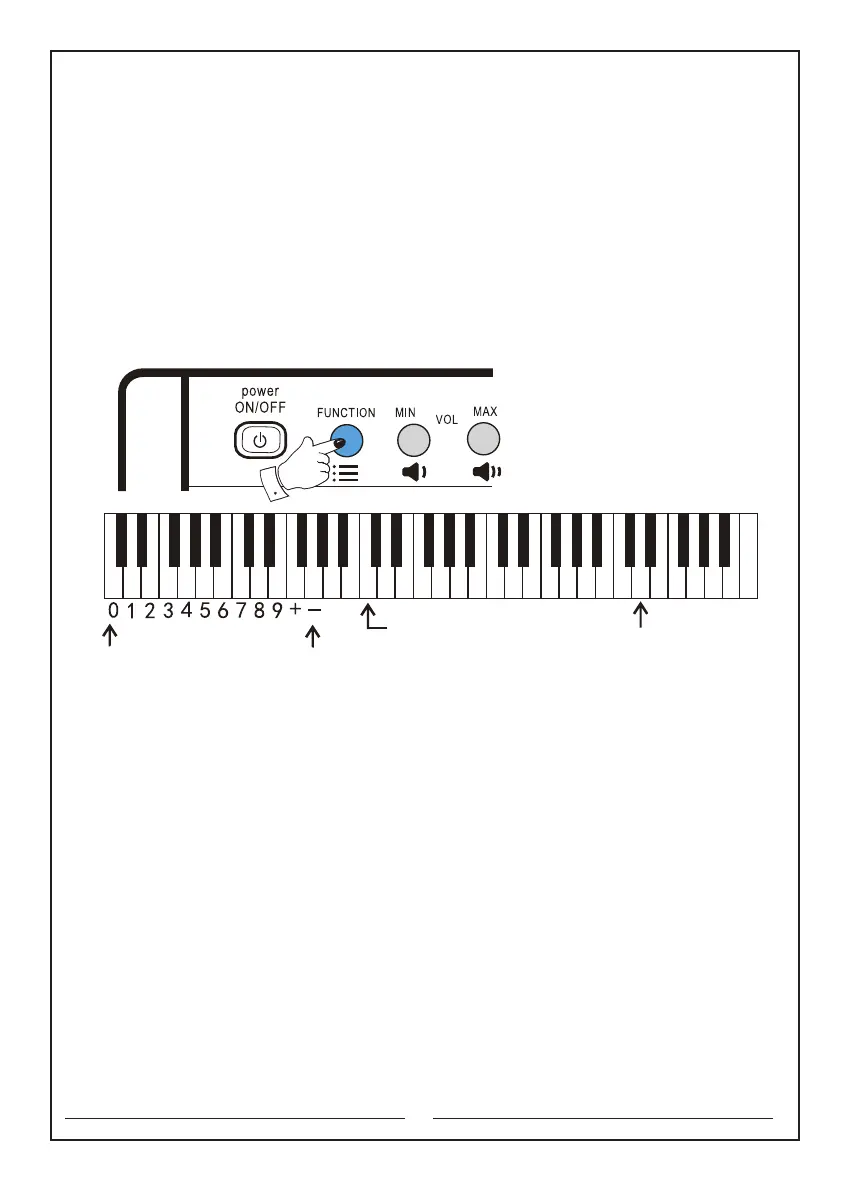
11.5 Dual keyboard switch: first press and hold the "Function" selector, and then
press "Dual keyboard" button. At this time, the keyboard is divided into c2-b3 part
and c4-c7 part. Keyboard c2-b3 corresponds to c4-b5. You can choose the tone
of c4-c7 keyboard by the "Tone" selector. Therefore, the keyboard can play
2 different tones simultaneously. To cancel this function, first press and hold the
"Function" selector, and then press "Dual keyboard" button once.
The keyboards that will be used are as follows:
Function key: the second button in the upper left corner
Dual keyboard: the d3 key
Tone: the c1 key
Numeric keyboard: the C key to the e key
The numeric keyboard
Tone Selection key
Dual keyboard key
C D E F G A B c d e f g a b c1 d1 e1 f1 g1 a1 b1 c2 d2 e2 f2 g2 a2 b2 c3 d3 e3 f3 g3 a3 b3 c4



 To Next Page