3-8
HAZARD
TEST
2 3 4 5 6
Switches
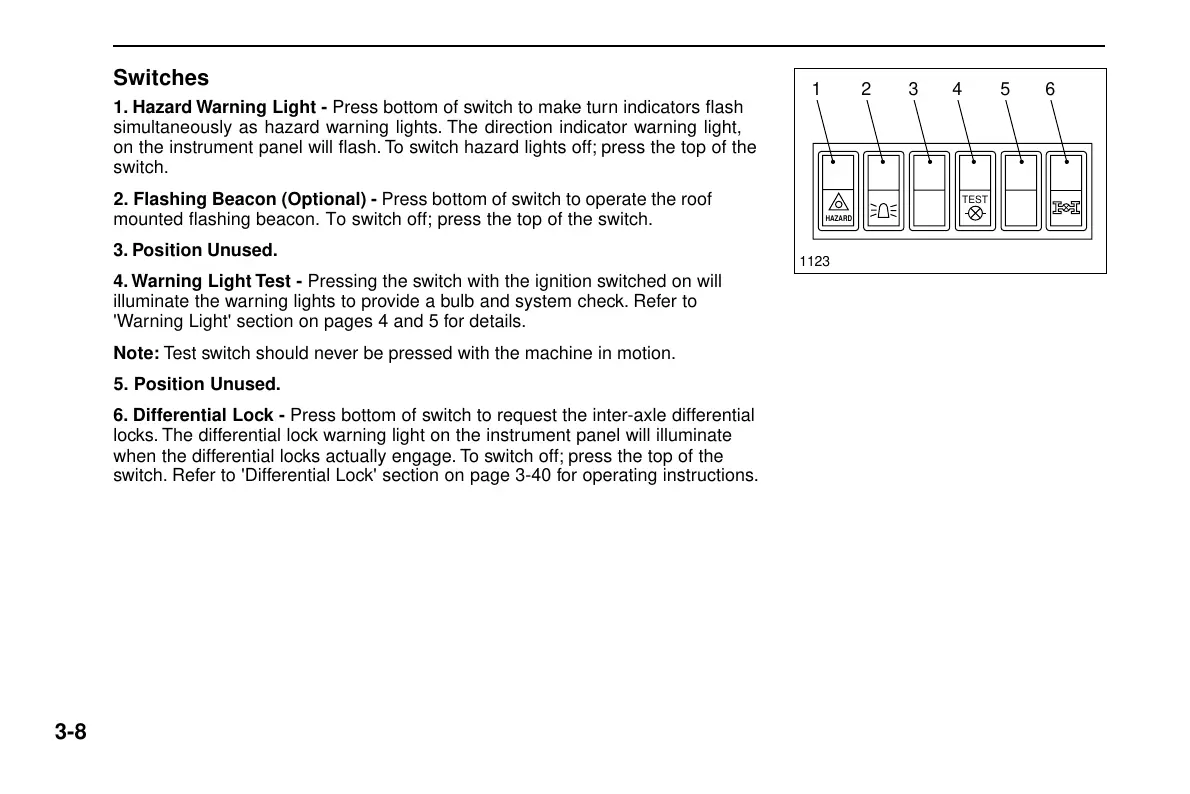
1. Hazard Warning Light - Press bottom of switch to make turn indicators flash
simultaneously as hazard warning lights. The direction indicator warning light,
on the instrument panel will flash. To switch hazard lights off; press the top of the
switch.
2. Flashing Beacon (Optional) - Press bottom of switch to operate the roof
mounted flashing beacon. To switch off; press the top of the switch.
3. Position Unused.
4. Warning Light Test - Pressing the switch with the ignition switched on will
illuminate the warning lights to provide a bulb and system check. Refer to
'Warning Light' section on pages 4 and 5 for details.
Note: Test switch should never be pressed with the machine in motion.
5. Position Unused.
6. Differential Lock - Press bottom of switch to request the inter-axle differential
locks. The differential lock warning light on the instrument panel will illuminate
when the differential locks actually engage. To switch off; press the top of the
switch. Refer to 'Differential Lock' section on page 3-40 for operating instructions.
1123
Courtesy of Machine.Market



 To Next Page