88
Operating Instructions Wheel Loader TL120
Care and Maintenance7
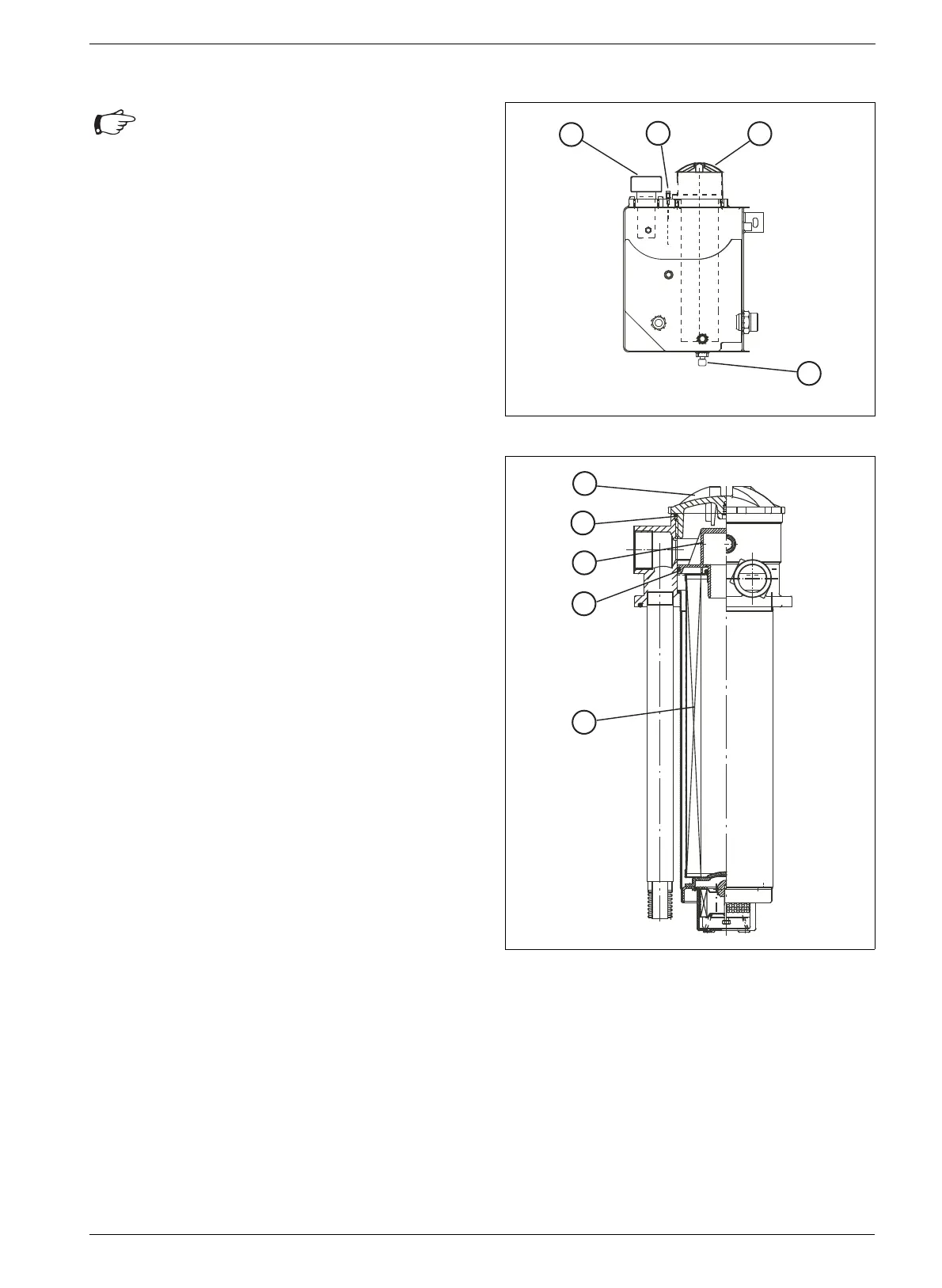
7.8.10 Hydraulic oil return filter
Changing the filter insert
• Switch off the engine.
• Unscrew the oil dipstick (57/1).
• With the aid of a tool, remove the filter
cover (58/1).
• Remove the filter element (58/5) along with the
inlet connection (58/3) by pulling and turning at the
same time.
• Remove the filter element from the inlet
connection and dispose of according to
regulations.
• Ensure that the seal (58/2) in the cover and the
O-ring (58/4) on the inlet connection are in
faultless condition and replace any damaged
parts.
• Push a new filter element onto the inlet connection
and insert together in filter.
• Screw back on the filter cover (58/1) and tighten
using a torque of 20 Nm.
• Screw back in the oil dipstick.
• Check the tightness of the filter by means of a test
run.
Fig. 57 Hydraulic oil tank
Fig. 58 Changing the filter insert
Attention
• After a larger repair job, renew the filter
cartridge following the test run.


 To Next Page
 Loading...