10
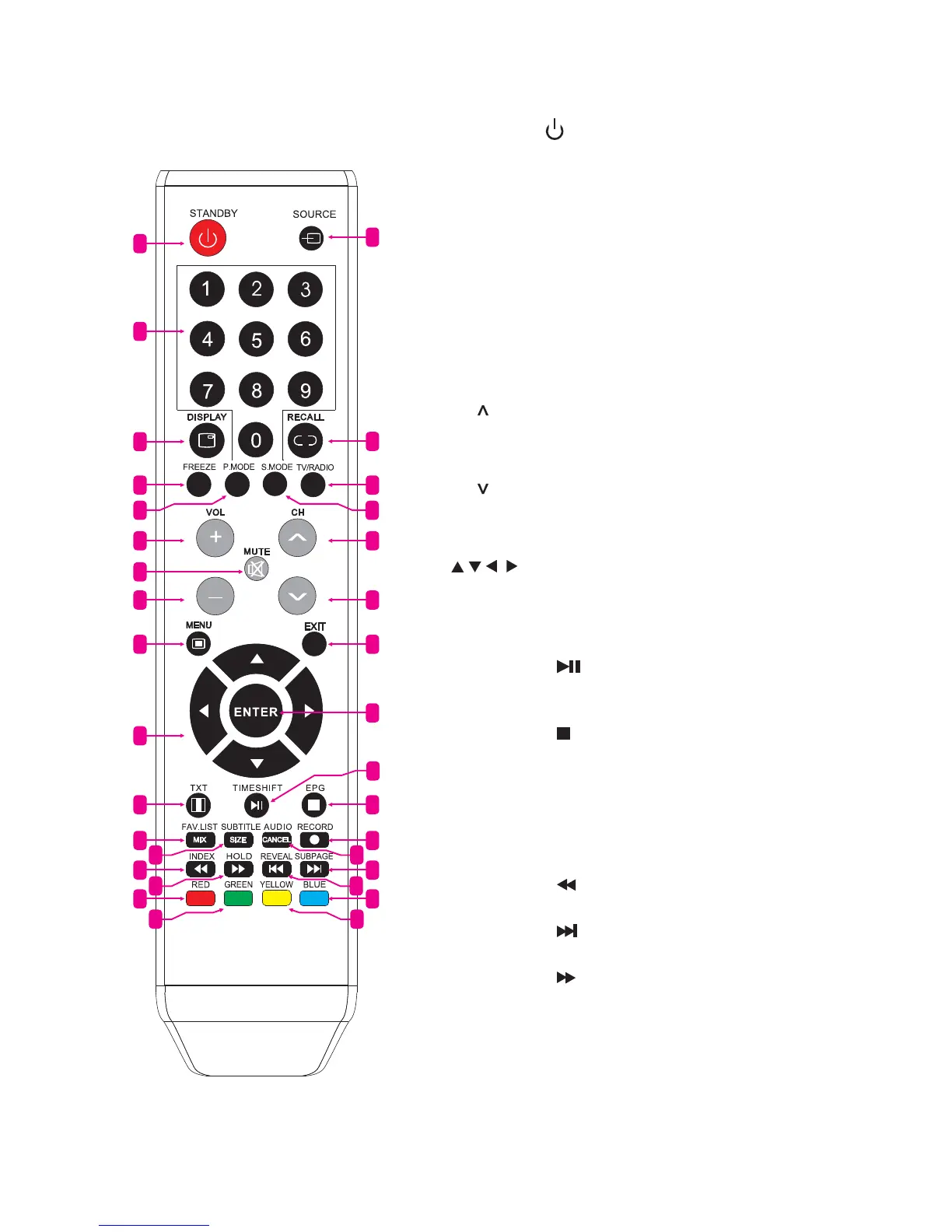
1.4 Remote Control
1. STANDBY (
): Standby turn on and off
2. SOURCE Select signal source
3. 0~9 Continue to press the keys to select a channel
4. DISPLAY Display the information of current video
and audio
5. RECALL Return to previous channel
6. FREEZE Freeze the picture
7. TV/RADIO Select TV or Radio mode
8. P. MODE Select picture mode
9. S. MODE Select sound mode
10. VOL+ Increase volume
11. CH
Select channel forward
12. MUTE Mute sound
13. VOL- Decrease volume
14. CH
Select channel backward
15. MENU Enter or exit menu
16. EXIT Exit menu or operation
17.
, , , key The menu item selection
18. ENTER Confirm or enter
19. TXT Enter or exit teletext
20. TIMESHIFT DTV mode time shift.
MEDIA mode:
Press one time to pause,
press again to playback
21. EPG Enter or exit EPG (Electronic Program Guide).
MEDIA mode:
Stop playback and return to file list
22. FAV. LIST Favorite channel list
23. RECORD DTV mode record data USB disk
24. SUBTITLE DTV mode select subtitle mode
25. AUDIO Select TV audio mode
26. INDEX Display index page.
MEDIA mode:
Fast Backward
27. SUBPAGE Enter sub page mode.
MEDIA mode:
Next
28. HOLD Hold the current page.
MEDIA mode:
Fast Forward
29. REVEAL Reveal the hidden information.
MEDIA Mode: Previous
30. RED Access red item or page
31. BLUE Access blue item or page
32. GREEN Access green item or page
33. YELLOW Access yellow item or page
1
2
5
7
11
14
16
21
23
27
31
18
3
4
6
10
13
15
17
19
22
30
26
12
8 9
24 25
20
28 29
32 33



 To Next Page