11
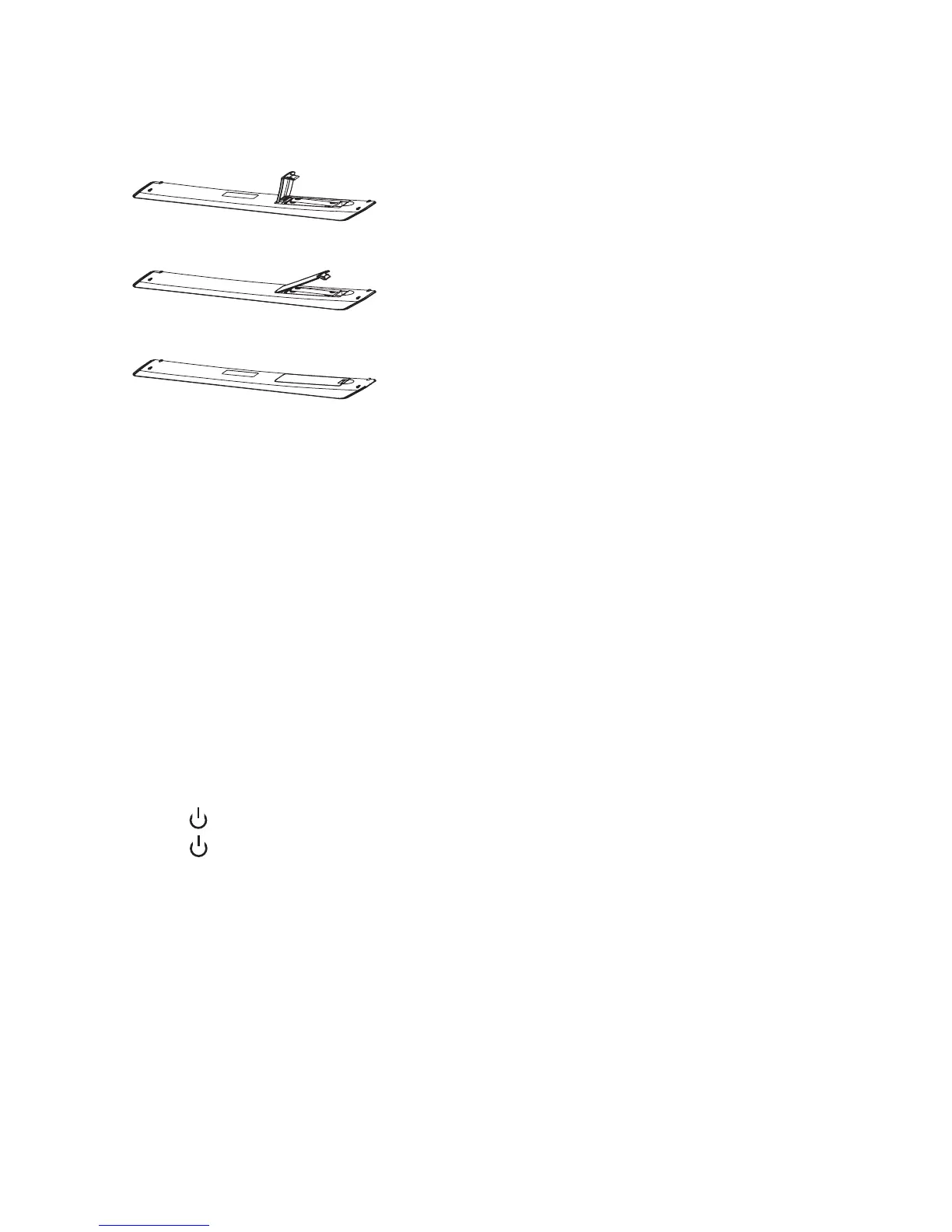
1.5 Installation of Batteries
2. Basic Operation
2.1 Power ON/OFF
- Connect the power cord to the AC input. Insert the power cord into the appropriate
socket.
- Press the Power switch to switch on the TV, then press Power button to turn on the
unit.
- Press the Power switch again to switch off the TV.
Note: After switching off the TV, please do not try to immediately turn on the
power switch again. It could take a couple of minutes before it is ready to
use.
2.2 Setting of Standby Mode
- Press (
) button to turn on the unit.
- Press (
) button again to put the display to standby mode. The power indicator turns
red.
- Make sure not to set your TV in standby mode for a long period of time.
2.3 Selection of Input Mode
This set has different signal source modes, you may continue to press the Source button
to select a signal source.
1. Open the back lid of the remote control.
2. Install two 7#(AAA)1.5V batteries.
Make sure that the polarity of batteries is
correct.
3. Cover the back lid.
Please take the batteries out of the remote
control if not in use for long time.
If the remote control does not work properly,
please carry out the following checks.
- Check that the TV is turned on.
- Check that the polarity of batteries is correct.
- Check that the batteries are not drained.
- Check that the power supply is normal and power
cord is correctly connected.
- Check that there is no special fluorescent light or
neon light around.



 To Next Page