®
TV 450/455 Recalling test results
57
6.4 Recalling test results
Press the MEM key in a main function menu when there is no result available for storing
or select MEMORY in the SETTINGS menu.
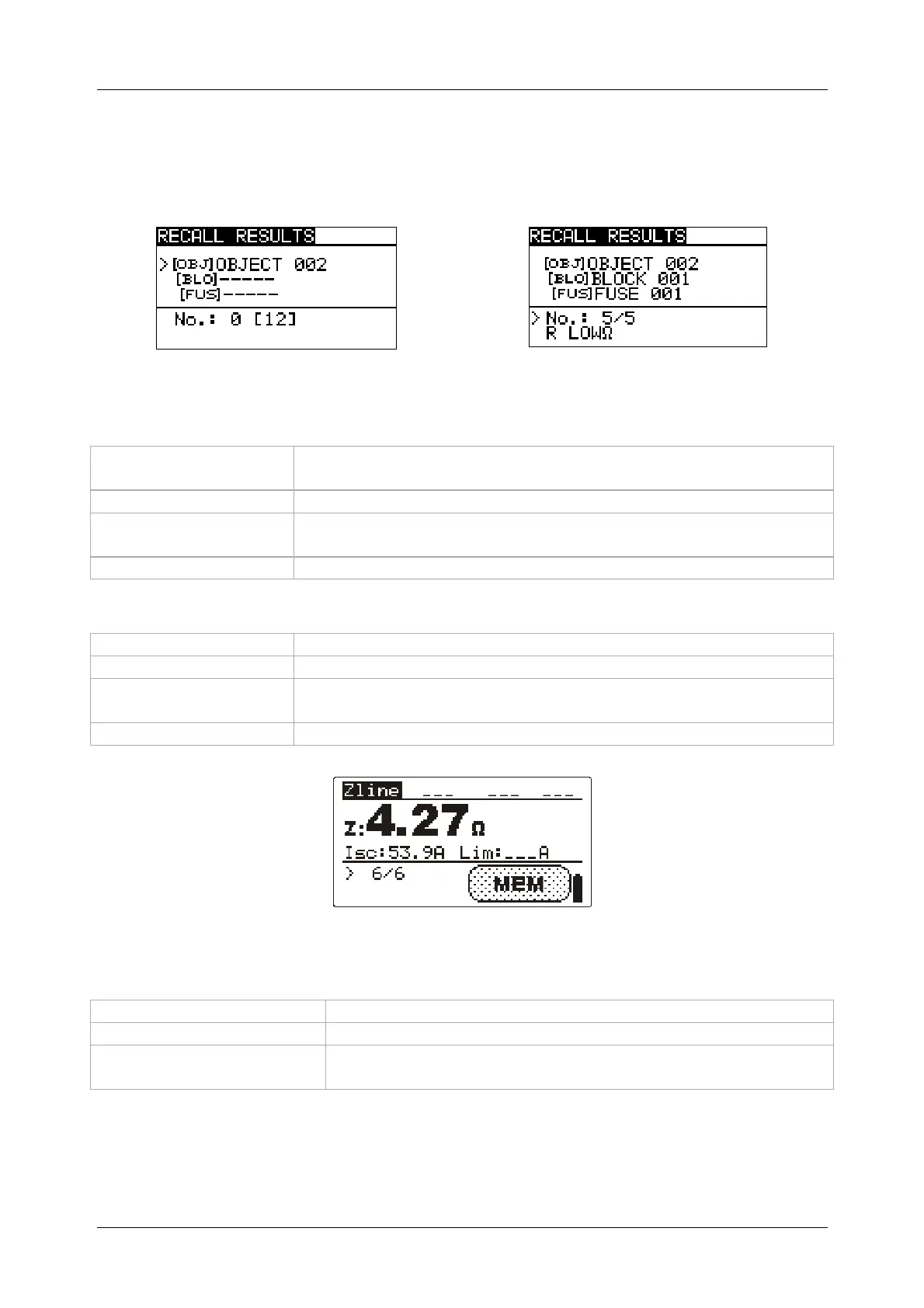
Figure 6.3: Recall menu - installation
structure field selected
Figure 6.4: Recall menu - measurements
field selected
Keys in recall memory menu (installation structure field selected):
TAB
Selects the location element (Object / Block / Fuse).
Enters measurements field.
UP / DOWN
Selects the location element in selected level.
Function selectors /
TEST
Exits back to main function menu.
MEM
Enters measurements field.
Keys in recall memory menu (measurements field):
UP / DOWN
Selects the stored measurement.
TAB
Returns to installation structure field.
Function selector /
TEST
Exits back to main function menu.
MEM
View selected measurement results.
Figure 6.5: Example of recalled measurement result
Keys in recall memory menu (measurement results are displayed)
UP / DOWN
Displays measurement results stored in selected location
MEM
Returns to measurements field.
Function selector /
TEST
Exits back to main function menu.


 To Next Page